Algo Shadow Matrix for cTrader: the TradingView original, ported and verified bar by bar
An adaptive Supertrend whose band width follows a Trend Quality Index, scored BUY and SELL signals, a structure-aware stop with three targets, a live dashboard and alerts. The cTrader edition is a C# transcription of the Pine script that was checked series by series on the same bars.
cTrader 5.x · C# on the cAlgo API · 86 parameters: the 71 inputs of the TradingView script plus 15 cTrader-only · sold on the cTrader Store, EURUSD trial
EURUSD M5, ICMARKETS feed, 2026-06-01 to 2026-09-05; measured with the parity harness described below
The Algo Shadow Matrix gallery, picture by picture
The 11 pictures of the cTrader Store gallery. Select any picture to open it full size.

What it does
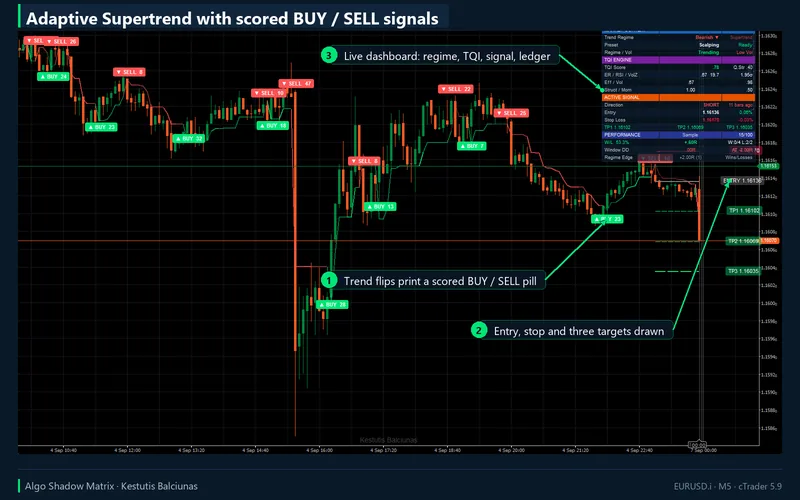
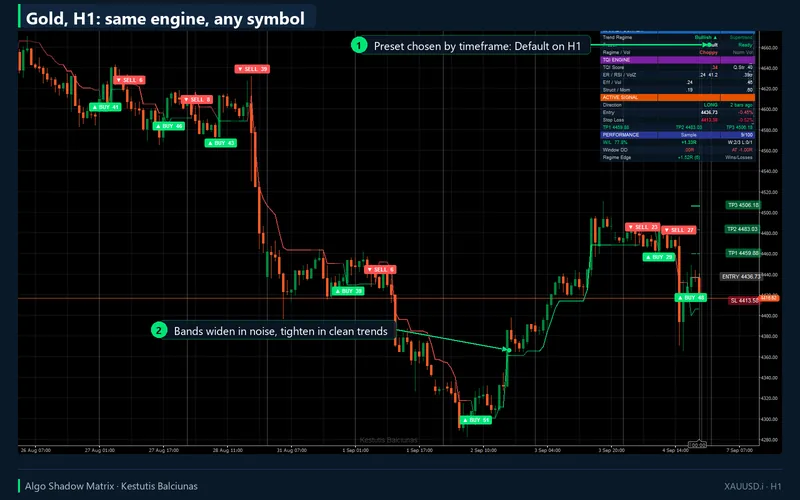
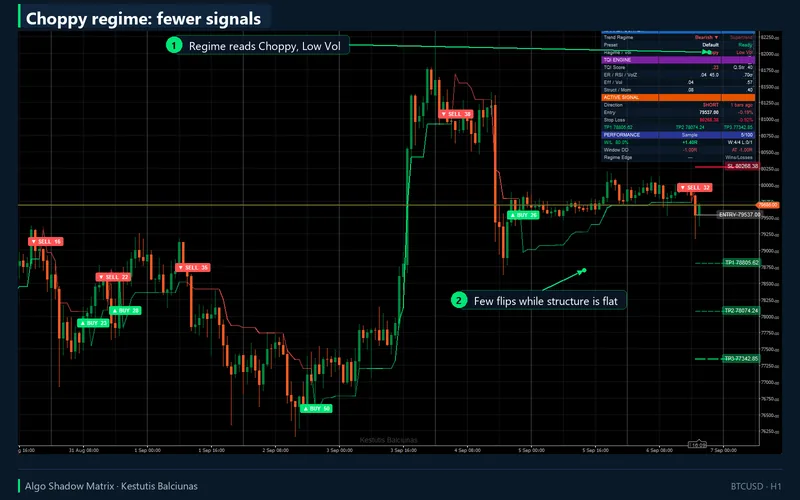
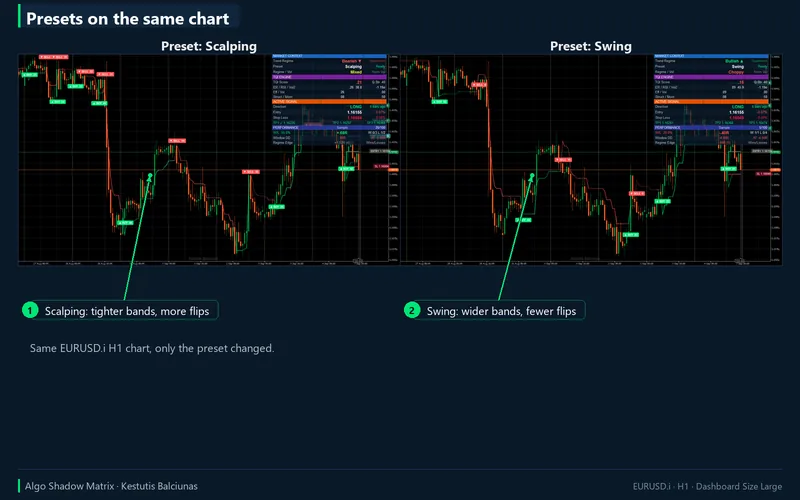
Algo Shadow Matrix is a trend indicator. Its core is a Supertrend whose ATR multiplier is not fixed: a Trend Quality Index (TQI) built from four readings of the market decides how wide the band is on every bar. When the market is efficient, calm, structured and persistent, the band tightens and the line hugs price; when it is noisy, the band widens so the line is not whipsawed. Asymmetric bands tighten the active side and widen the passive side, and a character-flip rule can end a trend early when its quality collapses.
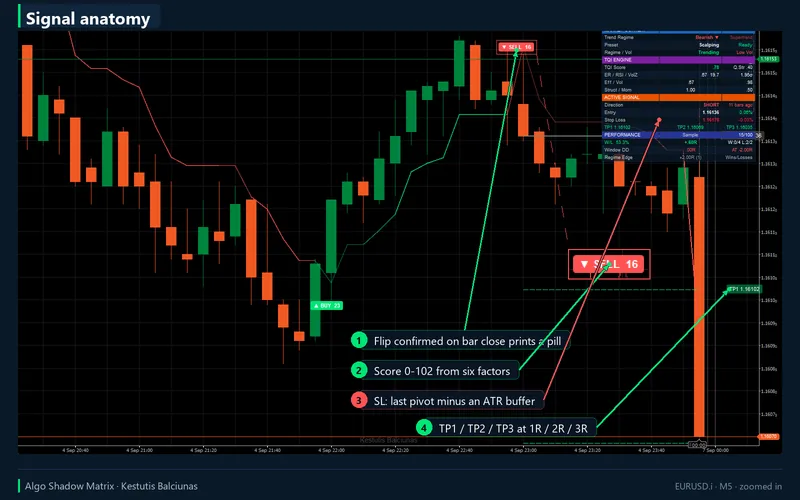
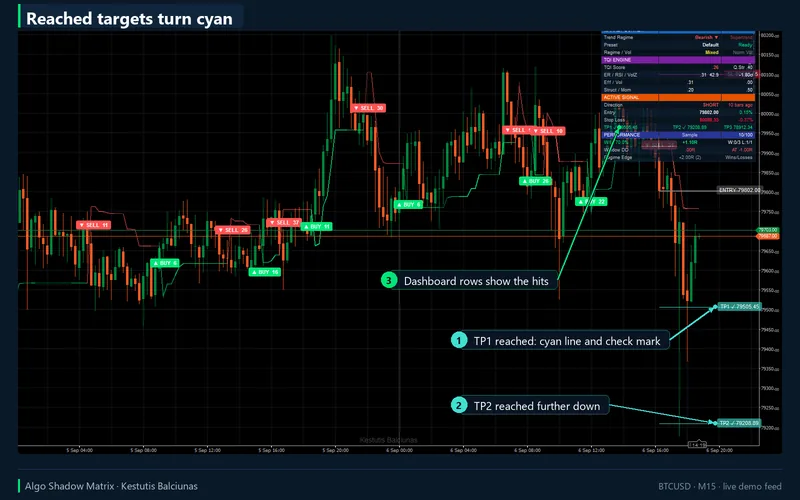
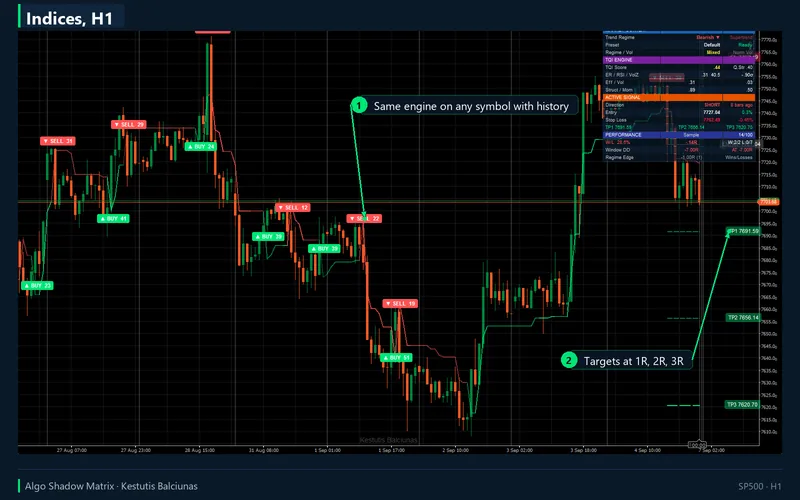
Every flip of the line is a signal. It is scored from 0 to 102 on six factors (momentum, efficiency, volume, RSI depth, distance to the last pivot and break depth) and printed as a BUY or SELL pill with the score. For each signal the indicator draws the entry, a stop below the last pivot low (or above the last pivot high) minus an ATR buffer, and three targets at fixed R multiples, 1R, 2R and 3R by default. The lines run ten bars to the right, and a target that price reaches turns cyan with a check mark.
The dashboard
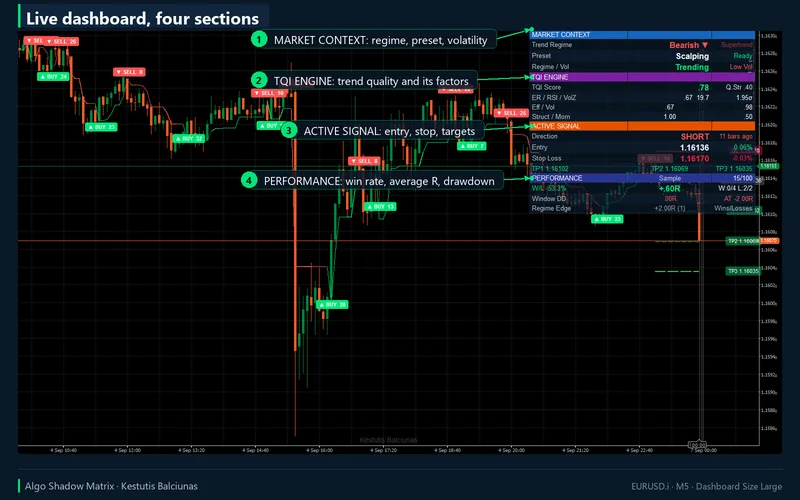
Three columns in the corner of your choice, in four sizes. Market context (trend regime, resolved preset, efficiency regime and volatility regime), the TQI engine (score, quality strength, efficiency ratio, RSI, volume z-score and the four TQI factors), the active signal (direction, bars since, entry with open P/L, stop with distance, the three targets) and the performance ledger: how many of the indicator's own signals closed in the last 100, the rolling average R and W/L percentage over the calibration window, the worst run in that window, the all-time drawdown and the edge of the current efficiency-volatility cell. The ledger is a hypothetical bookkeeping of the signals on the loaded history, exactly as on TradingView.
Alerts
Once per closed bar: BUY, SELL, any signal, bullish shift, bearish shift, as five separate toggles. The signal body is the same text as on TradingView (symbol, timeframe, price, stop, targets, score) or the same JSON. Channels are the cTrader log, a sound of your choice and email through cTrader's own settings. The indicator makes no network calls and needs no access rights. A hidden SignalMarker output (+1, -1, 0) lets a cBot consume the signals.
Parameters
| Group | Inputs | Notes |
|---|---|---|
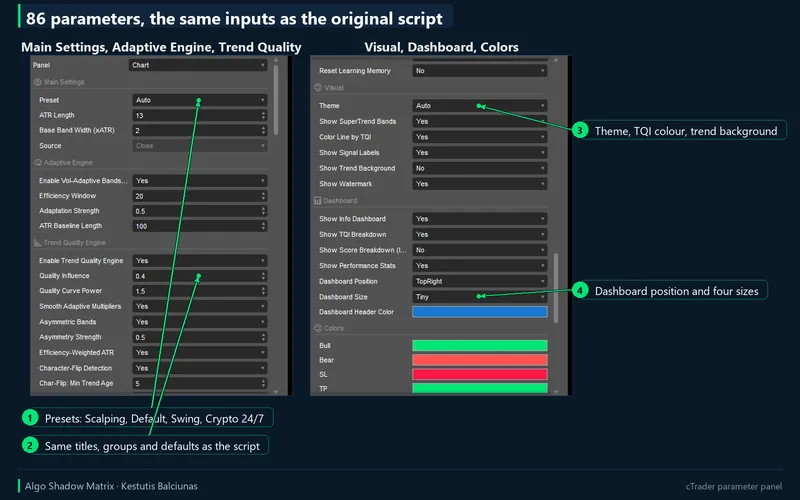
| Main Settings | 4 | Preset (Auto, Custom, Scalping, Default, Swing, Crypto 24/7), ATR length, base band width, source |
| Adaptive Engine | 4 | Efficiency-ratio adaptation, its window and strength, ATR baseline length |
| Trend Quality Engine | 17 | TQI on/off, quality influence and curve, smoothing, asymmetric bands, efficiency-weighted ATR, character flip and its thresholds, the four factor weights, structure and momentum windows |
| Signal Filters | 10 | Structure, RSI and volume in the score, pivot strength, RSI length, levels and memory, volume window, minimum score (display only, as on TradingView) |
| Risk Management | 8 | Levels on/off, stop buffer, three R multiples, label offset, hit marking, trade timeout |
| Self-Learning | 9 | Experimental auto-calibration of the quality strength: window, thresholds, step, cooldown, floor, ceiling, reset |
| Visual, Dashboard, Colors, Alerts | 19 | Theme, bands, TQI colouring, labels, background, watermark, dashboard rows, position, size, header and signal colours, alerts on/off, JSON format |
| cTrader | 15 | Alert toggles per event, sound, email, marker style, label and background caps, score RSI memory mode, debug log |
86 parameters in total: the 71 inputs of the TradingView script keep their titles, groups, order, defaults and ranges, plus 15 cTrader-only parameters (alerts, marker style, caps, score RSI memory, debug log). The full table with every default is in the documentation shipped with the product.
Requirements and installation
cTrader 5.0 or newer, desktop. Buy or try on the Store listing, press Install, then add Algo Shadow Matrix from the Custom section of the indicator list. The indicator needs 50 bars plus its longest window before it draws (60 bars on M5 defaults). Presets resolve from the timeframe: Scalping up to M5, Default up to H4, Swing above; Custom uses your own inputs.
The trial
The trial edition is the full product with one restriction: it runs on EURUSD only (broker suffixes such as EURUSD.i are accepted). On any other symbol it draws a notice. There is no time limit.
How the port was verified
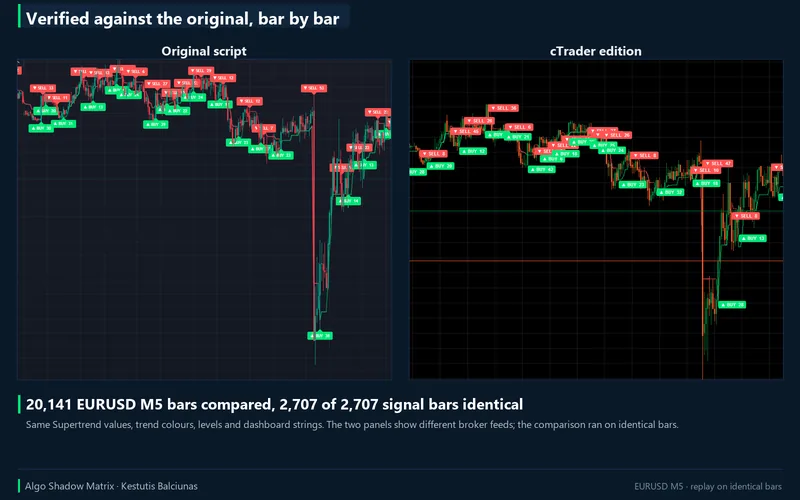
The TradingView chart's bars were read from the chart model, 20,141 EURUSD M5 candles from June to September 2026, and fed to the same engine that ships inside the .algo. On the TradingView side a probe copy of the script exposed 56 internal series (ATR, efficiency ratio, TQI and its factors, both multipliers, both bands, trend, flips, RSI, pivots, scores, the trade state, the ledger) at ten decimals. Bar by bar, all 55 series compared are equal to within floating-point noise: same Supertrend values, same trend, same signal bars (2,707 of 2,707), same stops and targets, same ledger. Against the published script itself, all 499 signal labels TradingView still held, their scores and tooltip numbers, the five level lines and all 15 dashboard rows are identical strings.
Three TradingView behaviours had to be measured rather than assumed: the tie rule of its pivot functions, a 1e-10 tolerance in its float comparisons, and how it evaluates ta.lowest and ta.highest inside a function that only runs on some bars. The last one is undefined behaviour that TradingView's own compiler warns about; the cTrader edition reproduces the measured behaviour by default and offers a strict mode, and two score cells out of 2,707 signals still differ by a few points. The one-line fix on the Pine side is documented for the next TradingView release of the script.
What differs on purpose: the brand text in the header and watermark, the broker's symbol name in the header (cTrader prints EURUSD.i where TradingView prints EURUSD), and the alert channels, which are cTrader's. Labels on cTrader have no hover tooltip; the same numbers are on the dashboard and in the alert text. One rendering difference is documented: cTrader shows no right margin unless Chart Shift is on, so the ENTRY, SL and TP price labels are pinned inside the right edge of the chart instead of sitting twelve bars past the last candle.
Support
Questions about the product go through the Discussion tab of the Store listing or the contact page. Refunds are the Store's 14-day money-back. Updates are free for buyers and are announced in the listing's version history.
Chart captures are from the cTrader build on a demo account. This is analytical software, not investment advice; the dashboard ledger is a hypothetical R bookkeeping of the indicator's own signals and includes no spread, commission or slippage. Trading involves risk. Past performance does not guarantee future results.