Scored flips
Five independent measurements on every closed bar: MACD histogram, EMA 150 against EMA 250, ADX above 20, volume above its 20-bar average, Hull slope. The count out of five is printed on the plate as stars.
 NinjaTrader 8 indicator, NinjaScript
A SuperTrend flip is a fact about one line. Hyper Trend PRO asks five more questions before it prints a signal: is the MACD histogram moving that way, is EMA 150 on the right side of EMA 250, is ADX above 20, is volume above its average, is the Hull average sloping with it. The answer is a score out of five on every BUY and SELL, with the stop and three targets drawn at the signal bar. On NinjaTrader 8, with real contract volume.
$77one payment, lifetime licence
Get the lifetime licence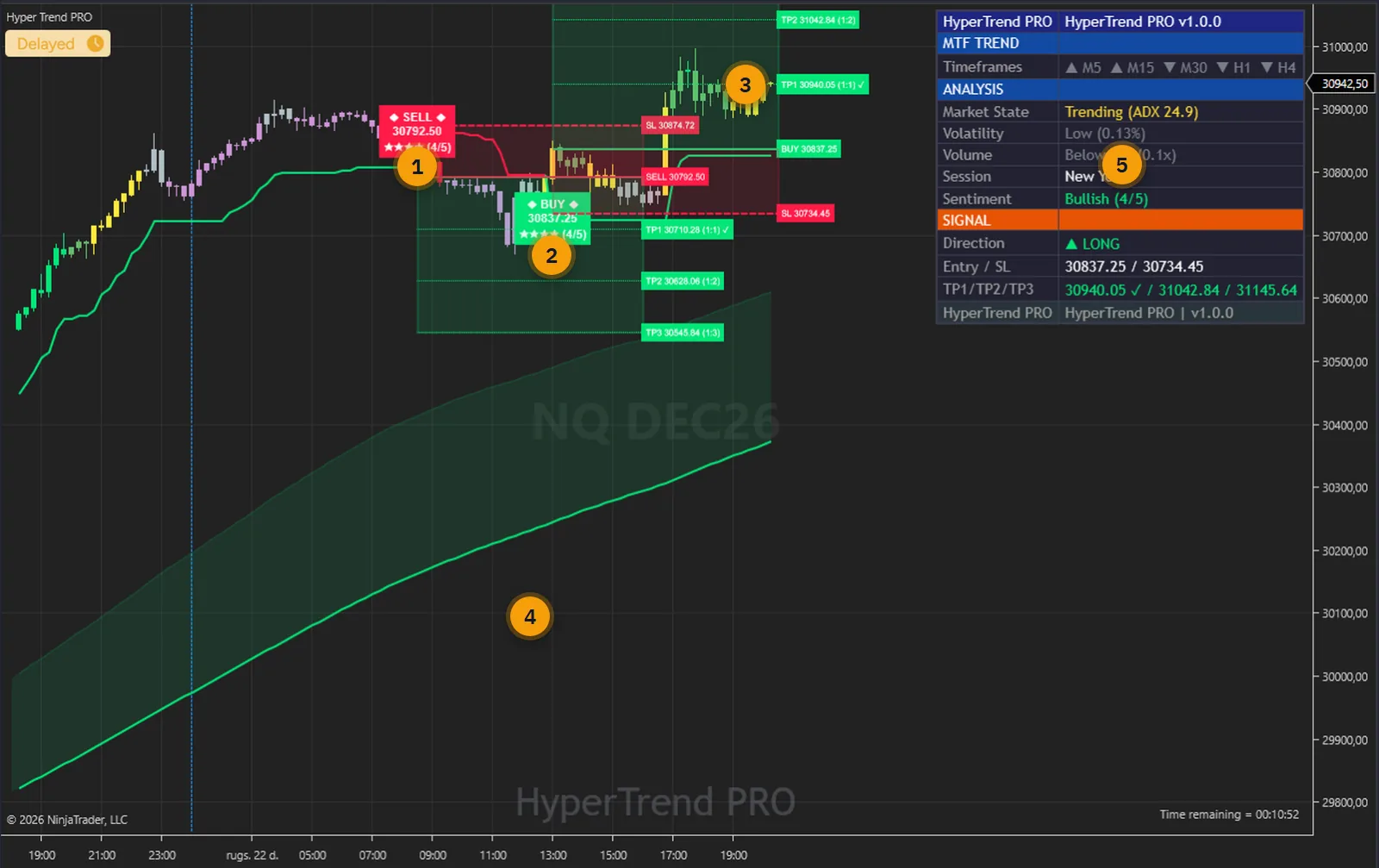
SuperTrend flips when price closes through a band that is a fixed multiple of ATR away. That is all it knows. It flips in a clean trend and it flips in chop, and it flips with the same confidence both times, so you end up taking every one or none of them.
What you actually want to know at a flip is whether the rest of the market agrees: momentum, the longer averages, trend strength, participation, and the smoothed slope. Each of those is a measurement you could check by hand on five indicators. Nobody does that on every bar.
Hyper Trend PRO does. It counts how many of the five agree on the closed bar, prints the count on the plate, and lets you set the minimum you want to see through a preset or a number. Then it draws the stop and the three targets, so the plan is on the chart before you touch the order ticket.
The user guide is public: every parameter, the dashboard rows and the verification are in it. Read it before you pay.
One indicator in the price panel: the trend engine, the scoring, the levels, the cloud, the tracer and the dashboard together.
Five independent measurements on every closed bar: MACD histogram, EMA 150 against EMA 250, ADX above 20, volume above its 20-bar average, Hull slope. The count out of five is printed on the plate as stars.
All Signals, Trend Scalper, Quality+ and Strong+ set the minimum score. Five optional filters on top: Trending Only, Strong Only, High Vol Only, Cloud-Aligned Only, Contrarian Only.
Entry, a stop at ATR x Sensitivity or a percentage, and TP1, TP2, TP3 at your risk-reward ratios, drawn at the signal bar with a red risk box and a green reward box. A reached target is ticked.
The band between two moving averages, green while bullish and red while bearish: Smooth, Scalping, Scalping+ or Swing pairs, and a Cloud-Aligned Only filter that uses it.
A 250-bar EMA coloured by the close's side, and a one-way ATR trail for the tracked trade, both plotted as series you can read elsewhere.
A gradient from the MACD against the ATR, green through yellow and grey to red. Switch it to the SuperTrend side, to the score, or off.
A multi-timeframe row (M5 to H4, each from the last closed bar of its timeframe), market state with the ADX value, volatility, volume, session, a sentiment score, and the tracked trade with ticks. Six positions, three sizes.
Buy, sell, any signal, strong signal, stop hit, TP1, TP2, TP3 and trend change. They land in the Alerts Log with a sound, and by email through NinjaTrader's Mail share service, with JSON bodies if you want them.
CloudUpper, CloudLower, SuperTrend, TrendTracer, TrailingSL, Signal (+1, -1, 0), TradeDirection and SignalScore are exposed to NinjaScript strategies and the Market Analyzer.
Every picture below is a NinjaTrader 8 capture with numbered notes added. Nothing on the charts is drawn by hand, and the dashboard sits in the chart margin so no signal is covered. Click any image to enlarge it.
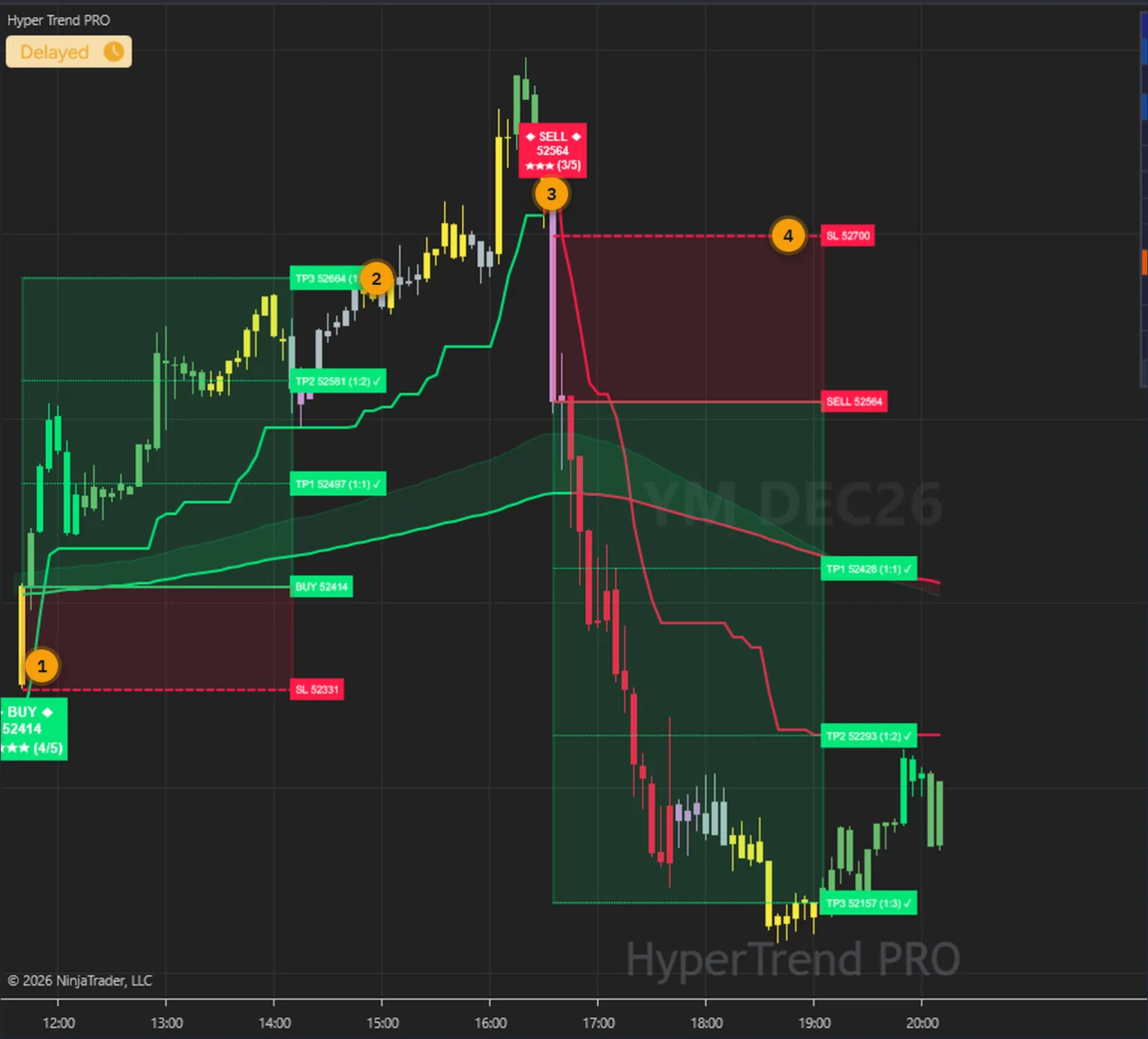
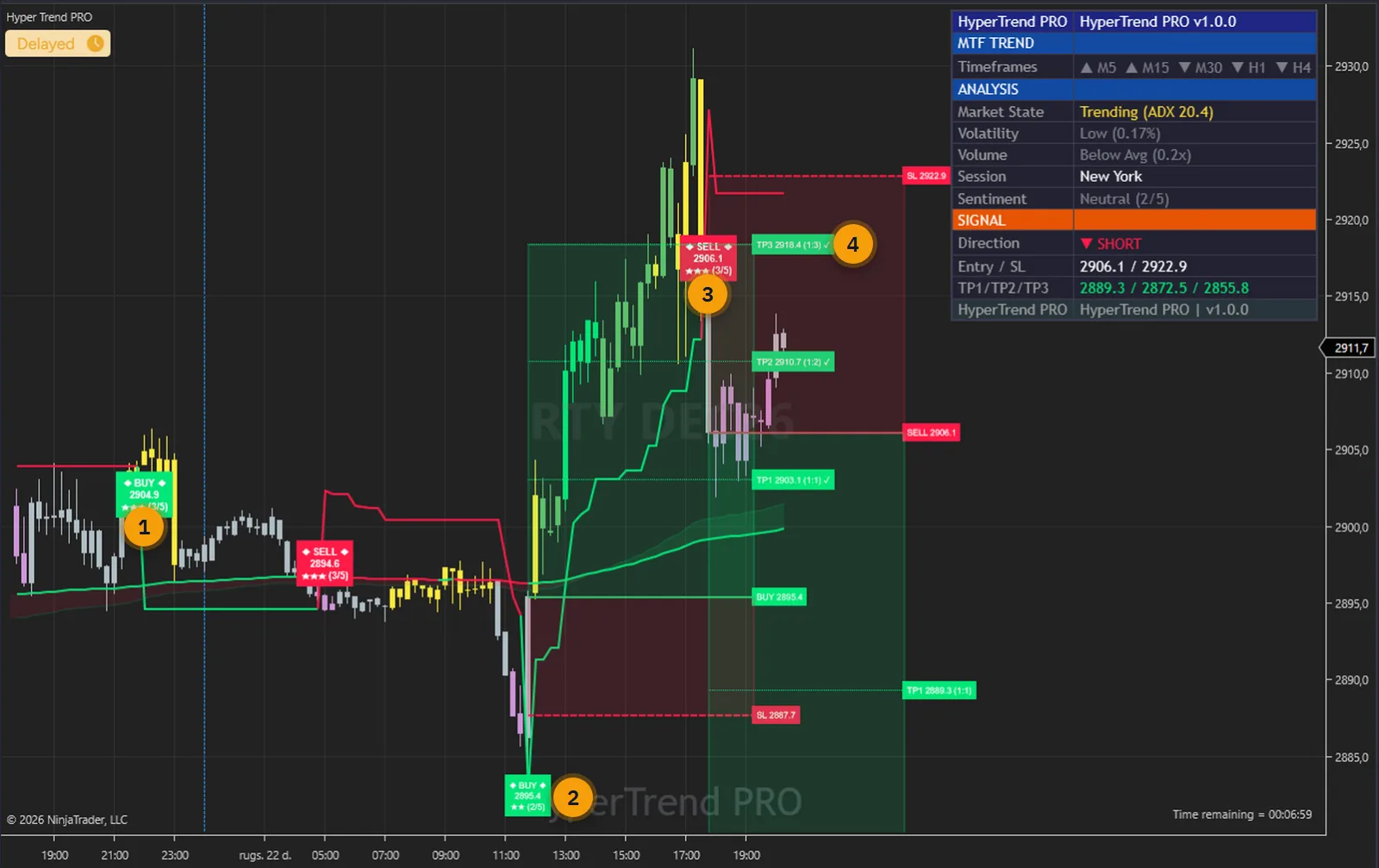
A SuperTrend flip tells you direction changed. It does not tell you whether the rest of the market agrees. On this Dow session the BUY at the open scored four of five and the SELL at the top scored three: MACD, the EMA pair and the Hull slope leaned down while ADX and volume did not. Both reached all three targets, and the score told you how much agreement each had before you took it.
The score is a count of how many measurements agreed. It is not a probability of profit, and the page will not pretend it is. What it gives you is a consistent reason to skip the flips that stand alone.
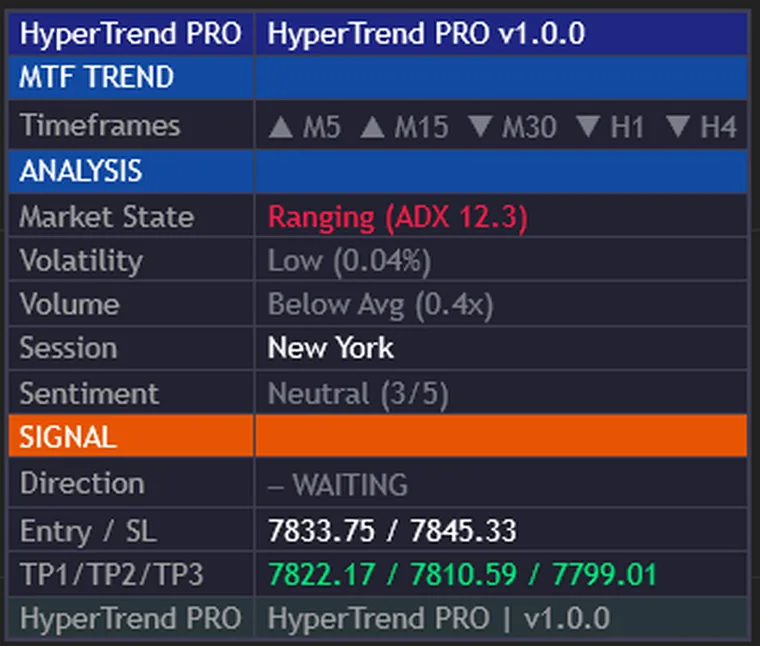
The MTF TREND row answers one question for each of five timeframes: is the close above its 200-bar EMA, read from the last closed bar of that timeframe so it never flickers within a candle. Below it the market state with the ADX value, volatility, volume against its 20-bar average, the session by UTC hour, and a sentiment score out of five.
The SIGNAL rows hold the tracked trade: direction, entry and stop, the three targets with a tick on each one reached. They freeze at the last signal until the next one. A tick records that price traded through the level on the loaded history; there is no spread, commission or slippage in it.
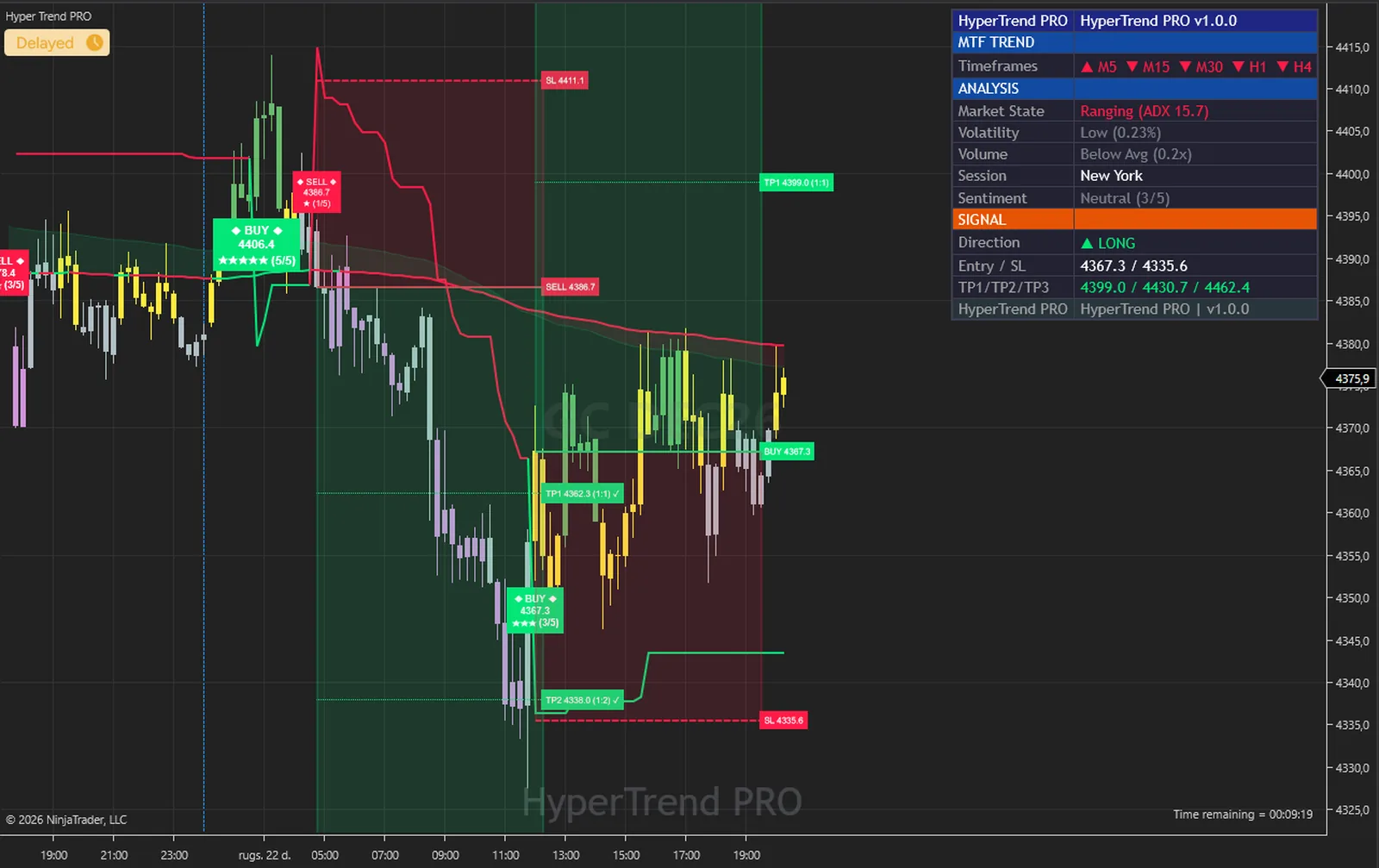
Four presets set the bar: All Signals shows every flip, Trend Scalper needs two of five, Quality+ three, Strong+ four, and Min Strength lets you type your own. On this Russell chart the All Signals preset shows a two-of-five BUY next to two three-of-five signals; Quality+ would have hidden the first and kept the other two.
Five filters sit on top, each off by default and each able to veto a flip that scored enough: Trending Only (ADX), Strong Only, High Vol Only, Cloud-Aligned Only and Contrarian Only. Nothing repaints when you change them; the chart simply shows the flips that pass.
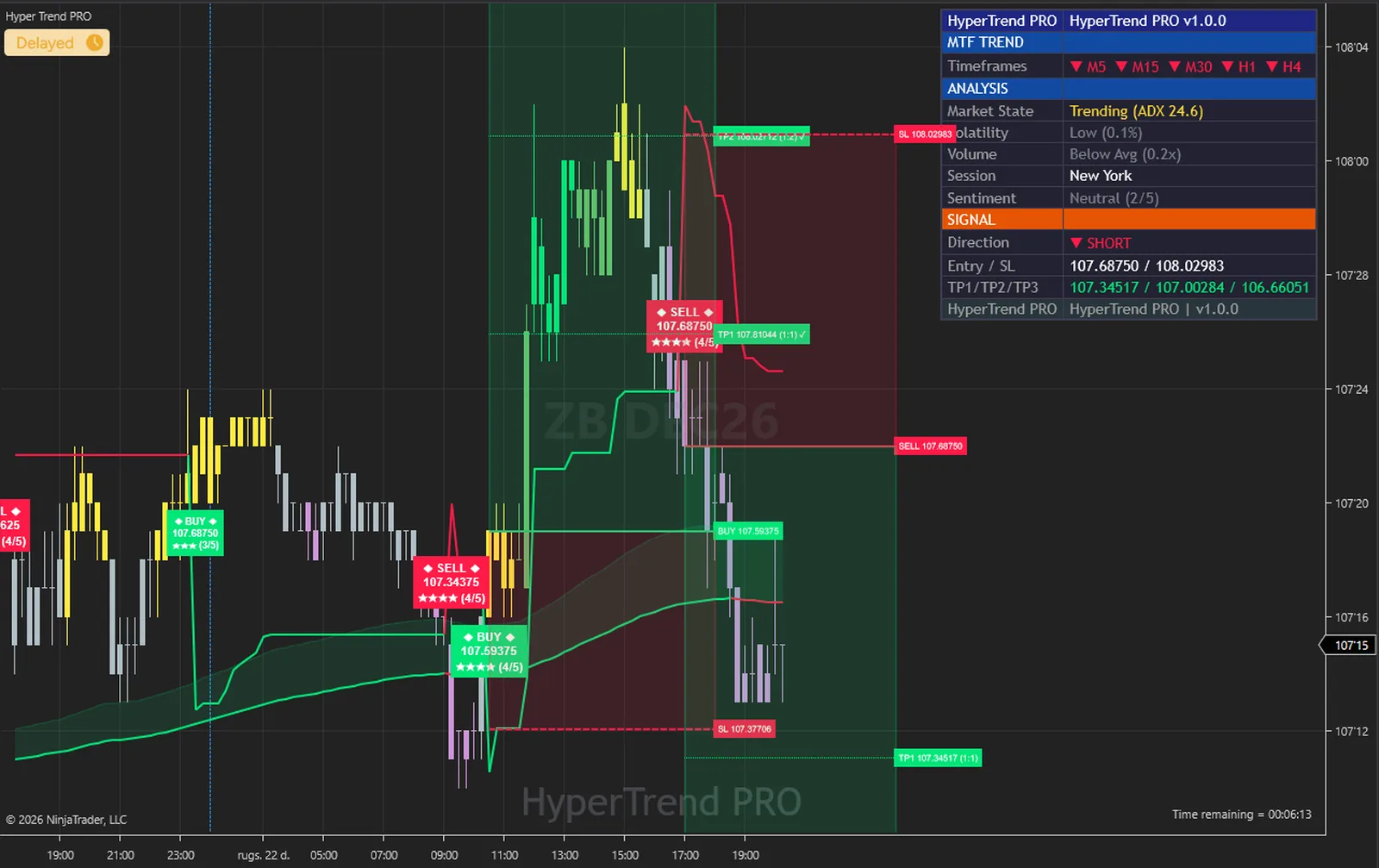
The calculations are not tied to an instrument. Twelve captures below, all taken on the same evening in NinjaTrader 8 on the free simulation feed: index, energy, metal, currency and rate futures, from 1-minute to 30-minute bars, with the defaults on every one.
On a futures chart the volume measurement and the High Vol Only filter read real contract volume against its own 20-bar average, a better input for the same test than the tick volume forex feeds supply.




Five measurements and two gates, applied in order on every closed bar. Nothing hidden and nothing exotic.
Bands sit Sensitivity multiples of a Tuner-bar ATR from the mid price and ratchet; the trend flips when a bar closes through the far band. Every signal starts here.
MACD histogram rising or falling, EMA 150 against EMA 250, ADX above 20, volume above its 20-bar average, the slope of a 55-bar Hull average. Each adds one point to the bull or bear score.
All Signals 0, Trend Scalper 2, Quality+ 3, Strong+ 4, or your own Min Strength. The higher of the two is the minimum score a flip must reach.
Trending Only, Strong Only, High Vol Only, Cloud-Aligned Only and Contrarian Only, each off by default, each able to block a flip that scored enough.
Entry at the close, stop at ATR x Sensitivity or a percentage, three targets at your ratios, the boxes shaded, the alerts fired, the dashboard's trade rows frozen until the next signal.
| Plain SuperTrend | Hyper Trend PRO | |
|---|---|---|
| Signal strength | None, every flip looks the same | Score out of five on the plate |
| Which flips to take | All or none | Presets and five filters, your minimum |
| Stop and targets | You work them out | Drawn at the signal bar, in your ratios, with boxes |
| Bigger picture | One line on one chart | EMA cloud, trend tracer, five-timeframe row |
| Feedback | None | Fourteen-row dashboard, targets ticked when reached |
| For your strategies | One line | Eight series including Signal and SignalScore |
| Alerts | Direction change | Nine events, with JSON bodies |
Two stages, stated separately because they measure different things. The engine that computes everything is the same C# code as the cTrader edition's engine, apart from its namespace line. That engine was replayed on 20,141 EURUSD M5 bars read from the TradingView chart model and compared with probe copies of the original script: 15,991,469 comparisons across 34 runs, 0 mismatches. The report is on the cTrader page.
The NinjaTrader host is the second stage. With its diagnostic dump switched on it writes every committed bar with the values it drew, in exactly the columns the reference harness writes; those bars are replayed through the engine outside NinjaTrader, and the two files are diffed value by value. On 6,899 MNQ 1-minute bars every one of the 105 series compared was equal on every bar; a second run on a trading day, with Calculate set to each tick and the chart left live for 21 minutes across the historical-to-realtime transition, gave the same result on 5,258 bars.
What that proves: the host feeds the engine exactly one closed bar per chart bar with the right open, high, low, close and volume, never double-feeds or skips a bar, and plots the values the engine produced. The five extra minute series feed the dashboard's multi-timeframe row only. What it does not claim: there is no comparison against the original on futures bars, because TradingView's CME feed and NinjaTrader's feed do not carry the same bars, so no such comparison exists to make. And nothing here says anything about future performance.
The full method, with the columns compared, is in the user guide: User Guide (PDF) and Installation and Quick Start (PDF).
No subscription and no renewal. Pay once and the indicator stays licensed to your NinjaTrader account, updates included.
Hyper Trend PRONinjaTrader 8 indicator
$77one payment, lifetime licence
The licence is issued to your NinjaTrader account through NinjaTrader's Vendor Licensing, by hand, normally within a few hours and always within 24 hours of your form arriving. You get an email with the download link when it is done.
Because a licence cannot be handed back once it is on your account, a sale is final once the licence has been issued. If you paid and the licence has not been issued yet, email me and I will refund you in full. The user guide is public, so you can read exactly what the indicator does before you pay.
The full terms of sale and the privacy notice for buyers are one page each, in plain language.
Trading carries risk of loss. This is an analysis tool, not financial advice, and no indicator can promise a profit.
No. Signals, plates, the stop and the targets are fixed when the bar closes and never move afterwards. With Calculate set to each tick the forming bar is previewed the way the original previews its realtime bar, and the signal still waits for the close. The dashboard and the level-hit ticks follow the forming bar, as they should.
NinjaTrader 8.1 Desktop for Windows; the build is tested on 8.1.8.2. Any data connection that delivers bars works, including the free simulation connection. No Order Flow+ features, market depth or tick history are needed.
No. NinjaTrader 8 is free to download and use for charting and simulation, with free real-time futures data for the simulator. A live account with a broker of your choice is a separate step that this indicator does not need. NinjaTrader is the platform it runs inside, not a broker.
No. The licence is tied to your NinjaTrader account login through NinjaTrader's Vendor Licensing, not to a PC. Log in on any installation and the indicator runs; a new PC needs no transfer.
I issue it by hand in the NinjaTrader Vendor Dashboard. It is normally done within a few hours and always within 24 hours of your form arriving, including weekends.
No. It is one payment of 77 USD for a lifetime licence on one NinjaTrader account, with future updates included.
That row reads five extra minute series (5, 15, 30, 60 and 240 minutes) and each needs 201 closed bars before it is live. With five days loaded M5 to M30 are live at once, H1 needs about nine trading days and H4 about forty. Raise Days to load in the Data Series dialog. Nothing but the sentiment score depends on that row.
Yes. Eight series are exposed to NinjaScript strategies and the Market Analyzer: CloudUpper, CloudLower, SuperTrend, TrendTracer, TrailingSL, Signal (+1 on a BUY bar, -1 on a SELL bar, 0 otherwise), TradeDirection and SignalScore. A strategy that hosts it loads the same five minute series.
Once the licence has been issued the sale is final, because a licence on your account cannot be handed back. That is why the user guide is public: read it first. If you paid and the licence has not been issued yet, email me and I will refund you in full.
Yes. Email me from the address you bought with and I will move the licence to your new account login.
Yes. The same indicator is on the MQL5 Market for MetaTrader 4 and 5, on the cTrader Store, and as an invite-only script on TradingView. Each platform has its own licence; this page is the NinjaTrader 8 edition.
No indicator can promise that, and this one does not. It gives you scored trend signals, a way to rank them, and a stop and targets to plan around. What you do with that, and how you size positions, decides the outcome.
Each one is a compiled NinjaScript Add-On, 77 USD once, with its own page, charts and public user guide.
Adaptive Supertrend with a Trend Quality Index for NinjaTrader 8, on the engine verified against the TradingView original.
$77 one payment, lifetime licence
Sloped pivot trendline breakouts for NinjaTrader 8, scored by four filters on closed bars, on the engine verified against the TradingView original.
$77 one payment, lifetime licence
77 USD once. A lifetime licence on your NinjaTrader account, updates included, and the licence issued within 24 hours.

