Regime flips as signals
The regime turns bullish when price is above the filter while it steps up, bearish when price is below it while it steps down. Each flip on a closed bar prints one plate.
 NinjaTrader 8 indicator, NinjaScript
A range filter tells you which side it is on. Voidbreak Buy Sell Pro marks the closed bar where that side changes with a BUY or SELL plate and draws the plan: an entry line, a stop in one of three modes and three targets at multiples of the risk. One trade is tracked at a time, and the next flip closes it and opens the other side. Every flip is a signal. The stars on the plate are for reading, and no signal, stop or target depends on them.
$77one payment, lifetime licence
Get the lifetime licence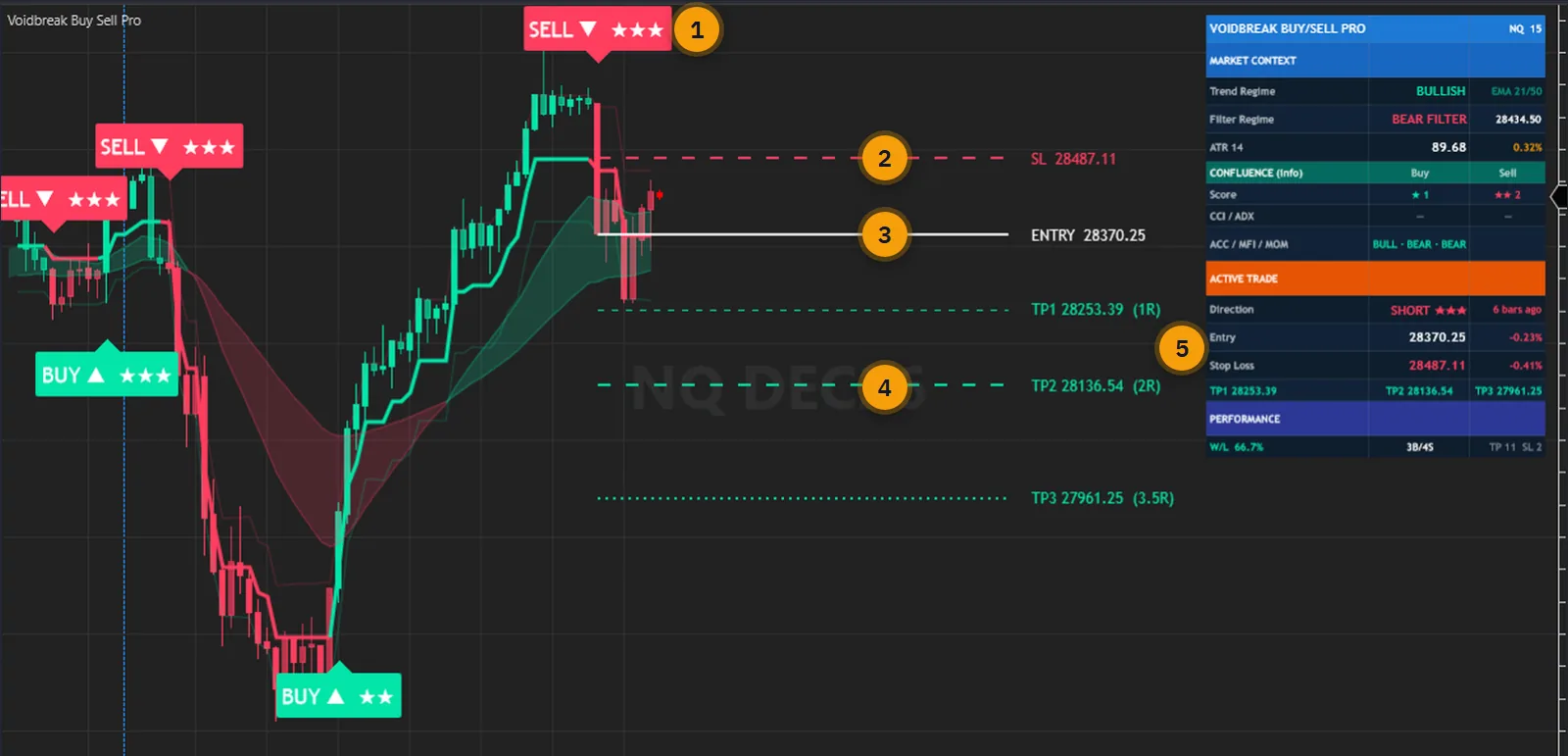
A plain range filter gives you a stepping line. You still have to decide where the turn happened, where the stop goes and where the targets sit, and then keep track of them until the next turn arrives. You do that on every turn, by hand.
Adding a score to those turns raises a second problem: it is easy to read a score as a chance of being right. Here the stars are a separate reading of five factors. No signal, stop or target reads them, and a plate with no stars is still a signal.
Voidbreak Buy Sell Pro fixes the rule and draws the rest. Every flip on a closed bar is a signal, so in a sideways market you see every flip that market produces; there is no gate to hold them back. A wider Range Sensitivity means fewer flips, and that is the setting to use if you want fewer.
The user guide is public: every parameter and the verification are in it. Read it before you pay.
One indicator in the price panel, on one data series: the filter, the plates, the plan, the cloud and the dashboard together.
The regime turns bullish when price is above the filter while it steps up, bearish when price is below it while it steps down. Each flip on a closed bar prints one plate.
Hybrid, the default, takes the tighter of the ATR stop and the swing stop. Pure ATR never reads the swing. Recent Swing can put a BUY's stop very far below the entry: read the warning first.
TP1 and TP2 are milestones and the trade stays open. TP3 closes it. The defaults are 1, 2 and 3.5 times the risk, and the risk is never smaller than ten ticks.
CCI, ADX/DMI, Accumulation/Distribution, Money Flow and Momentum LinReg can each add a star. They are display only, and a factor you switch off lowers the most a plate can show.
The thick filter line with its two faint bands, candles coloured by the filter's direction, and a cloud between the 21 and 50 EMAs. The cloud is display only.
Sampling Period, Range Sensitivity and eight Source prices. A wider range means fewer flips. Stop Loss Mode changes the levels, never the signals.
Trend and filter regime, ATR, the standing score of each side, the active trade with its stop and targets, and the tally row. Six positions and four sizes.
BUY, SELL, Any Signal, TP1, TP2, TP3 and SL Hit, each with its own switch. On live bars only, when the bar closes, through the Alerts Log, Output window, sound and email. There is no webhook.
The signals, scores, regime and the live trade's entry, stop and targets can be read from a NinjaScript strategy and shown as Market Analyzer columns. It is not advertised as a scanner.
Every picture below is a NinjaTrader 8 capture with numbered notes added. Nothing on the charts is drawn by hand. Click any image to enlarge it.
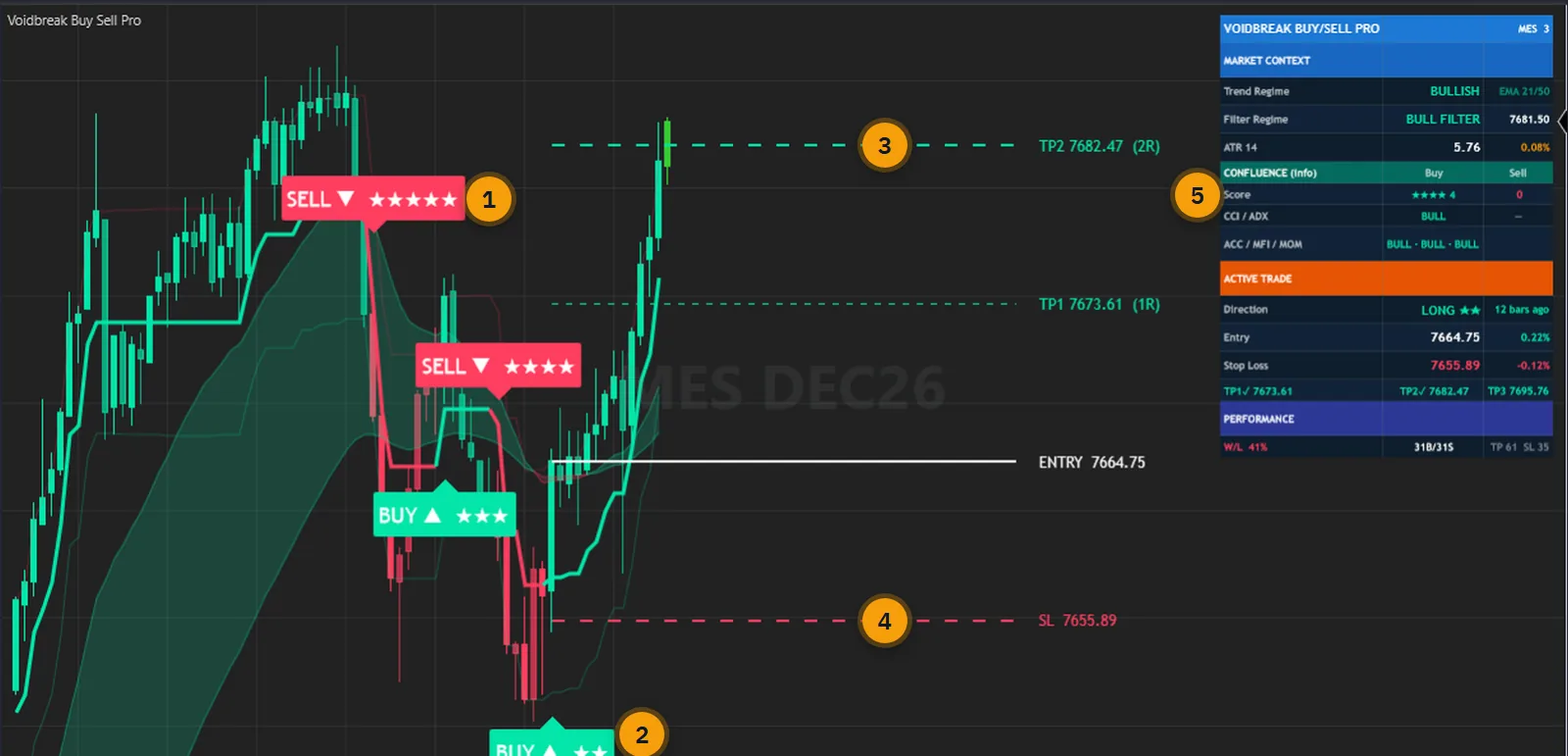
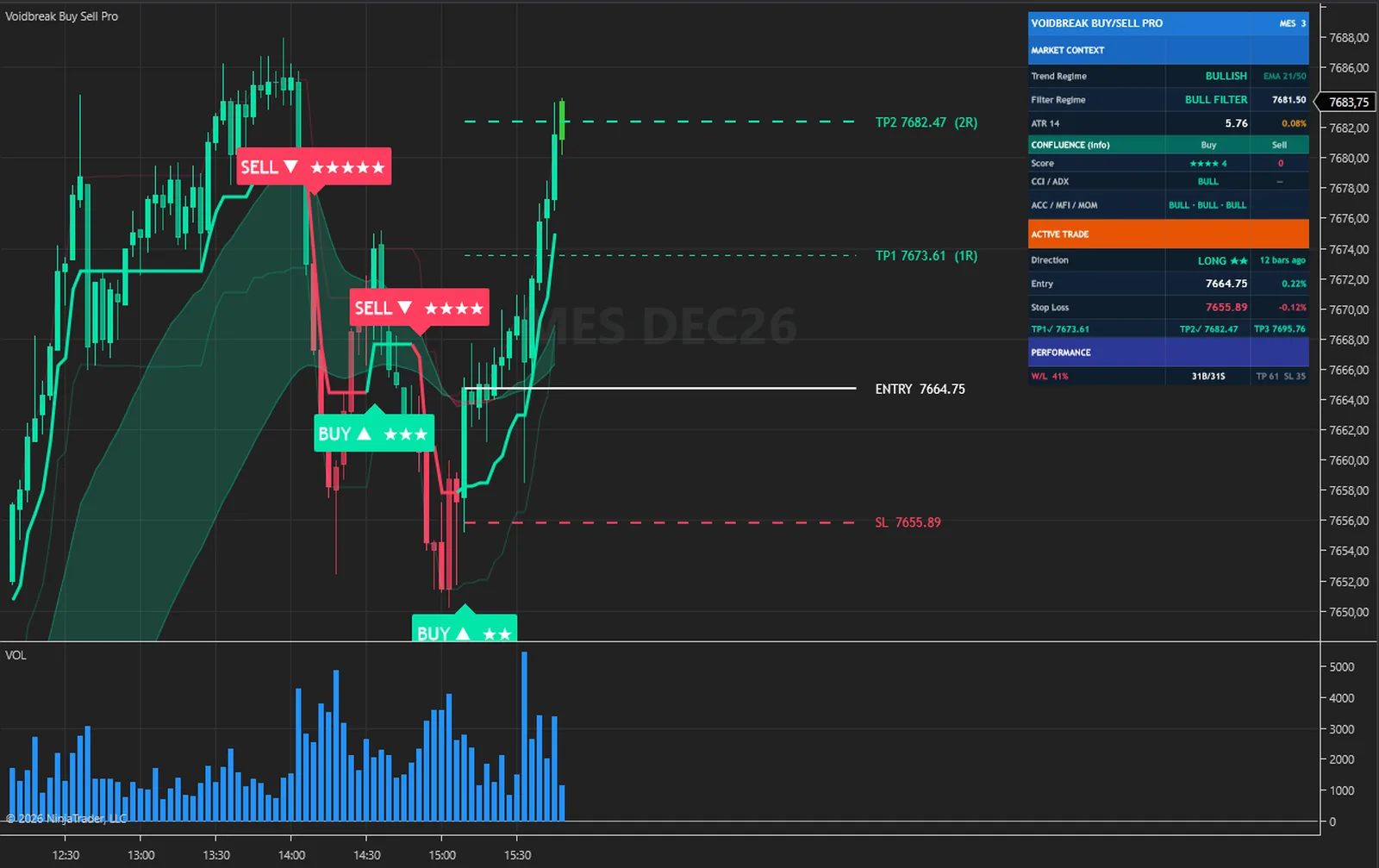
On this MES chart a SELL with five stars comes first, and the next plate along is a BUY. The newest signal is a BUY with two stars, and it is the one whose trade has reached TP1 and TP2. That is one chart and it proves nothing about stars either way, which is the point: no signal, stop or target reads them.
A flip closes any open trade at the close and opens the other side on the same bar, so only one trade is ever tracked, in the direction of the last flip. Rest the pointer on a plate to read its confluence score, entry, stop and three targets.
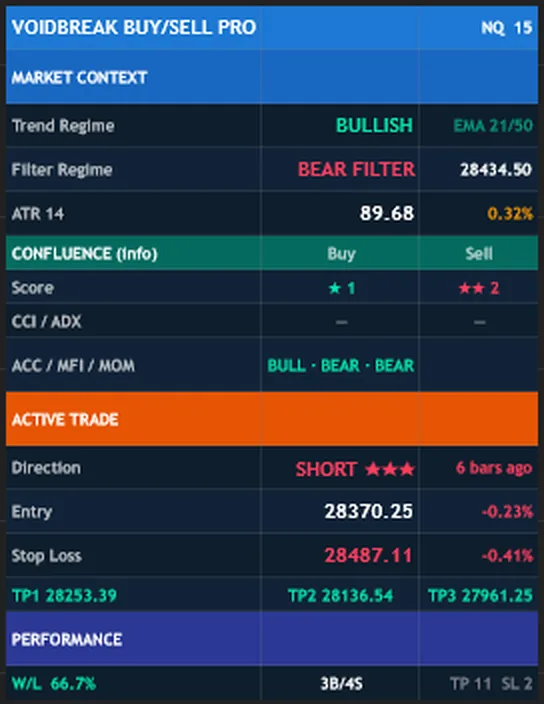
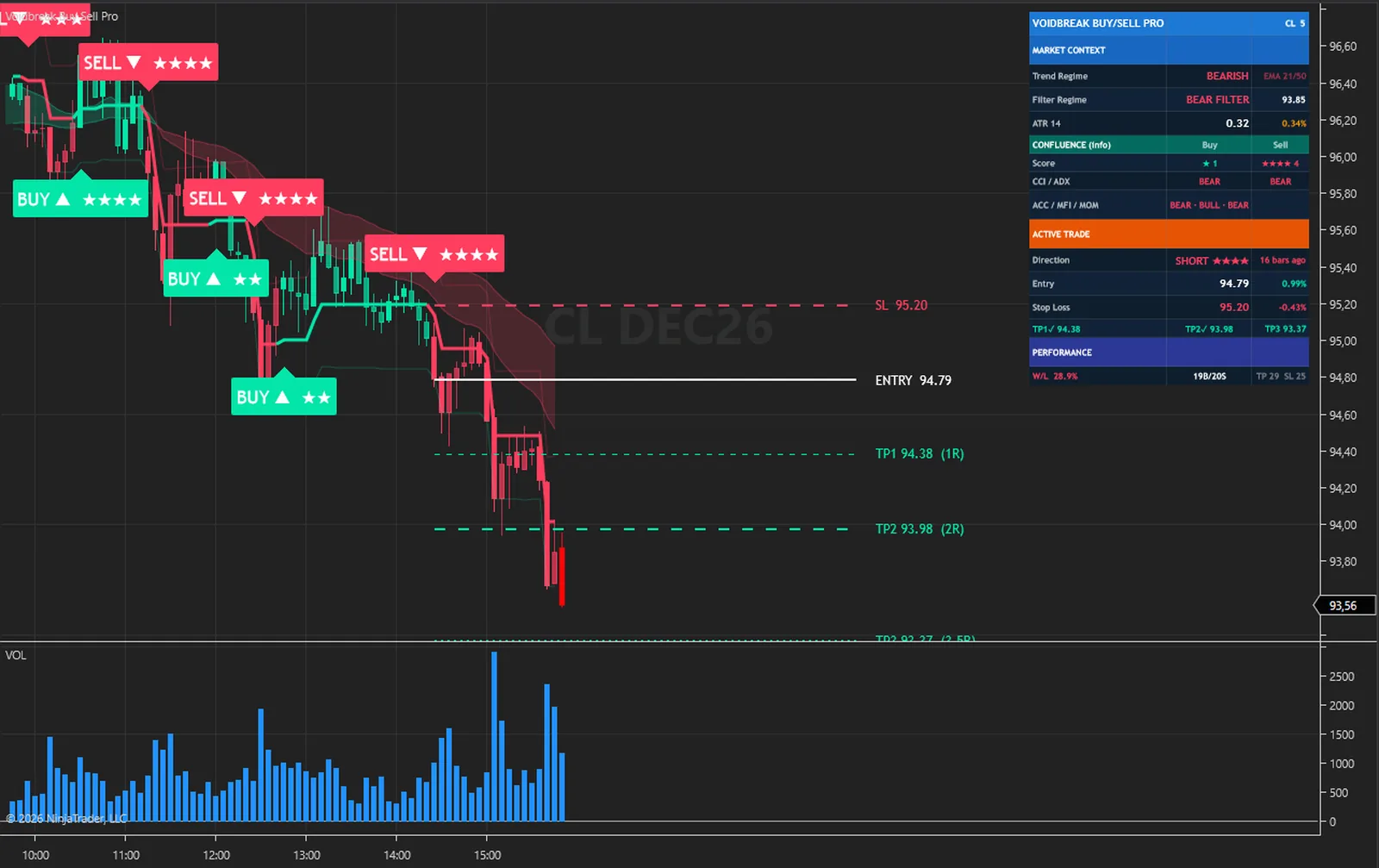
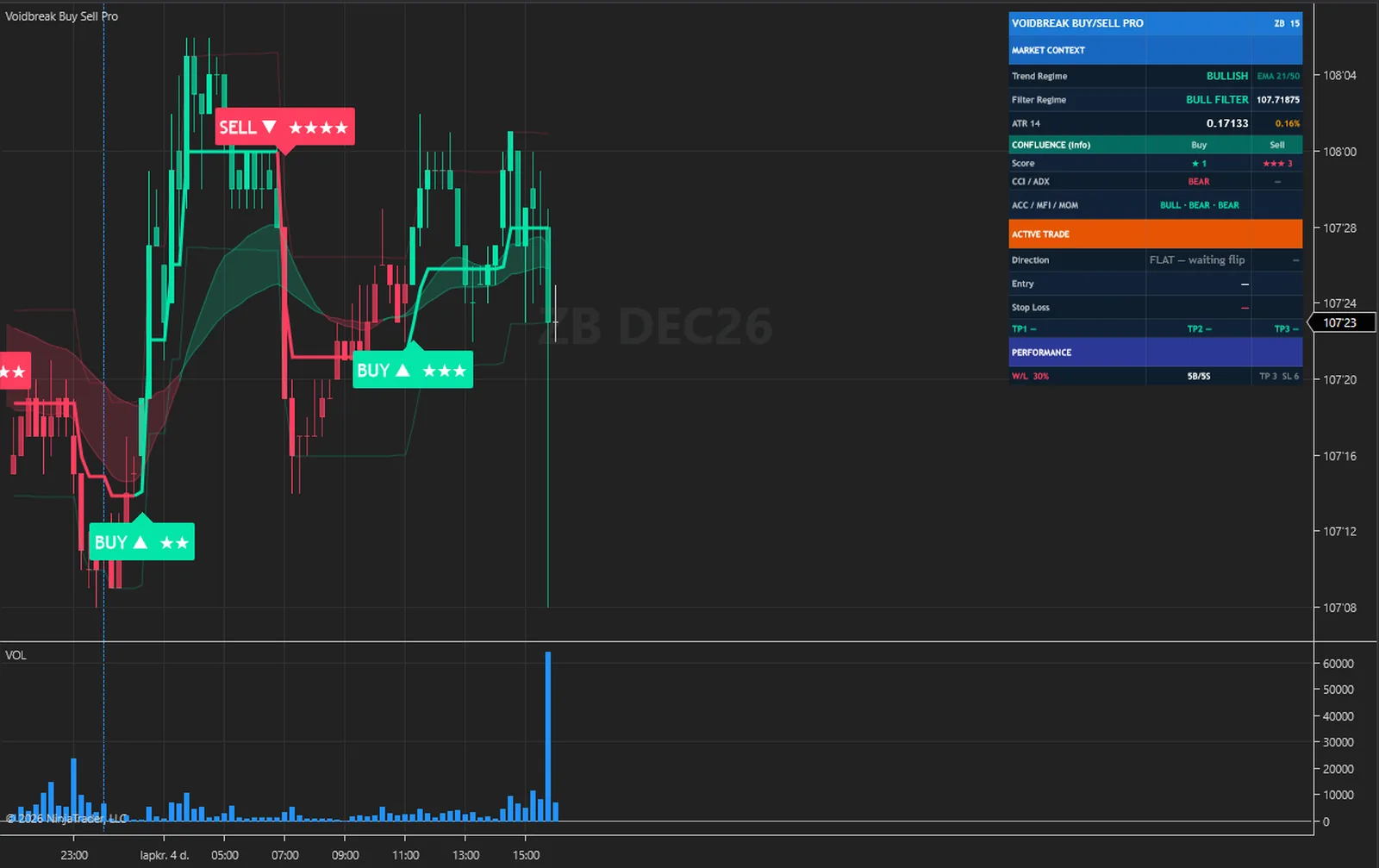
MARKET CONTEXT reads two different things: Trend Regime comes from the 21 and 50 EMAs, and Filter Regime from the filter. They can disagree, as they do here with BULLISH and BEAR FILTER. ACTIVE TRADE shows the direction with the signal's stars, the bars since it, the entry with the move since entry, the stop with its distance, and three targets that each get a tick once reached.
The tally row counts what the drawn plan would have met on the bars this chart has loaded. It has no spread, commission, slippage or position size. A stop after TP1 counts as a win, and a trade closed by an opposite flip counts as a win when the close is at or beyond its entry. It is not a backtest and not a probability of profit, and it changes with Days to load.
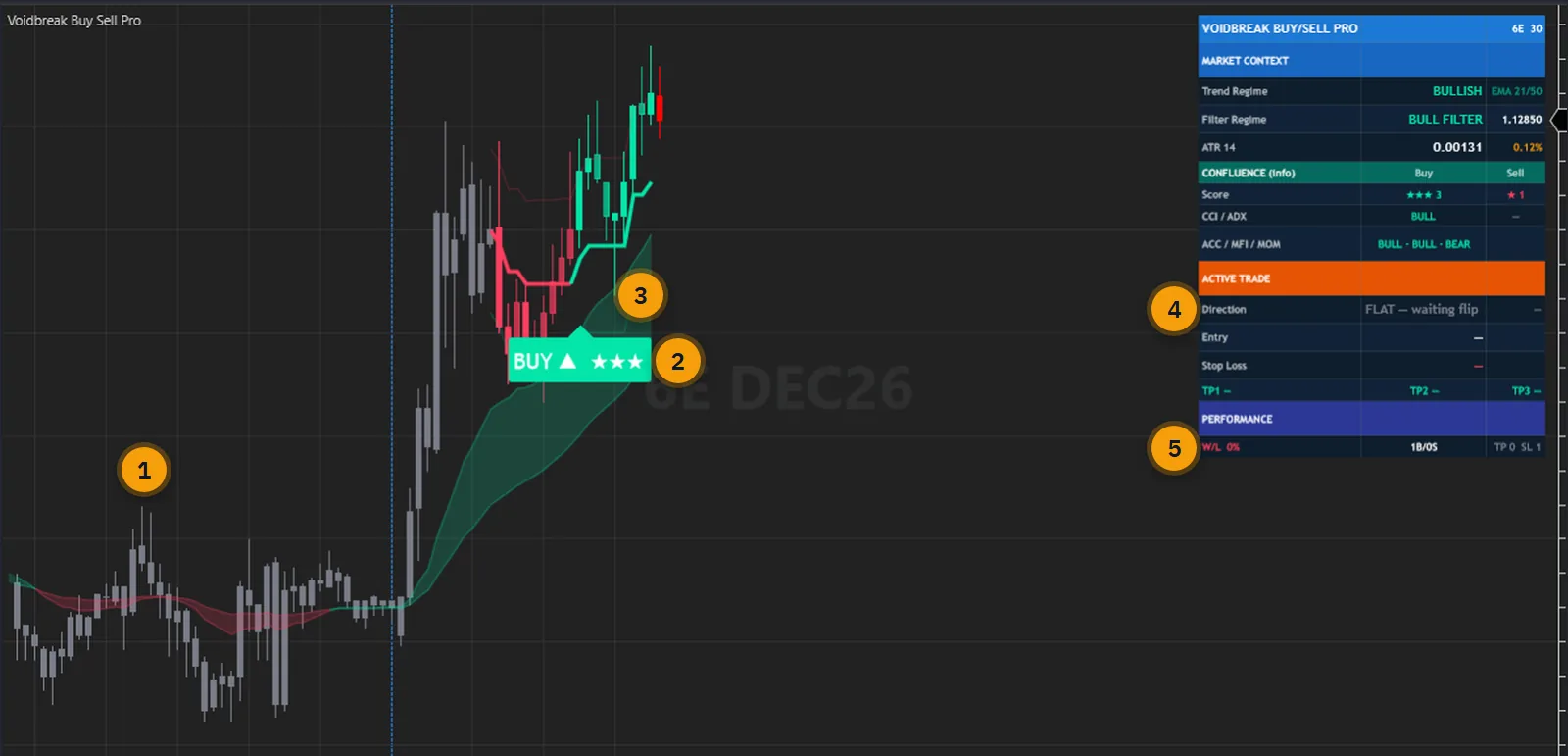
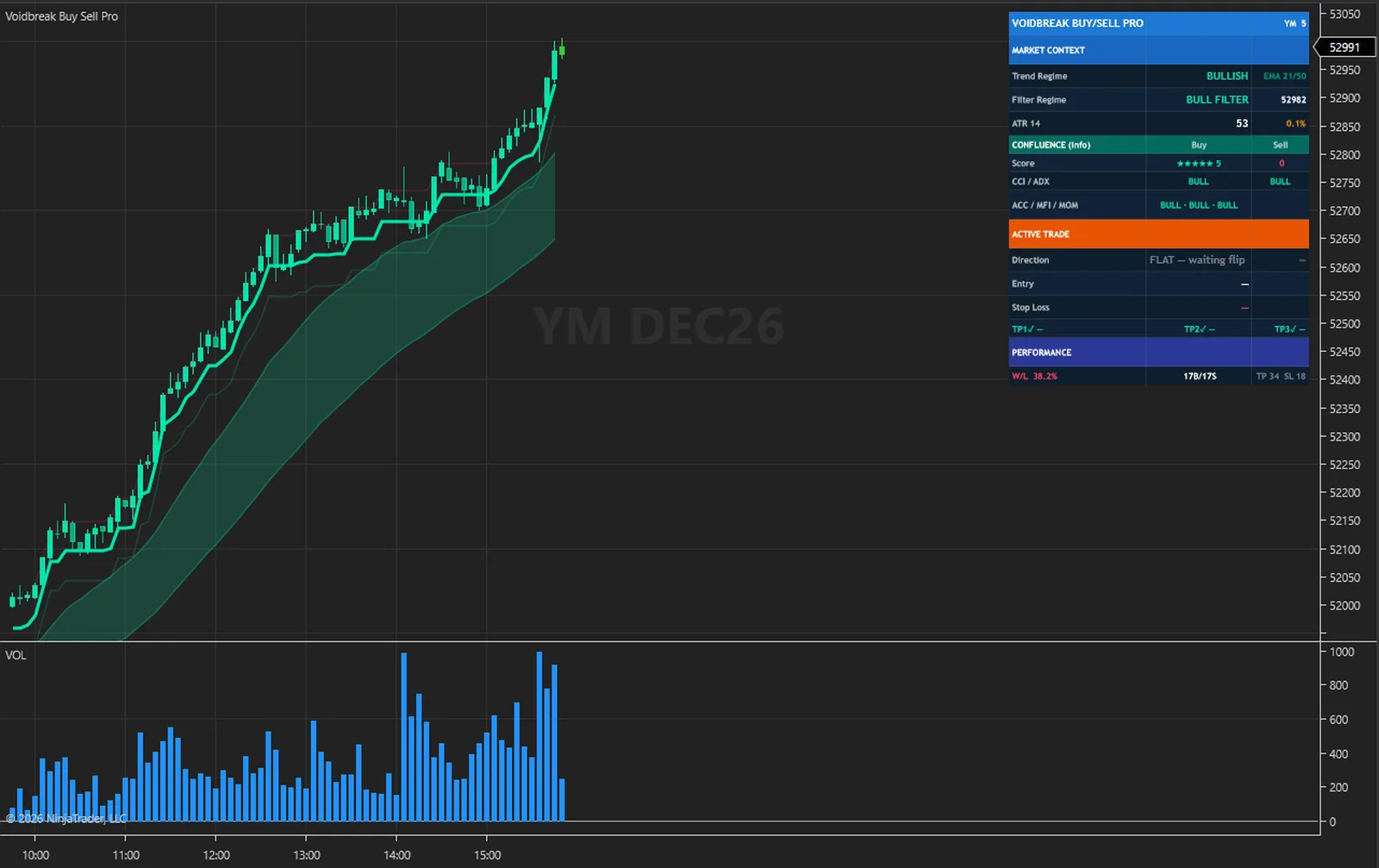
The grey candles are the filter warming up. At the default Sampling Period of 50 its smoothed range first exists about 150 bars in, and a signal needs a flip after that. A chart with few bars loaded can show one signal, as this one does, or none. Days to load in the Data Series dialog is where you raise it.
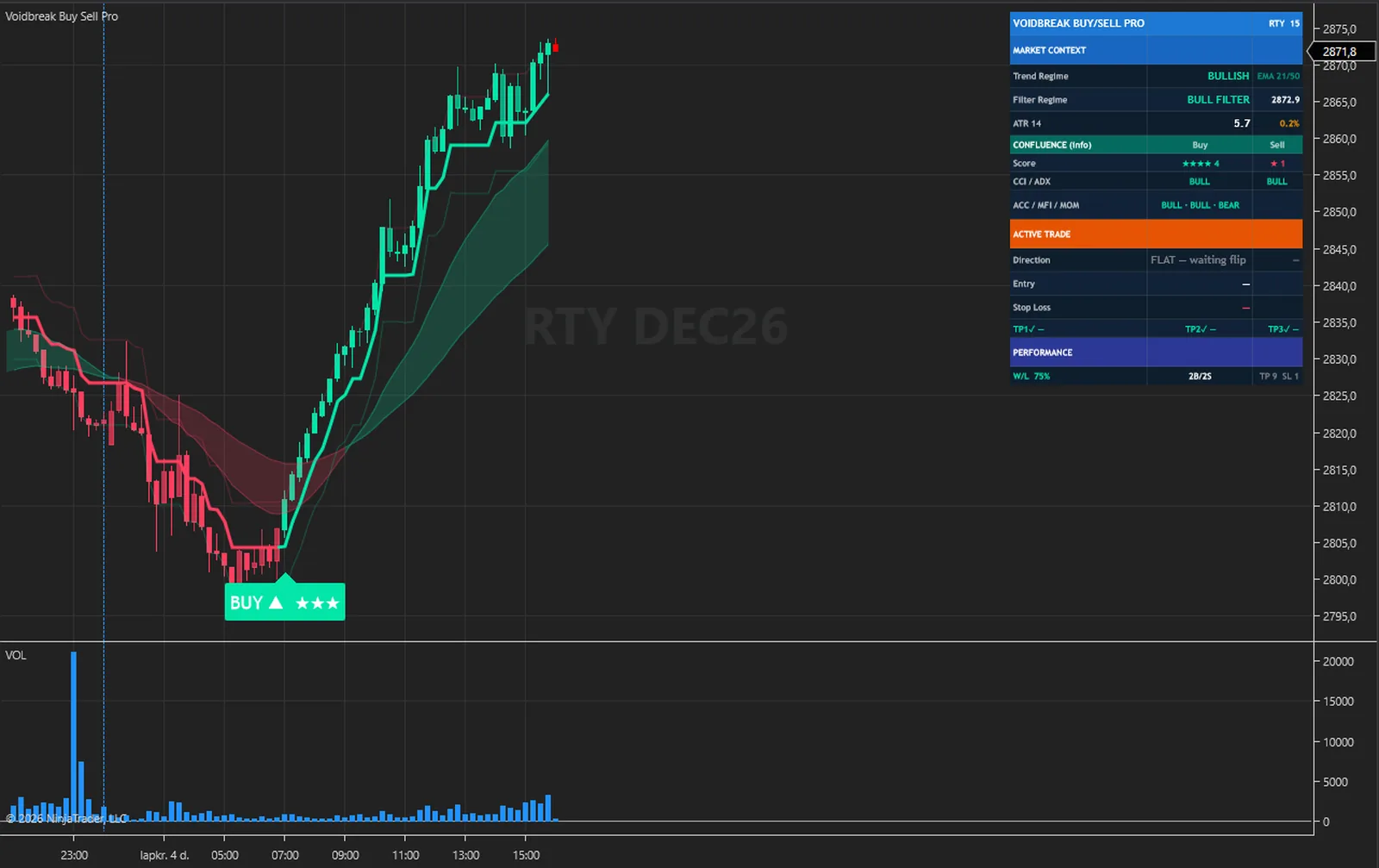
The one BUY here hit its stop before any target. The chart says so plainly: the lines and tags are gone, ACTIVE TRADE reads FLAT, waiting flip, and the tally row reads TP 0, SL 1 and W/L 0 %. Price is higher now and the stop still counts. A chart that only shows the trades that worked would tell you nothing.
The calculations are not tied to an instrument. The captures below were taken in NinjaTrader 8 on the free simulation feed: index, energy, metal, currency and rate futures, from 1-minute to 15-minute bars, with the indicator at its default settings on every one.
On a futures chart only the Accumulation/Distribution and Money Flow factors read the contract volume, and they only set stars: no signal, stop or target depends on volume. At the default Sampling Period of 50 the filter's smoothed range first exists about 150 bars in, so the grey candles at the left of the SI and 6E charts at 30 minutes are the filter warming up. The SI chart holds no signal yet, because a signal needs a flip after that. Days to load in the Data Series dialog is where you raise the history.
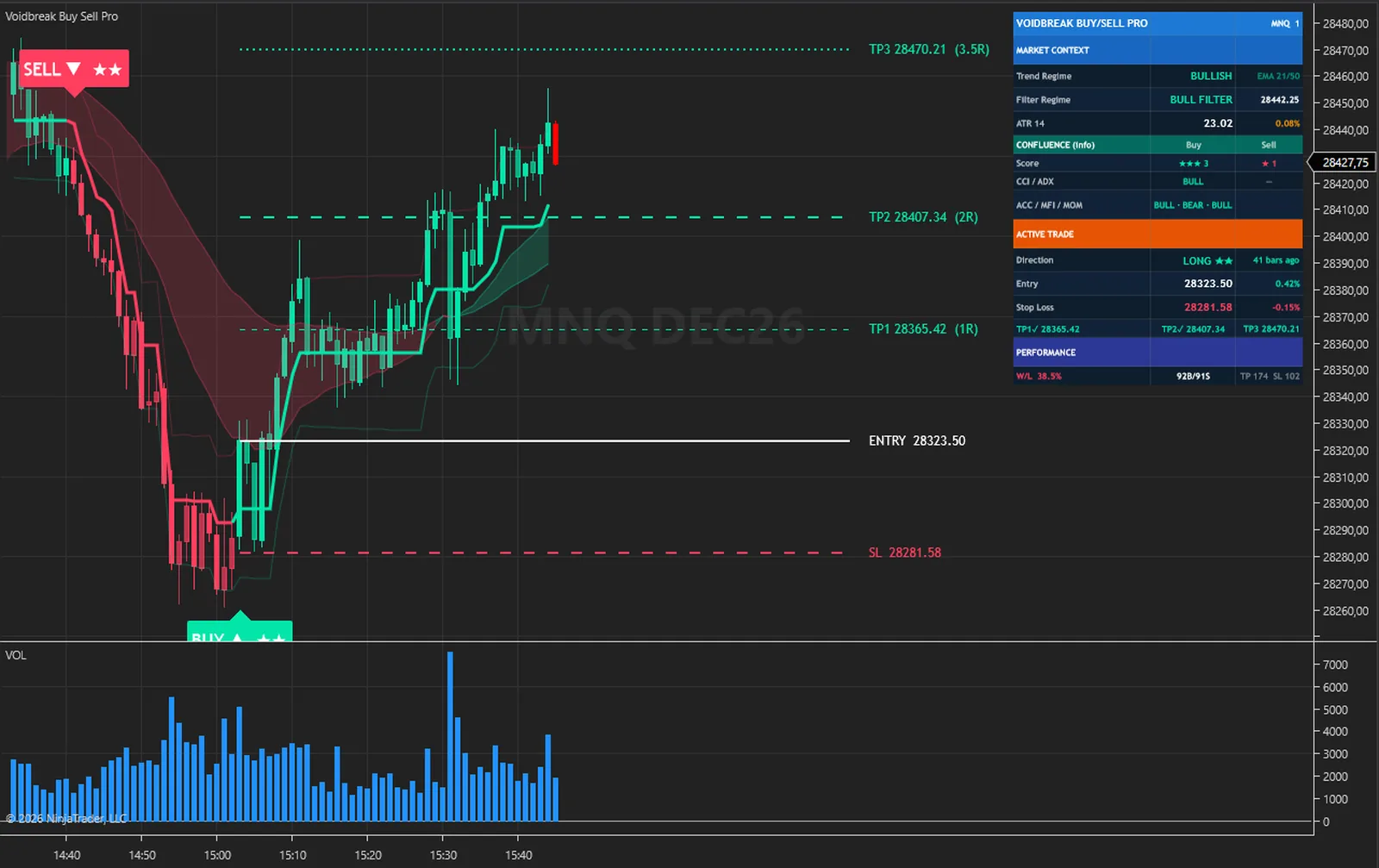
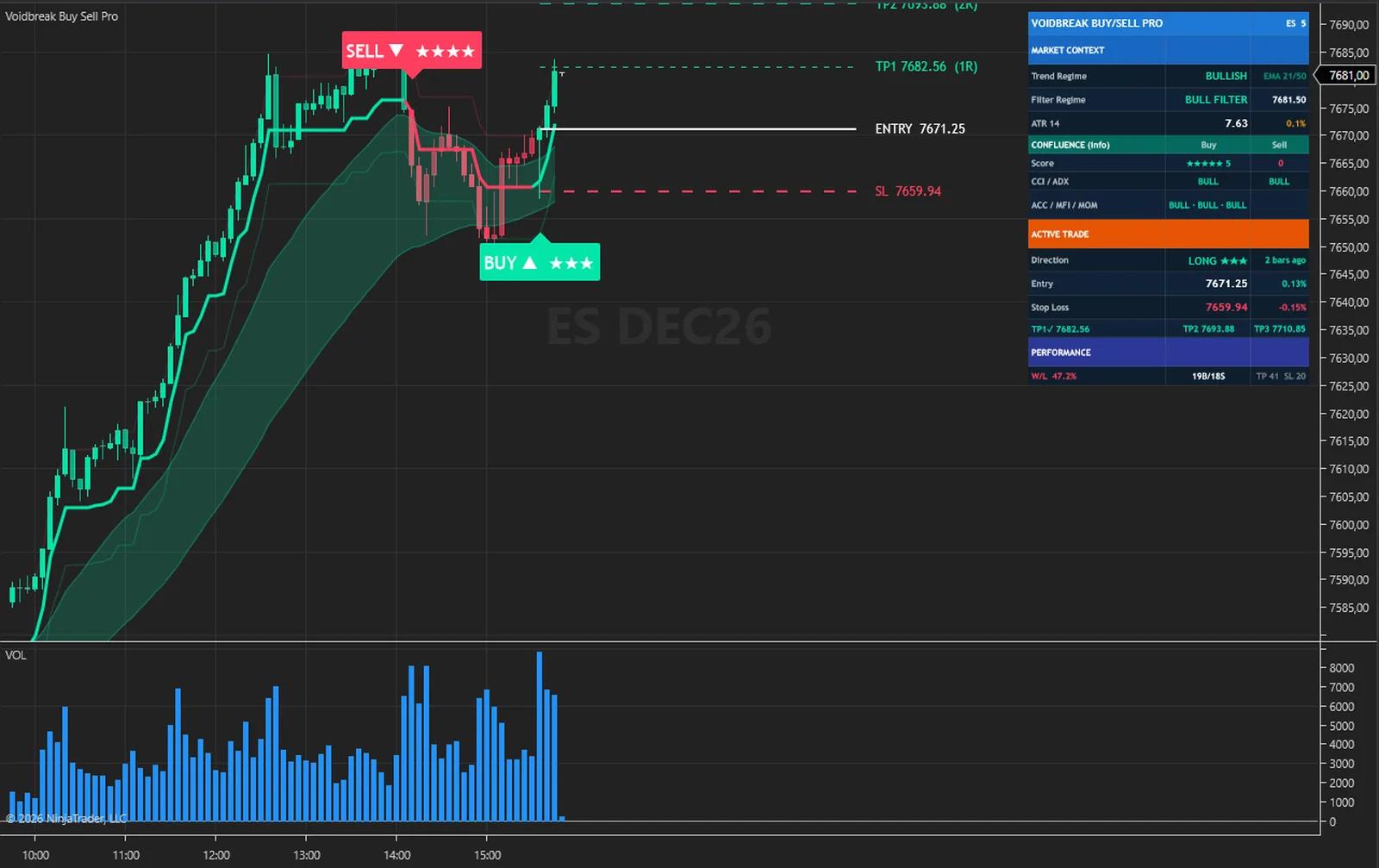
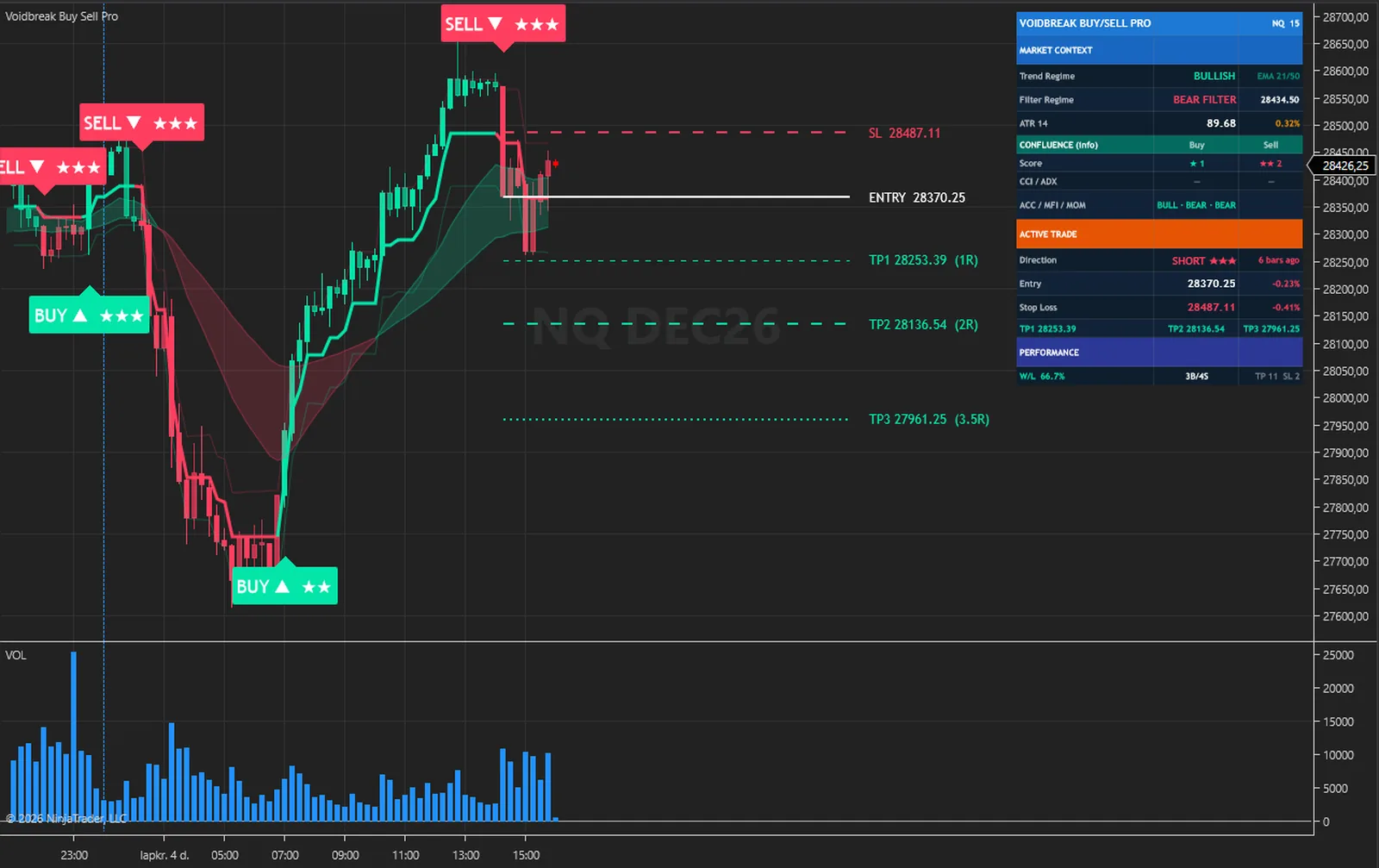
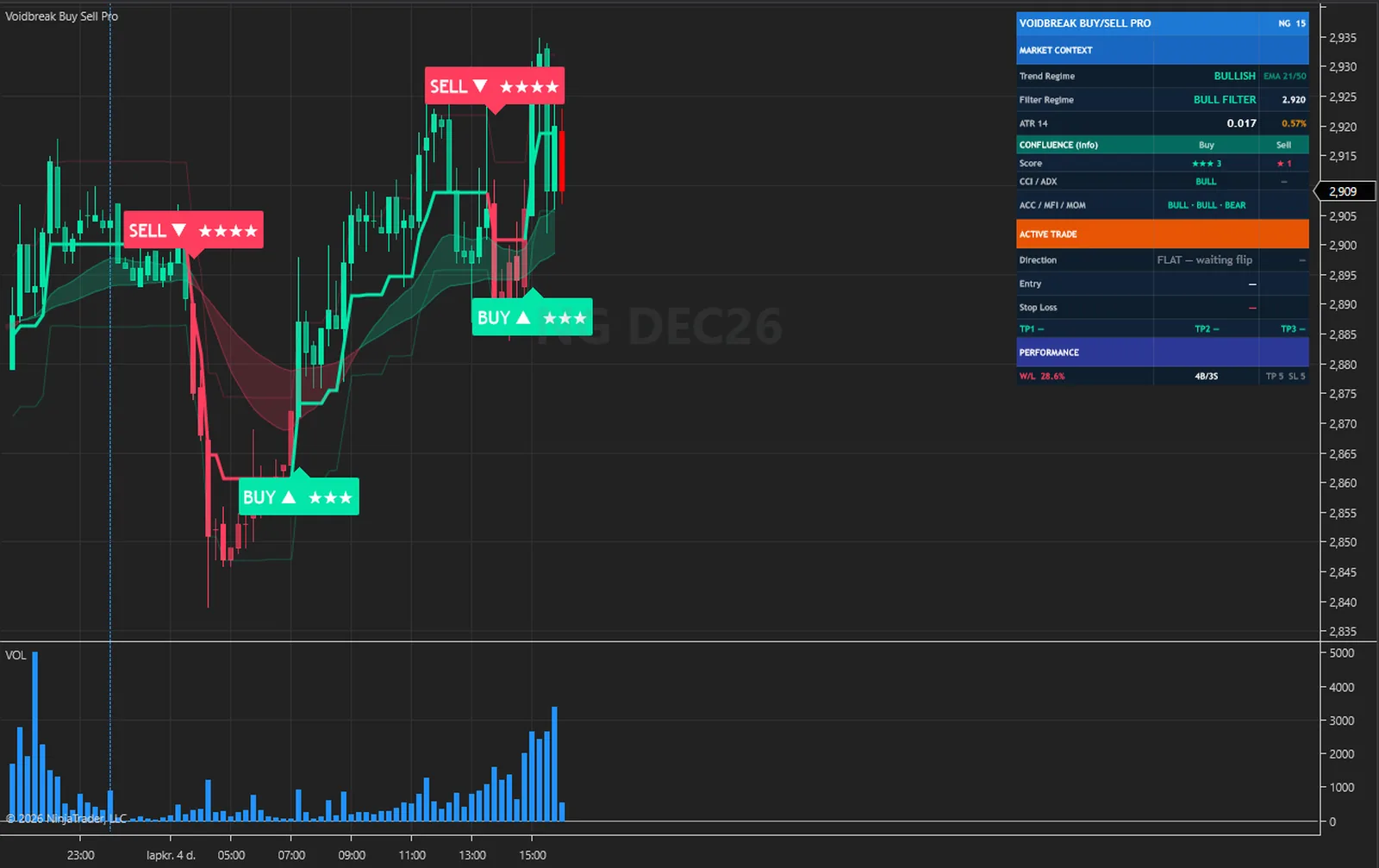
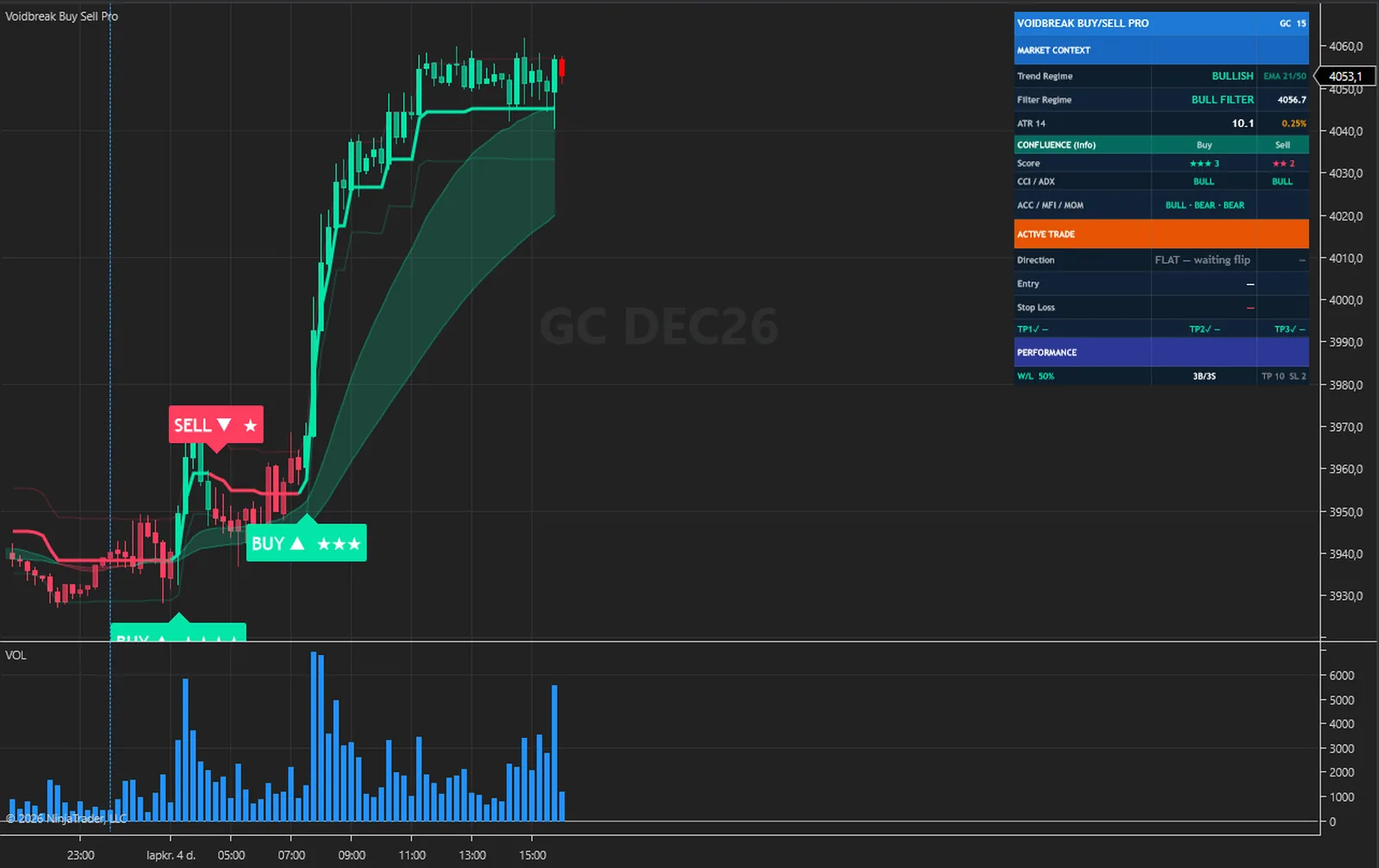
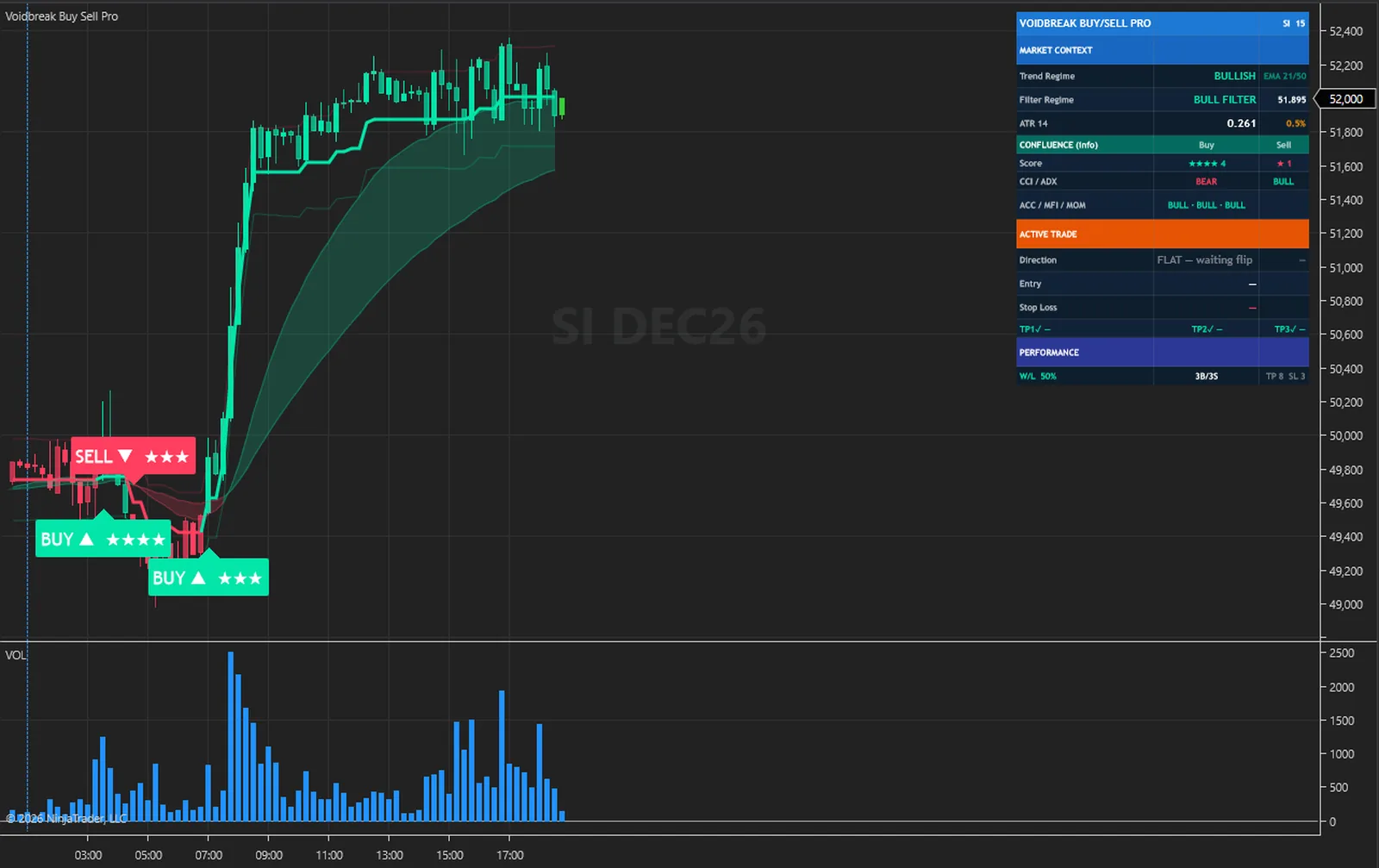
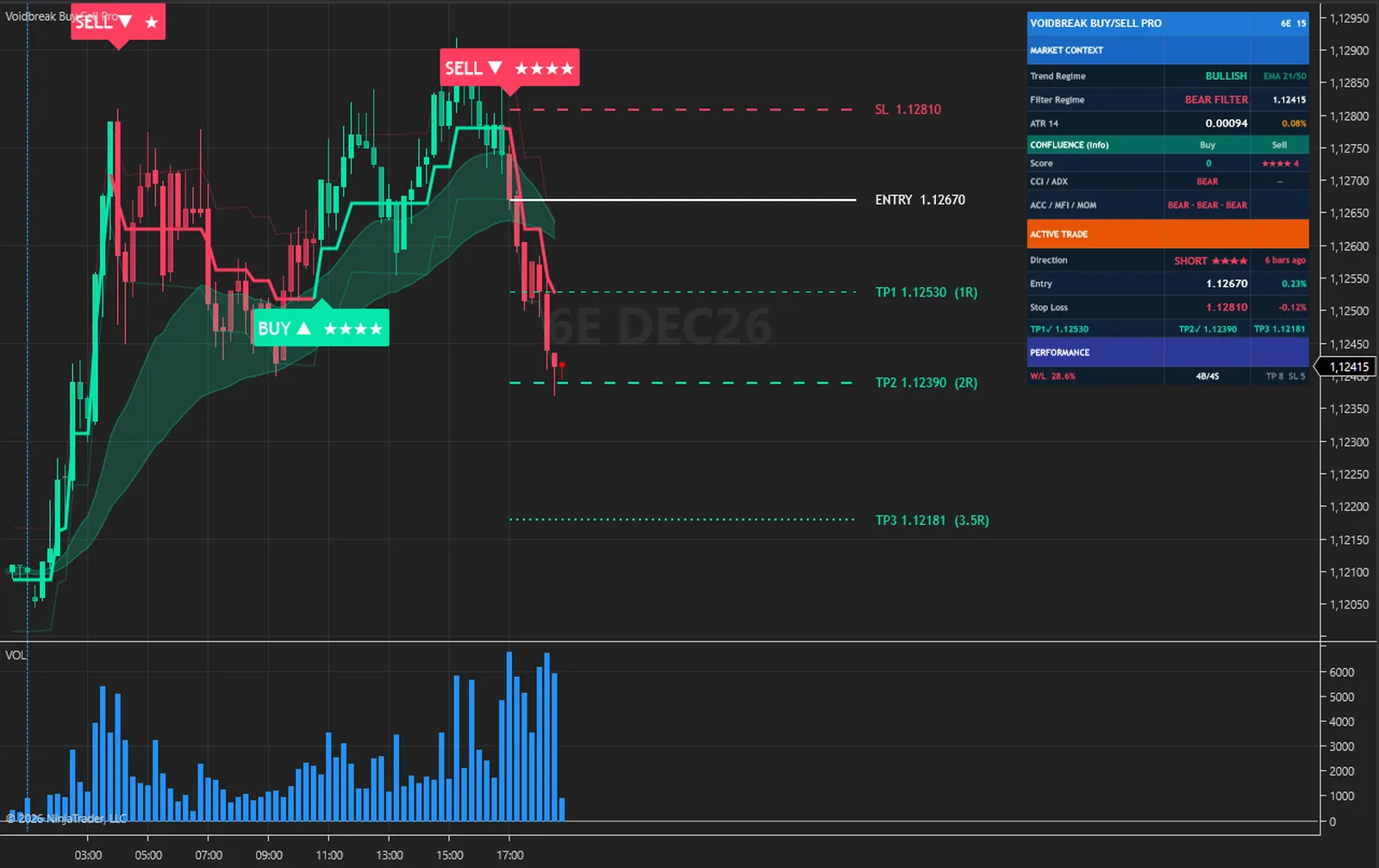
The same steps on every closed bar, in this order. Nothing hidden and nothing exotic.
TP1, then TP2, then TP3 by the bar's high or low, then the stop. TP3 or the stop closes the trade and removes its lines.
It holds still while price stays within the smoothed range of it, and steps after price when price leaves that range.
Bullish once price is above the filter while it steps up, bearish once price is below it while it steps down. It keeps its side until the other condition appears.
A change of regime on a closed bar is a signal. An open trade closes at the close, and the other side opens on the same bar.
The stop by your Stop Loss Mode, three targets at your multiples of the risk, and lines running 40 bars past the newest closed bar. Then the alerts and the dashboard.
| Plain range filter | Voidbreak Buy Sell Pro | |
|---|---|---|
| Signals | You read them off the line | A plate on every regime flip, on closed bars |
| Stop | You work it out | Hybrid, Pure ATR or Recent Swing, at least ten ticks of risk |
| Targets | You work them out | Three, at multiples of the risk you set |
| Open trade | You keep track | One tracked in the dashboard, closed by the next flip |
| Context | None | EMA cloud and five factors as stars, display only |
| What the plan met | None | A tally row on the loaded bars, not a backtest |
| For your strategies | The line | 16 series including signals, stop and targets |
The engine that computes everything also runs outside NinjaTrader. With its diagnostic dump switched on, the NinjaTrader edition writes every committed bar with the values it drew; those bars are replayed through the engine outside the platform, and the two files are compared value by value.
On 4,923 MNQ 1-minute bars every one of the 88 series compared was equal on every bar. A second run, with Calculate set to each tick and the chart left live across the switch from history to live bars, gave the same result on 4,191 bars.
What that proves: the indicator receives exactly one closed bar per chart bar with the right open, high, low, close and volume, never double-feeds or skips a bar, and shows the values the engine produced. What it does not claim: it is a test of correct calculation, not of trading results, and it says nothing about future performance.
The full method is in the user guide: User Guide (PDF) and Installation and Quick Start (PDF).
No subscription and no renewal. Pay once and the indicator stays licensed to your NinjaTrader account, updates included.
Voidbreak Buy Sell ProNinjaTrader 8 indicator
$77one payment, lifetime licence
The licence is issued to your NinjaTrader account through NinjaTrader's Vendor Licensing, by hand, normally within a few hours and always within 24 hours of your form arriving. You get an email with the download link when it is done.
Because a licence cannot be handed back once it is on your account, a sale is final once the licence has been issued. If you paid and the licence has not been issued yet, email me and I will refund you in full. The user guide is public, so you can read exactly what the indicator does before you pay.
The full terms of sale and the privacy notice for buyers are one page each, in plain language.
Trading carries risk of loss. This is an analysis tool, not financial advice, and no indicator can promise a profit.
A signal, a plate and the opposite-flip close only ever happen on a closed bar, in every mode. With Calculate set to each tick or price change the forming bar is previewed, and a preview is rolled back completely before the next one. In those modes a target or stop touched by the forming bar shows on the dashboard at once, and a stop or TP3 touch removes the trade's lines while the bar forms. It is booked for good when the bar commits.
The filter's smoothed range first exists about 150 bars in at the default Sampling Period of 50, and a signal needs a flip after that. The averages settle over a few hundred bars, so the first bars of a short chart can differ from a chart with more days loaded. Grey candles at the left of a chart are that warm-up. Days to load is in the chart's Data Series dialog.
The swing behind the stop is read only on signal bars, so it remembers earlier signals rather than the last bars, and on a BUY it often reads 0. The stop then sits far below the entry. On the 5-minute EURUSD history used to verify the engine, that put 28 % of Recent Swing stops more than 10 ATR away. In Hybrid, the default, the tighter ATR stop wins in those cases, and Pure ATR never reads the swing.
A stop after TP1 was reached counts as a win in the tally row. That is the tally's rule, and it is one reason the W/L figure is not a backtest or a record of trading results. It has no spread, commission, slippage or position size either, and it changes with how many bars the chart has loaded.
Yes. The series are calculated on every historical bar, so a strategy can read them, with no drawing and no alerts in a backtest. In the Market Analyzer it loads with no drawing and the same series are available as columns, though it is not advertised as a scanner. It runs on one data series and adds none of its own.
NinjaTrader 8.1 Desktop for Windows; the build is tested on 8.1.9.0. Any data connection that delivers bars works, including the free simulation connection.
No. NinjaTrader 8 is free to download and use for charting and simulation, with free real-time futures data for the simulator. A live account with a broker of your choice is a separate step that this indicator does not need. NinjaTrader is the platform it runs inside, not a broker.
No. The licence is tied to your NinjaTrader account login through NinjaTrader's Vendor Licensing, not to a PC. Log in on any installation and the indicator runs; a new PC needs no transfer.
I issue it by hand in the NinjaTrader Vendor Dashboard. It is normally done within a few hours and always within 24 hours of your form arriving, including weekends.
No. It is one payment of 77 USD for a lifetime licence on one NinjaTrader account, with future updates included.
Once the licence has been issued the sale is final, because a licence on your account cannot be handed back. That is why the user guide is public: read it first. If you paid and the licence has not been issued yet, email me and I will refund you in full.
Yes. Email me from the address you bought with and I will move the licence to your new account login.
No indicator can promise that, and this one does not. It gives you the regime flips of a range filter, and a stop and three targets to plan around. What you do with that, and how you size positions, decides the outcome.
Each one is a compiled NinjaScript Add-On, 77 USD once, with its own page, charts and public user guide.
A fast and a slow EMA with a trend band, three signal families on closed bars, swing support and resistance rays, and an entry, a stop and two ATR targets for each signal.
$77 one payment, lifetime licence
The closes that would print your RSI levels, drawn as bands with a midline, a trend regime, signals scored in five layers, a stop, three targets and a dashboard.
$77 one payment, lifetime licence
A range filter whose turns are scored with RSI side, EMA side, a higher-timeframe EMA and a volume burst, with star-rated plates, a percentage stop, five targets, reversal diamonds and a dashboard.
$77 one payment, lifetime licence
77 USD once. A lifetime licence on your NinjaTrader account, updates included, and the licence issued within 24 hours.


