ATR-adaptive periods
Volatility is measured with ATR and turned into a ratio that scales the Conversion, Base and Span B periods. Switch to Classic for the traditional fixed values.
 Invite-only TradingView indicator
Ichimoku's 9, 26 and 52 were chosen for the Japanese stock market decades ago, and most people trade it today on gold, crypto and forex without changing a thing. Kumo Forge Pro scales those periods to current volatility, finds five kinds of Ichimoku signal, grades each one against nine factors, and draws the stop and three targets.
$47one payment, lifetime access
Get lifetime access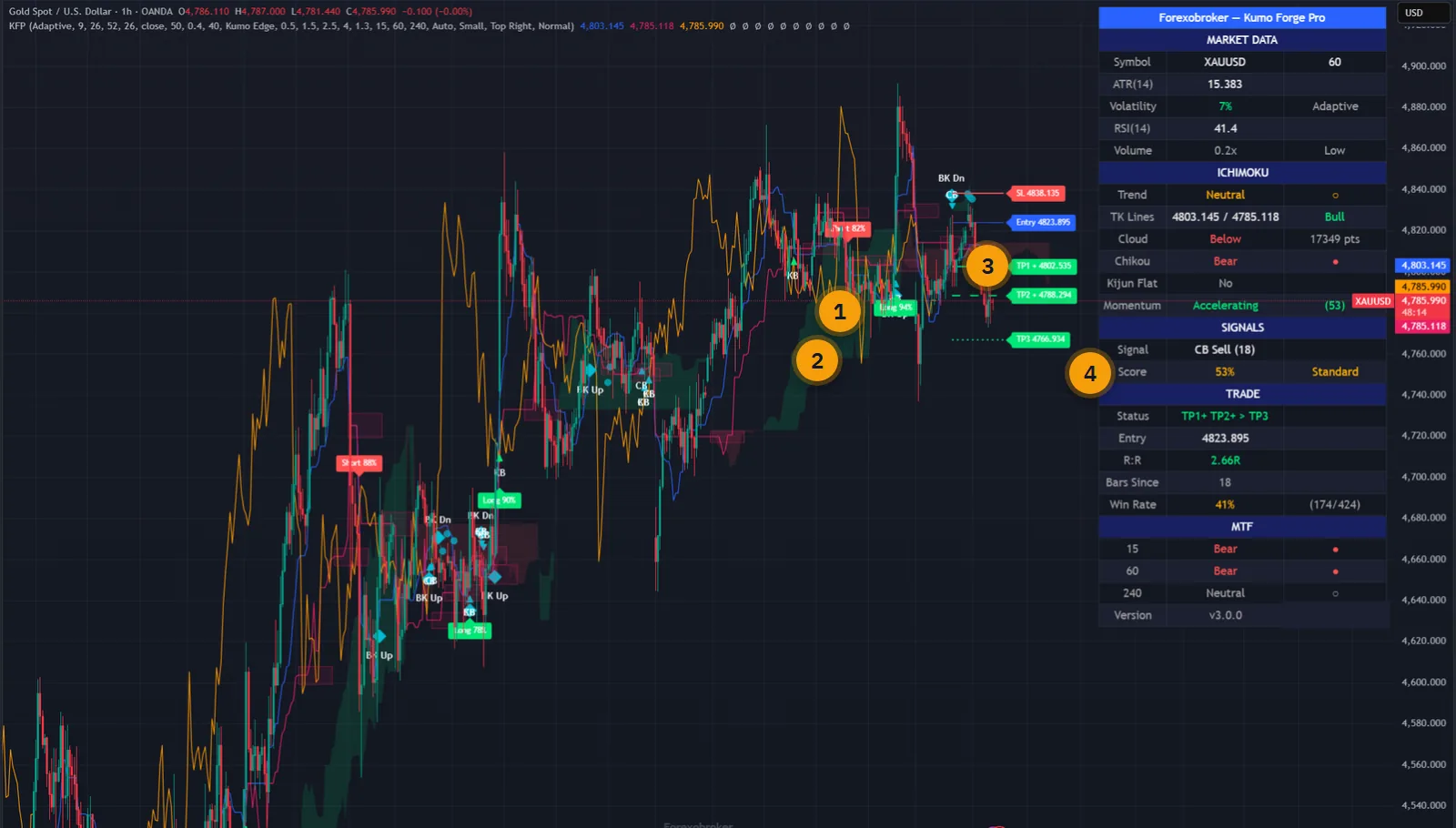
The published walkthrough: the indicator on real charts, what its inputs do, and which signals to take and which to skip.
Ichimoku is one of the most complete indicators there is, and that is its problem. Five lines and a cloud, each saying something, and a beginner and an expert will read the same chart two different ways.
The standard periods make it worse. They were designed for a six-day trading week in one equity market. On a fast crypto chart they lag; on a quiet currency pair they chatter.
Kumo Forge Pro handles both. An ATR-based engine scales the periods to the volatility in front of you, and a scoring engine turns the reading of all those lines into one number on the signal label.
The script page on TradingView is public. Read the full description there before you pay.
The cloud you know, with the judgement calls turned into rules.
Volatility is measured with ATR and turned into a ratio that scales the Conversion, Base and Span B periods. Switch to Classic for the traditional fixed values.
The Tenkan and Kijun crossover, filtered by the score. The main reversal signal, labelled Long or Short with its percentage.
Price touching the Kijun as support or resistance, and price bouncing off the edge of the cloud. Continuation entries inside an existing trend.
Price breaking through the cloud with volume above a multiplier, and the Chikou span crossing past price. The Chikou signal is off by default.
Cloud position, TK alignment, Chikou, cloud direction, cloud thickness, volume, momentum, its acceleration and RSI. Up to 110 points, shown as a percentage.
Strong at 80 percent and above, Standard from 50 to 79, Weak below that. A minimum score, 40 percent by default, hides the rest.
Stop at the cloud edge, at the Kijun or from ATR, with a buffer. Targets at 1.5R, 2.5R and 4R by default, each tracked as it is reached.
Market data, the Ichimoku reading, the current signal and grade, the open trade, and the trend on three further timeframes.
Every signal type in both directions, every target and the stop, trend changes, timeframe alignment, retests and strong-score signals.
Every picture below is a TradingView capture with numbered notes added. Nothing on the charts is drawn by hand. Click any image to enlarge it.
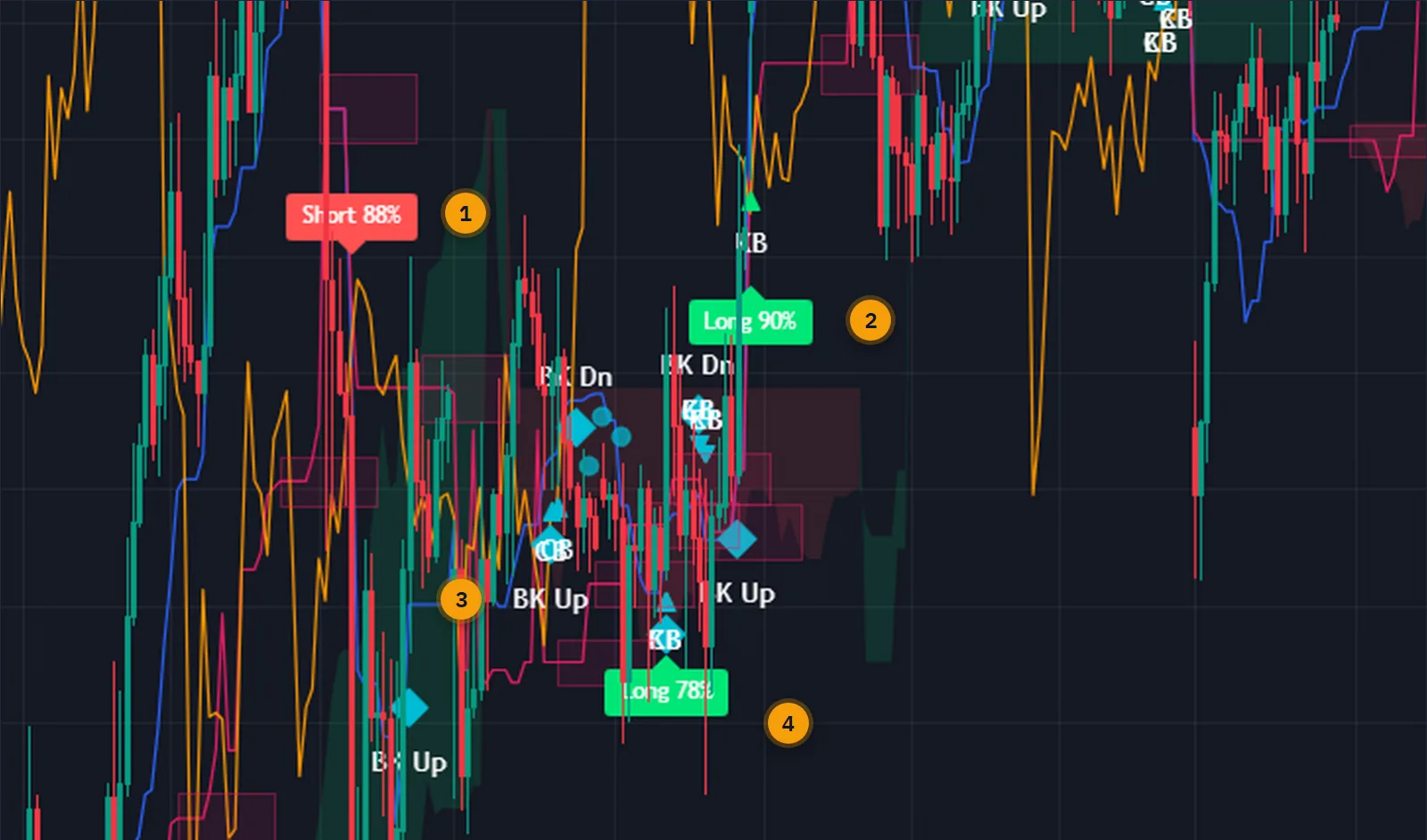
Long and Short labels are TK crosses and carry their score in percent. KB and CB triangles are bounces off the Kijun and off the cloud edge. BK diamonds are breakouts through the cloud. Because every type has its own shape, you can tell at a glance what kind of setup you are looking at.
Every type can be switched off. If you only trade crossovers at 70 percent and above, that is all the chart will show.
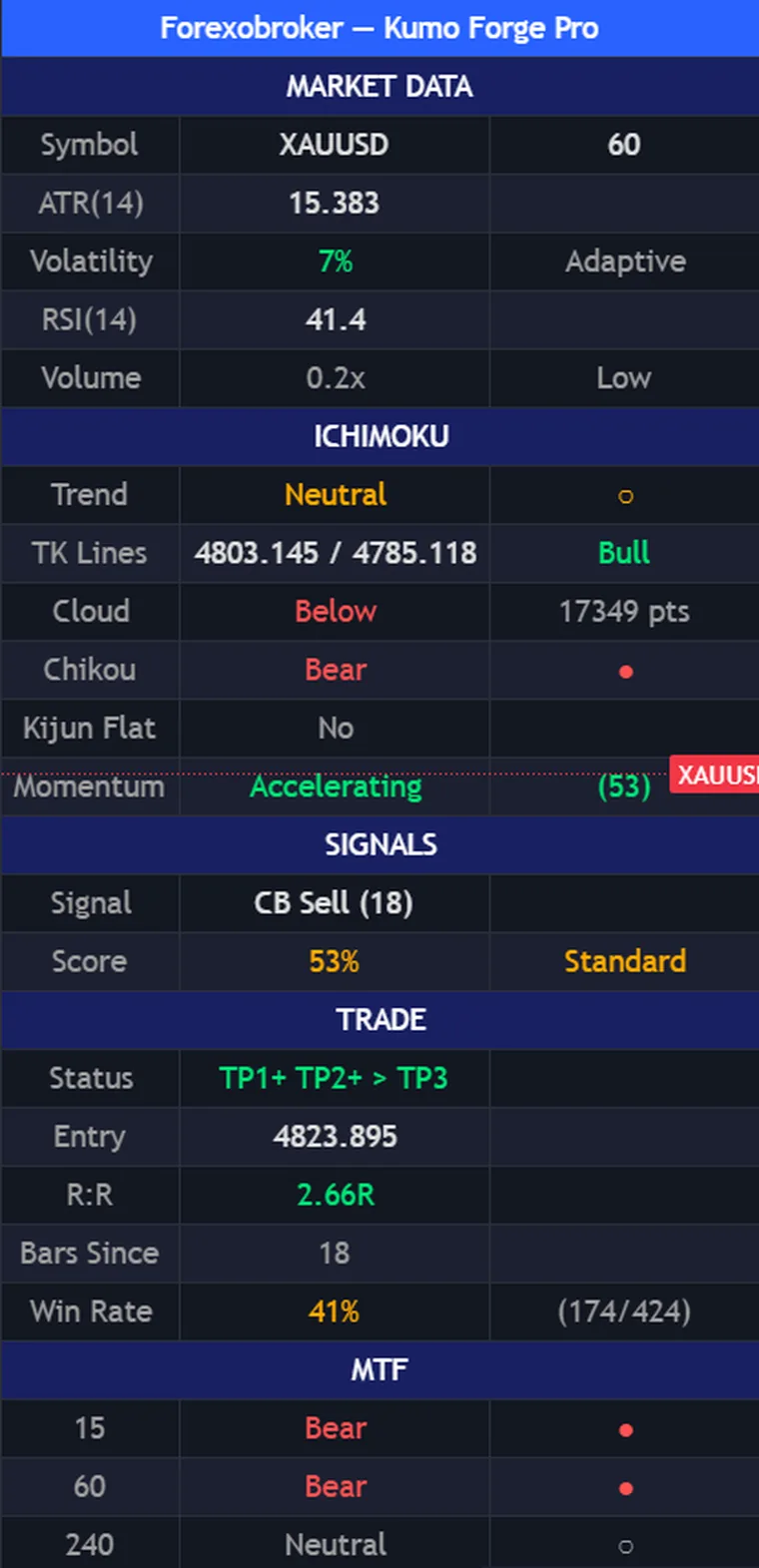
Instead of asking you to interpret five lines, the panel states the result: the trend, whether the TK lines are bullish, whether price is above or below the cloud and by how much, what the Chikou says, and whether momentum is accelerating.
Underneath are the current signal with its score and grade, the open trade with its entry and how far it has progressed through the targets, and the trend on three other timeframes. The panel also keeps the tool's own running count of past outcomes on this chart, which is a record and not a forecast.
The adaptive engine is the point: the periods are set by the volatility of the chart you open, so the same indicator is appropriate on a daily index and on a fifteen-minute coin.
Swing traders tend to use H4 and daily with TK crosses and Kijun bounces at high scores. Momentum traders use the Kumo breakout on any timeframe. For faster entries on M15 to H1, enable more signal types and lower the minimum score.


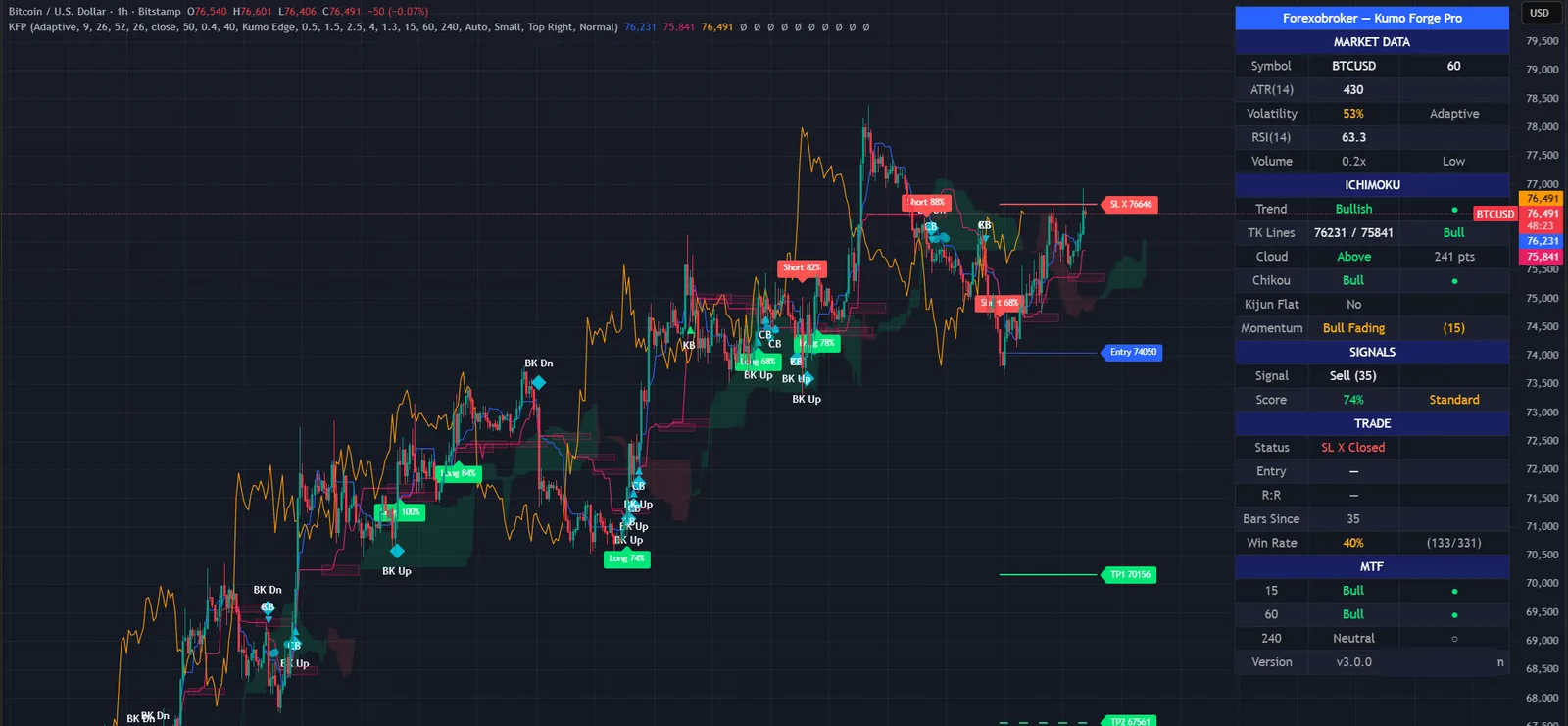
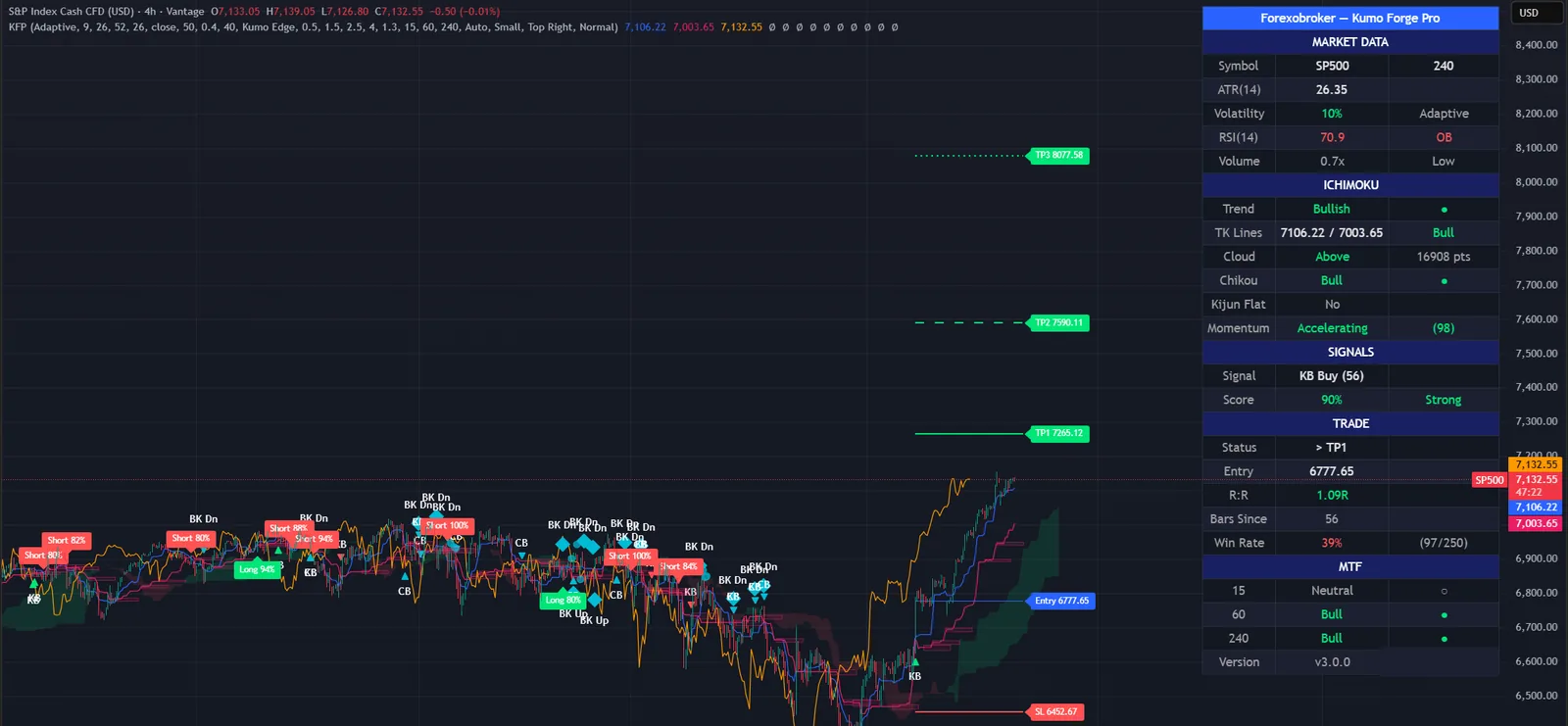
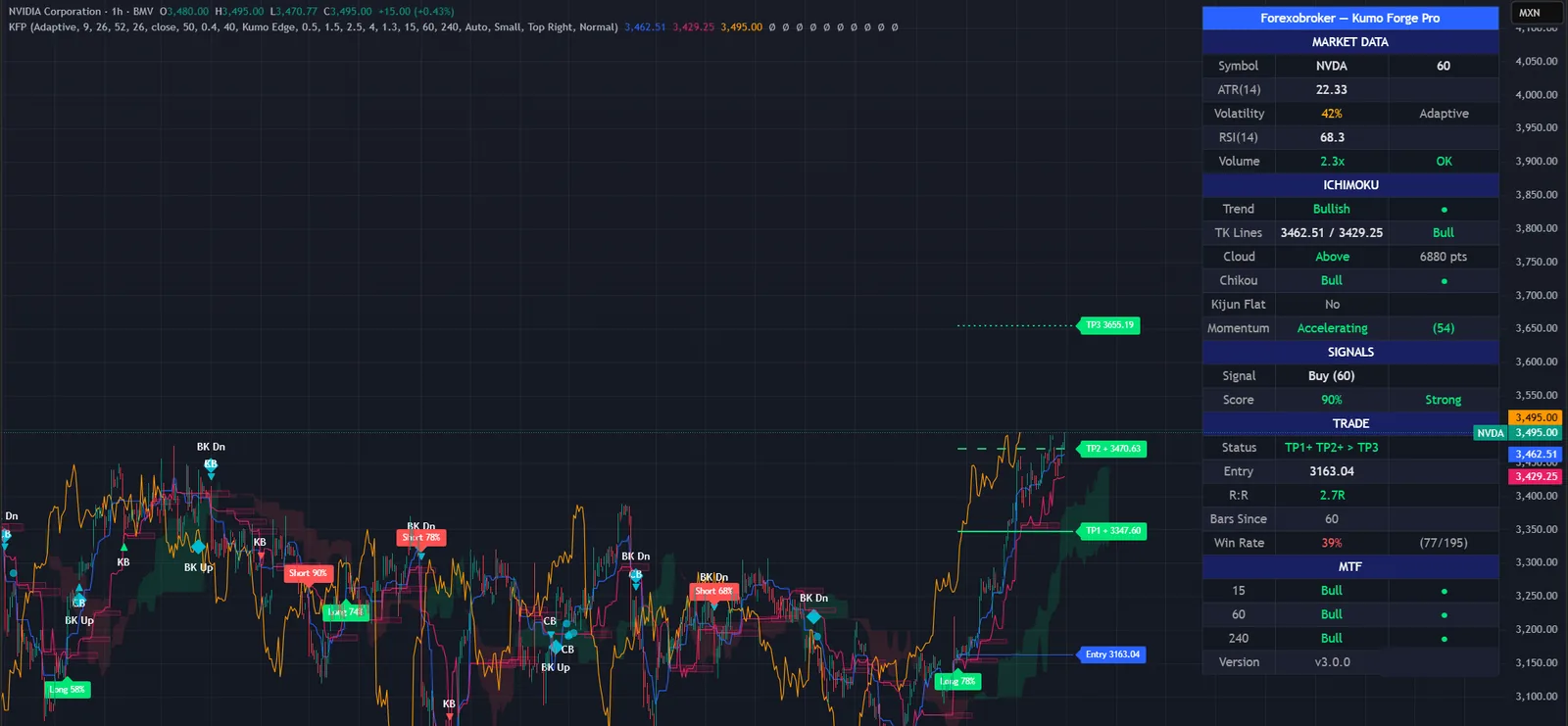
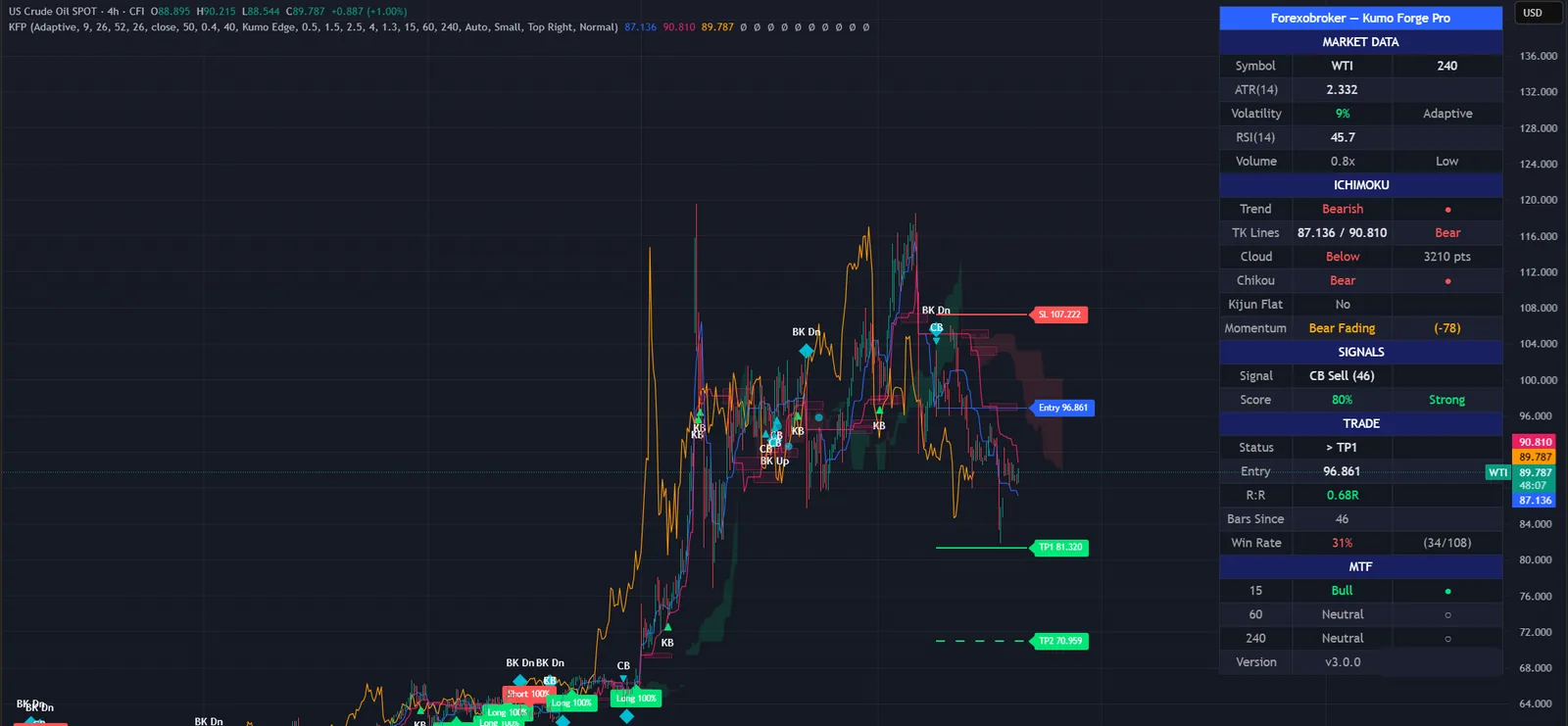
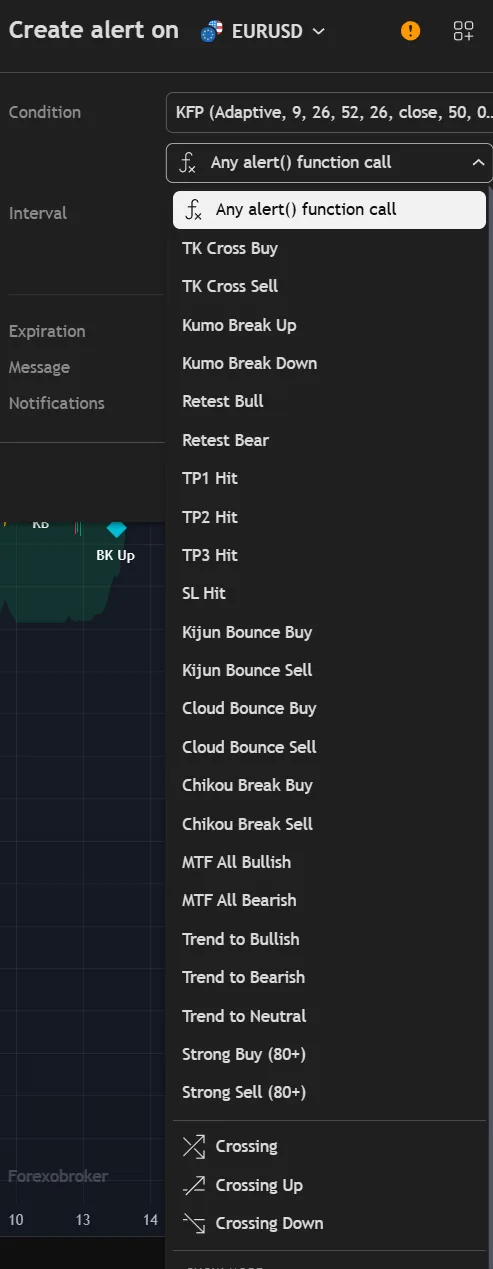
There is a buy and a sell alert for each of the five signal types, so you can be told about breakouts only, or bounces only. Further alerts cover each target and the stop, trend changes, multi-timeframe alignment, retests and strong-score signals.
All of them support an optional webhook JSON format for automation.
Four steps, recalculated as volatility changes.
Take ATR 14 and compare it with its own range over a lookback window you set.
Turn that into a ratio from 0 to 1: where current volatility sits between its recent low and high.
Use the ratio, times a strength factor, to shorten the Conversion, Base and Span B periods when volatility is high and lengthen them when it is low.
Build the cloud from those periods, look for the five signal types, and grade each against nine factors.
| Standard Ichimoku | Kumo Forge Pro | |
|---|---|---|
| Periods | Fixed 9, 26, 52 | Scaled to volatility, or Classic |
| Signals | You read the lines | Five types, marked on the chart |
| Signal quality | Your judgement | Nine factors, graded in percent |
| Stop and targets | You work them out | Three stop modes, three targets |
| Higher timeframes | Open more charts | Three timeframes in the dashboard |
| Alerts | Build your own | 23 conditions, webhook JSON |
No subscription and no renewal. Pay once and the indicator stays on your TradingView account, updates included.
Kumo Forge ProTradingView indicator
$47one payment, lifetime access
Access is granted by hand from my TradingView account, normally within a few hours and always within 24 hours of your form arriving.
Because access to an invite-only script cannot be handed back, a sale is final once access has been granted. The script page on TradingView is public, so you can read the full description and see it on charts before you pay.
The full terms of sale and the privacy notice for buyers are one page each, in plain language.
Trading carries risk of loss. This is an analysis tool, not financial advice, and no indicator can promise a profit.
It is the confluence score: how many of the available points, out of 110 across nine factors, agreed with the signal. 80 percent and above is graded Strong, 50 to 79 Standard, below 50 Weak. It measures agreement between the Ichimoku components, momentum and volume. It is not a probability of profit.
Yes. Switch the engine from Adaptive to Classic and the traditional fixed periods are used, with all the signal detection, scoring, stop and target features still available.
Any market and any timeframe. The adaptive engine exists so that the periods suit the instrument without manual recalibration. H4 and daily suit swing trading, and M15 to H1 suit faster entries with more signal types enabled.
No. Invite-only indicators work on the free plan. The free plan limits how many indicators you can have on one chart and how many alerts you can run, so a paid plan helps if you use many, but it is not required for this one.
I grant access by hand from my TradingView account. It is normally done within a few hours and always within 24 hours of your form arriving, including weekends.
No. It is one payment of 47 USD for lifetime access on one TradingView username, with future updates included.
Once access has been granted the sale is final, because access to an invite-only script cannot be returned. That is why the script page on TradingView is public: read it and look at the charts first. If you paid and access has not been granted yet, email me and I will refund you in full.
Yes. Email me from the address you bought with and I will move the access to your new username.
Yes. A MetaTrader 4 and 5 edition is on the MQL5 Market. It is a separate product sold by that store; this page is the TradingView edition.
No indicator can promise that, and this one does not. It gives you a clear, rule-based reading of the chart and a plan to work from. What you do with that, and how you size positions, decides the outcome.
Each one is invite-only, 47 USD once, and has its own page with charts and a full description.
A non-repainting momentum confluence indicator that scores every closed bar against three independent tests.
$47 one payment, lifetime access
An adaptive trend-following indicator combining a dynamic SuperTrend engine with a Trend Quality Index and three optional confluence filters.
$47 one payment, lifetime access
A non-repainting SuperTrend that pairs the classic trend engine with structural price levels.
$47 one payment, lifetime access
47 USD once. Lifetime access on your TradingView username, updates included, and access granted within 24 hours.


