Automatic trendlines
Consecutive pivot highs become resistance, consecutive pivot lows become support. The lines are sloped, so they carry the market's direction, not just a price.
 Invite-only TradingView indicator
Hand-drawn trendlines move every time you look at them, and a wick through one is not a break. Apex Break PRO joins confirmed pivot highs and lows into sloped support and resistance lines, waits for a bar to close beyond one by a margin, scores the break against four filters, and draws the stop and three targets.
$47one payment, lifetime access
Get lifetime access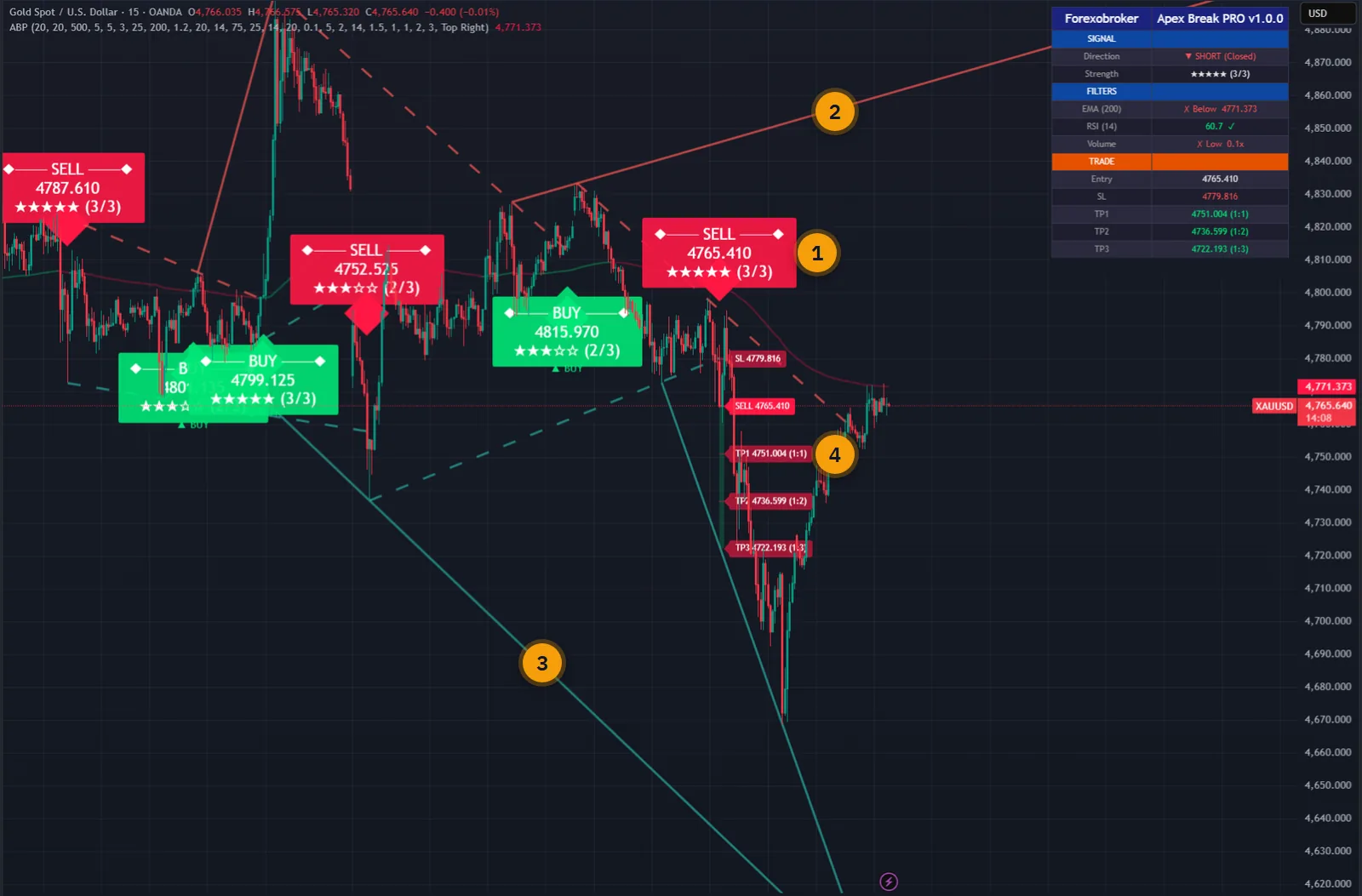
The published walkthrough: the indicator on real charts, what its inputs do, and which signals to take and which to skip.
The weakness of trendline trading is the person holding the pen. You pick the two points that make the line fit your view, you nudge it when price gets close, and afterwards every break looks obvious.
Then there is the false break: price pokes through the line, you enter, and the bar closes back inside. The line was right. The entry was early.
Apex Break PRO takes both decisions away from you. Lines are joined through pivots that are confirmed by bars on both sides, so you cannot choose them, and a signal exists only when a bar has closed beyond the line by a set fraction of ATR.
The script page on TradingView is public. Read the full description there before you pay.
Every filter and every level has its own switch, so you can run it bare or fully loaded.
Consecutive pivot highs become resistance, consecutive pivot lows become support. The lines are sloped, so they carry the market's direction, not just a price.
A pivot counts only after enough bars have formed on both sides of it, 20 by default. That is what stops the lines, and the signals, from repainting.
The close has to clear the line by at least 0.1 ATR by default. Marginal touches that reverse on the next bar never become signals.
Trend against the 200 EMA, RSI not at an extreme, volume above 1.2 times its average, and optionally ADX. One point each, minimum set by you.
Stop at 1.5 ATR or a percentage, targets at 1R, 2R and 3R, all editable, with shaded risk and reward zones.
The indicator follows the trade and ticks each target on the dashboard as price reaches it. TP3 or the stop closes it and the lines stop extending.
Direction and status, the star score, a pass or fail for each filter with its live value, and entry, stop and targets.
Buy, sell, any signal, raw resistance and support breaks, each target and the stop. All on the bar close, with webhook JSON.
A five-bar cooldown by default stops the same direction firing again and again during one long break.
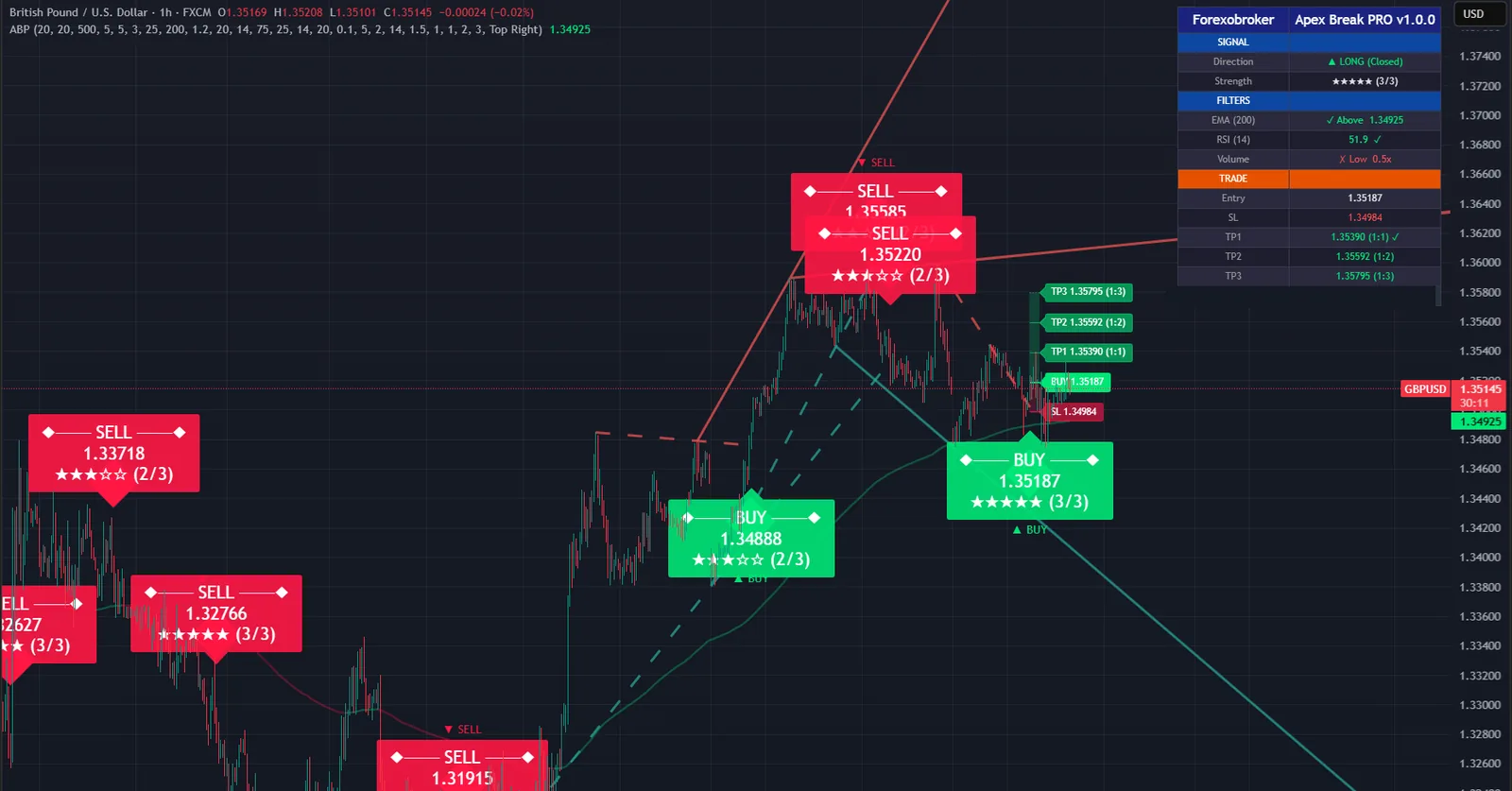
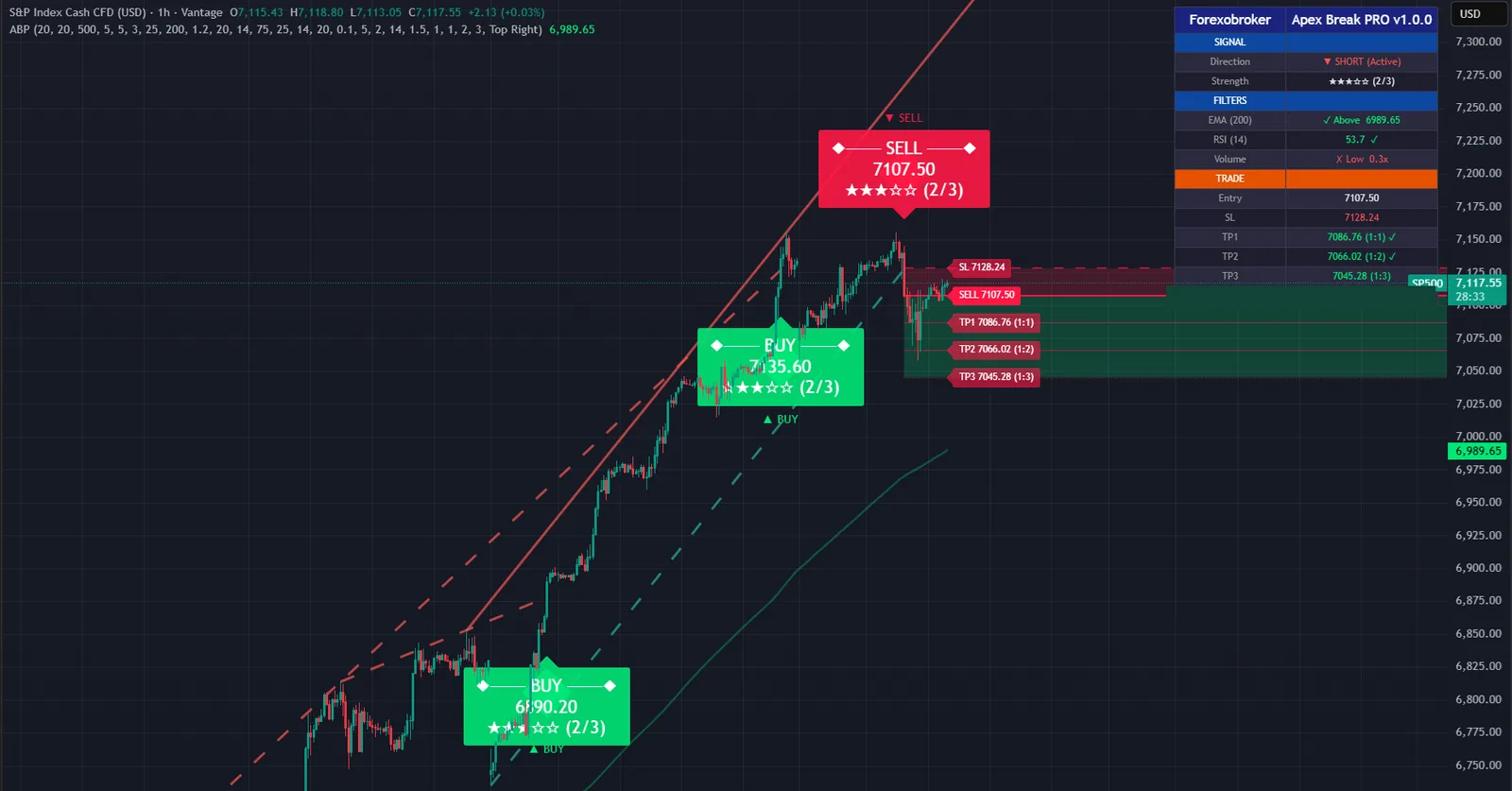
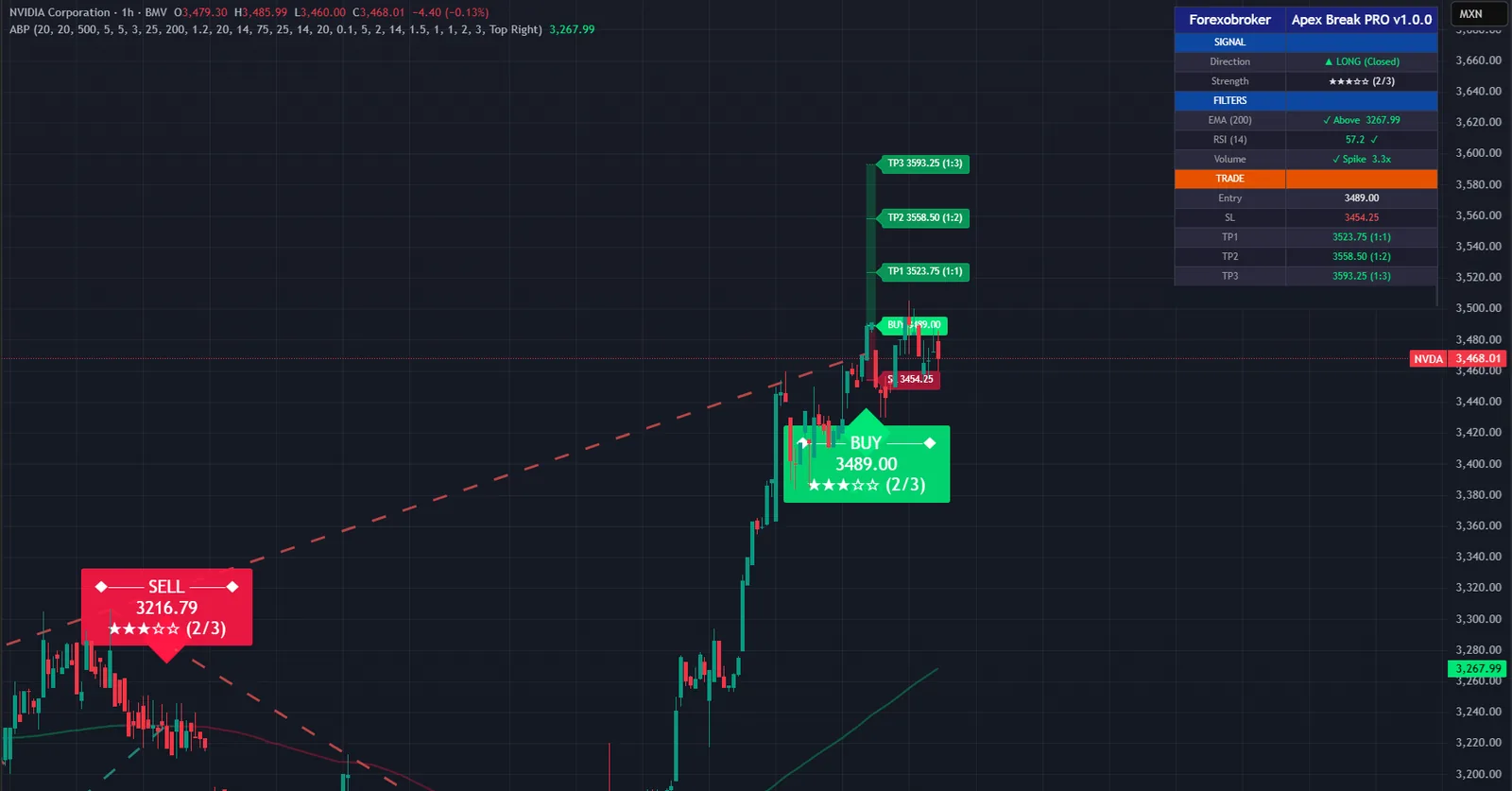
Every picture below is a TradingView capture with numbered notes added. Nothing on the charts is drawn by hand. Click any image to enlarge it.
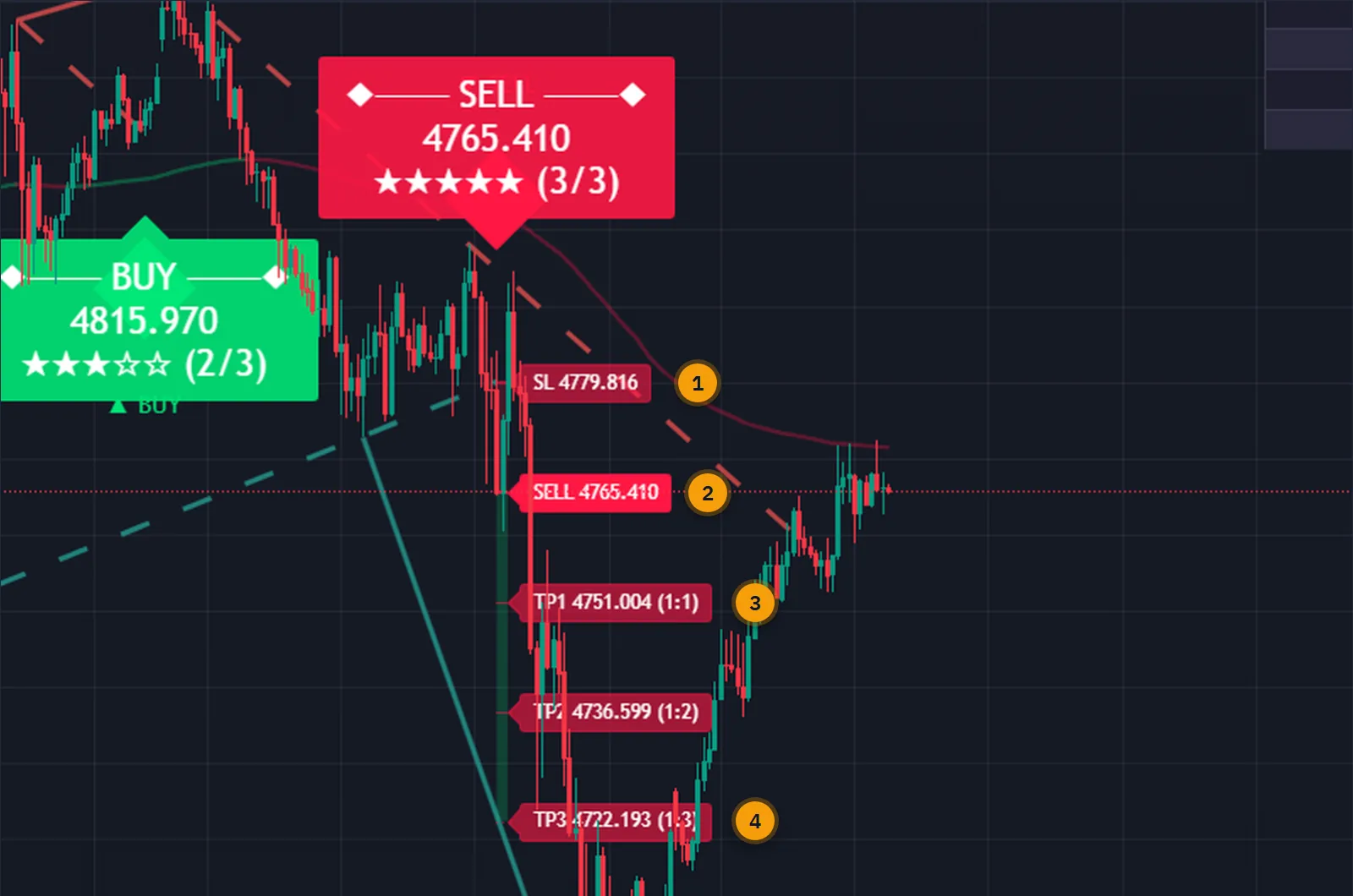
The moment a bar closes beyond the line, the entry, the stop and three targets are on the chart with their prices and their risk-reward ratios. Sizing the position is a matter of reading the stop distance.
After that the indicator keeps score for you. Each target is ticked on the dashboard when price reaches it, and when the third target or the stop is hit the trade is marked closed.
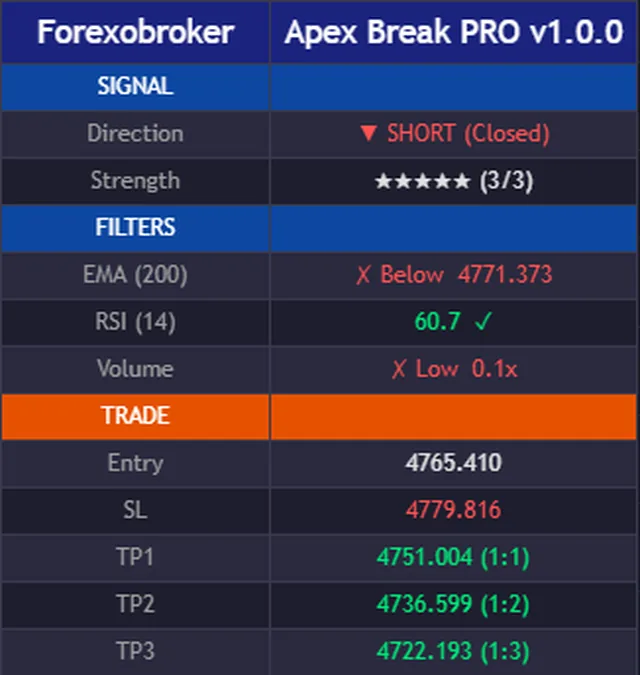
A star rating is only useful if you can see what is behind it. The dashboard lists each filter with a pass or a fail and its current value, so a three-star signal tells you exactly which check it missed.
Below that sit the open trade's entry, stop and three targets with their ratios.
Trendlines need nothing but swing highs and lows, so the indicator works on forex, gold, crypto, indices, stocks and oil, on any timeframe.
The break margin and the stop are both measured in ATR, which is what lets the same settings travel between a quiet currency pair and a fast-moving coin.



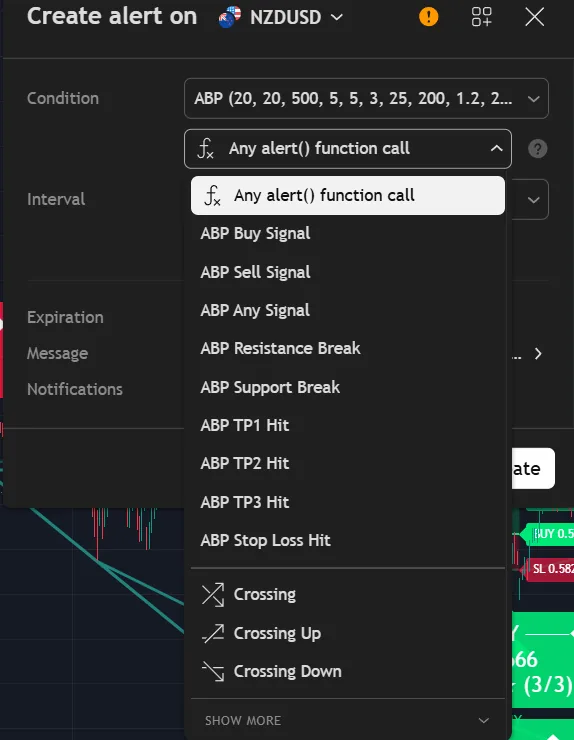
Nine alert conditions, all on the closed bar. The filtered buy and sell alerts fire only when the score meets your minimum. The raw resistance and support break alerts fire on any close beyond a line, if you want to judge them yourself.
In webhook mode, buy and sell alerts send JSON with the ticker, timeframe, price, stop, three targets and the score.
Each filter can be switched off. A switched-off filter is not counted, so three stars out of three is a full score.
Buys need price above the 200 EMA, sells need it below. The break has to agree with the dominant direction.
No buys above RSI 75 and no sells below RSI 25. Breaks at exhaustion are the ones most likely to fail.
The breakout bar needs volume above 1.2 times its 20-bar average. A break nobody traded is not much of a break.
Optional and off by default. When on, ADX must be above 20, so signals come only while the market is trending.
| Drawn by hand | Apex Break PRO | |
|---|---|---|
| The line | Wherever you put it | Through confirmed pivots, by rule |
| The break | A touch, a wick or a close | A close beyond the line by a margin |
| Quality check | Your judgement | Scored against up to four filters |
| Stop and targets | You work them out | Drawn with the signal, in R |
| Follow-up | You watch the chart | Targets ticked off, trade marked closed |
| Alerts | A price alert per line | Nine conditions, webhook JSON |
No subscription and no renewal. Pay once and the indicator stays on your TradingView account, updates included.
Apex Break PROTradingView indicator
$47one payment, lifetime access
Access is granted by hand from my TradingView account, normally within a few hours and always within 24 hours of your form arriving.
Because access to an invite-only script cannot be handed back, a sale is final once access has been granted. The script page on TradingView is public, so you can read the full description and see it on charts before you pay.
The full terms of sale and the privacy notice for buyers are one page each, in plain language.
Trading carries risk of loss. This is an analysis tool, not financial advice, and no indicator can promise a profit.
No. Pivots are confirmed only after enough bars have formed on both sides, and breakout signals are evaluated only once a bar has closed. A signal that has printed never moves to another bar and never disappears.
Because the pivot has to be confirmed first. With the default of 20 bars on each side, a swing high becomes a pivot 20 bars later. That delay is the price of lines that do not repaint, and you can shorten it in the inputs.
Any symbol and any timeframe TradingView offers. The volume filter needs real volume, so on symbols without it that filter cannot pass and is best switched off.
No. Invite-only indicators work on the free plan. The free plan limits how many indicators you can have on one chart and how many alerts you can run, so a paid plan helps if you use many, but it is not required for this one.
I grant access by hand from my TradingView account. It is normally done within a few hours and always within 24 hours of your form arriving, including weekends.
No. It is one payment of 47 USD for lifetime access on one TradingView username, with future updates included.
Once access has been granted the sale is final, because access to an invite-only script cannot be returned. That is why the script page on TradingView is public: read it and look at the charts first. If you paid and access has not been granted yet, email me and I will refund you in full.
Yes. Email me from the address you bought with and I will move the access to your new username.
Yes. The same indicator is on the MQL5 Market for MetaTrader 4 and 5 and on the cTrader Store. Those are separate products sold by those stores; this page is the TradingView edition.
No indicator can promise that, and this one does not. It gives you a clear, rule-based reading of the chart and a plan to work from. What you do with that, and how you size positions, decides the outcome.
Each one is invite-only, 47 USD once, and has its own page with charts and a full description.
A non-repainting signal and trade-management indicator: supply and demand zones with break of structure, a higher-timeframe cross, a stop and three targets.
$47 one payment, lifetime access
A non-repainting EMA crossover indicator that filters the false crosses a bare crossover leaves behind.
$47 one payment, lifetime access
A non-repainting regime indicator built on one rule: signal only while the market is in the regime it was designed for.
$47 one payment, lifetime access
47 USD once. Lifetime access on your TradingView username, updates included, and access granted within 24 hours.


