Range-filter engine
The bar-to-bar change of price, smoothed twice and scaled by a sensitivity input, becomes the smooth range. It widens in volatile markets and narrows in quiet ones.
 Invite-only TradingView indicator
Most buy and sell indicators stack thresholds and crossovers until the long logic and the short logic drift apart. Voidbreak Buy Sell Pro uses one mechanism for both: a filter line that holds still until price travels further than its own smoothed range. A confirmed break flips the regime and prints a single signal. Until the next flip, the chart stays quiet.
$47one payment, lifetime access
Get lifetime access
The published walkthrough: the indicator on real charts, what its inputs do, and which signals to take and which to skip.
An indicator that fires ten times a day inside a range teaches you to ignore it, and then you ignore the one that mattered.
The usual cause is that the signal logic has no memory. It checks a condition on every bar, and in a sideways market the condition keeps flickering on and off.
Voidbreak Buy Sell Pro has state. It holds a regime, bullish or bearish, and a signal can exist only at the moment that regime changes. Price moving around inside the volatility band, the void, changes nothing.
The script page on TradingView is public. Read the full description there before you pay.
Nothing is hidden behind a score: the rule that makes the signal is one you can watch working.
The bar-to-bar change of price, smoothed twice and scaled by a sensitivity input, becomes the smooth range. It widens in volatile markets and narrows in quiet ones.
The filter line moves only when price travels further than the smooth range from it. Otherwise it holds. That holding zone is the void.
Plus one while price is above the line, minus one below. A BUY is a flip up, a SELL is a flip down. One rule makes both.
By default the tighter of an ATR stop and a recent-swing stop. Pure ATR and recent swing are there if you prefer one.
At 1R, 2R and 3.5R by default, each editable. TP1 and TP2 are milestones. TP3 closes the trade.
The third target, the stop, or an opposite regime flip, which closes the trade and makes the new signal the active one.
The swing lookback for the stop shrinks on low timeframes and grows back to full on H1 and above, so one setup works from M1 to daily.
CCI, ADX and DMI, accumulation and distribution, money flow and momentum each add a star. Display only: they never filter a signal.
BUY, SELL, any, each target, the stop, and an exit on an opposite flip. Plain text or webhook JSON.
Every picture below is a TradingView capture with numbered notes added. Nothing on the charts is drawn by hand. Click any image to enlarge it.
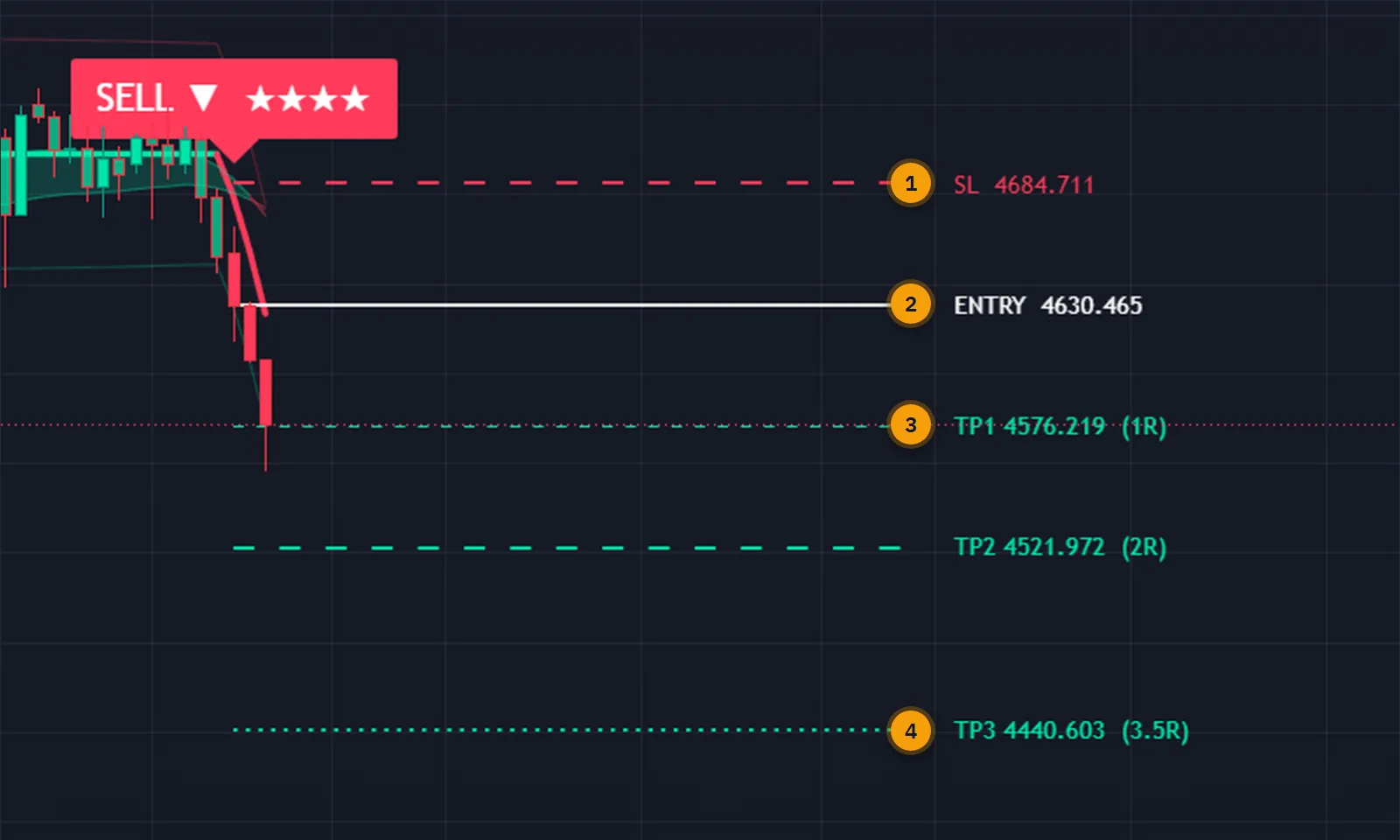
A live trade ends in one of three ways: price reaches the third target, price reaches the stop, or the regime flips against it. In the last case the trade closes at market and the new signal becomes the active trade.
The first two targets do not close anything. They are marked on the dashboard and can send an alert, so you can scale out by hand if that is how you trade, but the chart keeps one clean trade from start to finish.
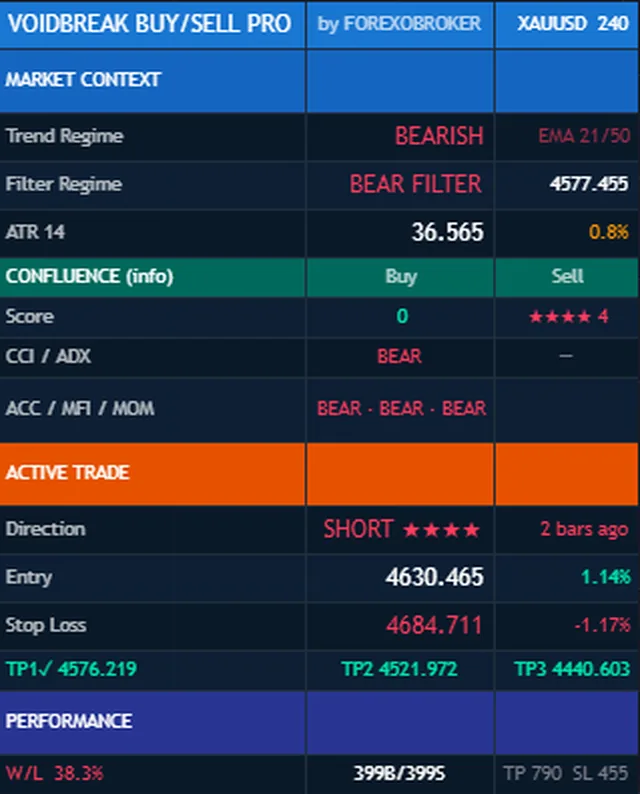
The top of the panel says which regime the filter is in and where price sits against the line. Below it, the five context layers are listed one by one with the combined star total.
Then the open trade: direction, entry, stop and the three targets with a mark on each one reached. The last block is the tool's own running tally of its signals and outcomes on this chart, which is a record of the past and not a forecast.
The smooth range is built from each symbol's own movement, so the void is wide on a volatile coin and narrow on a quiet currency pair without you touching anything.
It runs on every timeframe from one minute to monthly. One and four hours suit swing entries, and the daily chart gives fewer, slower flips. On low timeframes the sensitivity and sampling inputs control how readily the regime changes.
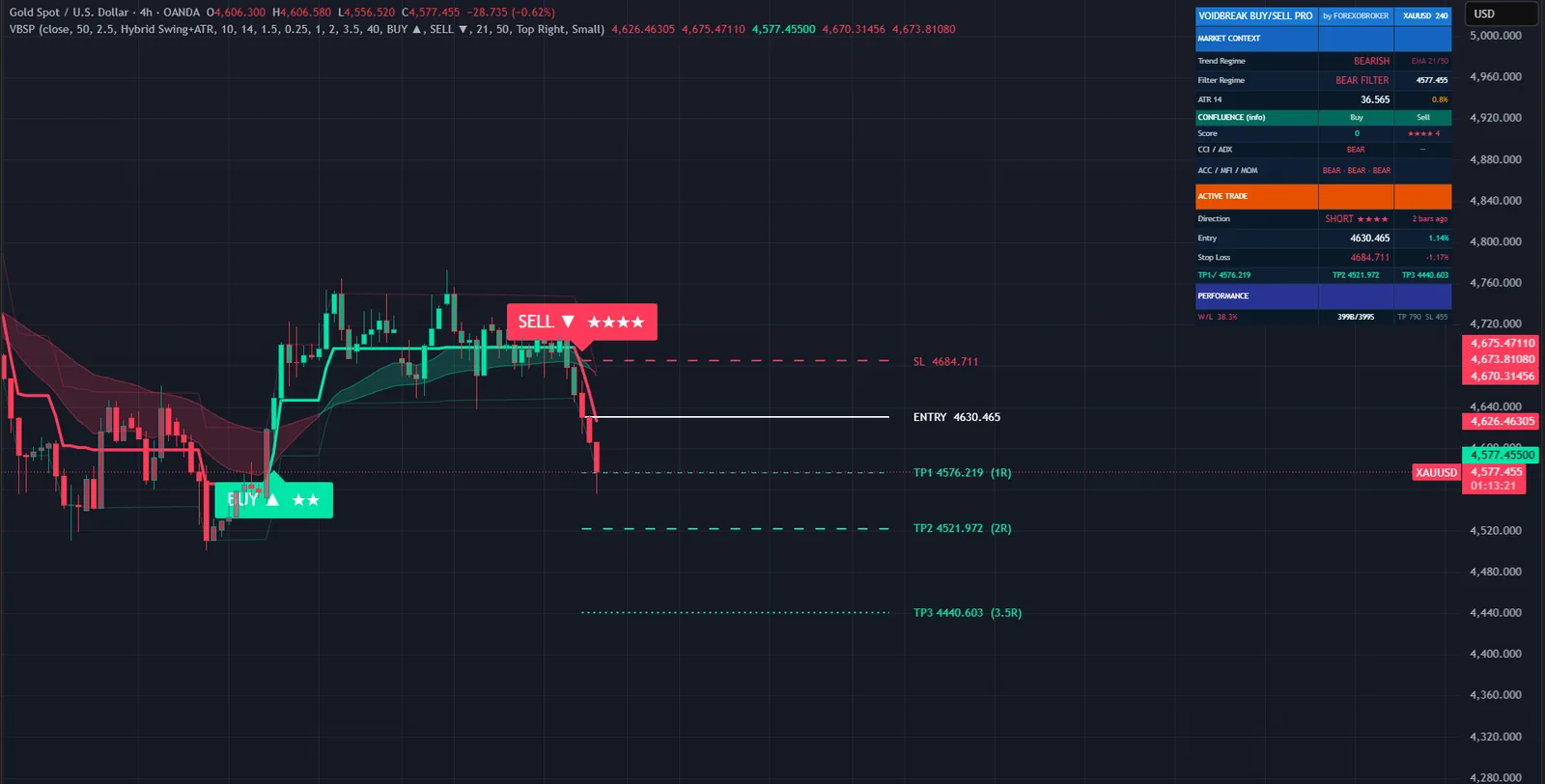


Because a signal can only happen at a regime flip, the alerts are quiet by design. You hear about the entry, each milestone, and how the trade ended.
Each event can be sent as plain text or as JSON with structured fields, for a Telegram or Discord bot or an automation service.
Three steps, all on confirmed bars.
Take the size of each bar-to-bar move of the chosen source, ignoring direction.
Average that with an EMA over the sampling period, average the result again over a longer window, and scale it by the sensitivity input.
Hold a filter line that moves only when price is further from it than the smooth range. Inside that distance the line does not move at all.
Price above the line is one regime, below is the other. The bar that confirms the change prints the signal.
| Typical buy/sell indicator | Voidbreak Buy Sell Pro | |
|---|---|---|
| Signal logic | Separate long and short rules | One rule for both directions |
| In a range | Repeated signals | None: price is inside the void |
| Per regime | As many as the conditions fire | Exactly one |
| Volatility | Fixed thresholds | Band built from the symbol's own range |
| Exits | Not defined | TP3, the stop, or an opposite flip |
| Alerts | Entry only | 8 events, webhook JSON |
No subscription and no renewal. Pay once and the indicator stays on your TradingView account, updates included.
Voidbreak Buy Sell ProTradingView indicator
$47one payment, lifetime access
Access is granted by hand from my TradingView account, normally within a few hours and always within 24 hours of your form arriving.
Because access to an invite-only script cannot be handed back, a sale is final once access has been granted. The script page on TradingView is public, so you can read the full description and see it on charts before you pay.
The full terms of sale and the privacy notice for buyers are one page each, in plain language.
Trading carries risk of loss. This is an analysis tool, not financial advice, and no indicator can promise a profit.
No. The range-filter engine runs on confirmed bars, and a signal is printed only on the bar that confirms a regime flip. Once printed it does not move or disappear.
No, and that is deliberate. The regime flip alone produces the signal. The five context layers are shown as stars so you can see how much of the background agreed at that moment, and you can choose to skip low-star signals yourself.
Any symbol, and every timeframe from one minute to monthly. One-hour and four-hour charts suit swing entries and the daily chart gives slower, higher-conviction flips. The money flow and accumulation layers need real volume.
No. Invite-only indicators work on the free plan. The free plan limits how many indicators you can have on one chart and how many alerts you can run, so a paid plan helps if you use many, but it is not required for this one.
I grant access by hand from my TradingView account. It is normally done within a few hours and always within 24 hours of your form arriving, including weekends.
No. It is one payment of 47 USD for lifetime access on one TradingView username, with future updates included.
Once access has been granted the sale is final, because access to an invite-only script cannot be returned. That is why the script page on TradingView is public: read it and look at the charts first. If you paid and access has not been granted yet, email me and I will refund you in full.
Yes. Email me from the address you bought with and I will move the access to your new username.
Yes. A MetaTrader 4 and 5 edition is on the MQL5 Market. It is a separate product sold by that store; this page is the TradingView edition.
No indicator can promise that, and this one does not. It gives you a clear, rule-based reading of the chart and a plan to work from. What you do with that, and how you size positions, decides the outcome.
Each one is invite-only, 47 USD once, and has its own page with charts and a full description.
A non-repainting trend and momentum indicator built on a dual Range Filter engine with partial-hit handling.
$47 one payment, lifetime access
A non-repainting reversal and continuation indicator built around the problem a bare RSI leaves unsolved.
$47 one payment, lifetime access
A non-repainting adaptive Ichimoku trading system.
$47 one payment, lifetime access
47 USD once. Lifetime access on your TradingView username, updates included, and access granted within 24 hours.


