Dual range filter
A fast filter, length 32, reacts within a few bars. A slow one, length 89, trails the structural trend. Each draws its own band above and below.
 Invite-only TradingView indicator
A fast range filter catches the momentum shift and a slow one holds the structural trend. When both agree, Wolf Blackout Trader scores the trigger against five checks, prints it only if it meets your minimum, and draws a stop with a ladder of five targets that keeps track of every rung price has reached.
$47one payment, lifetime access
Get lifetime access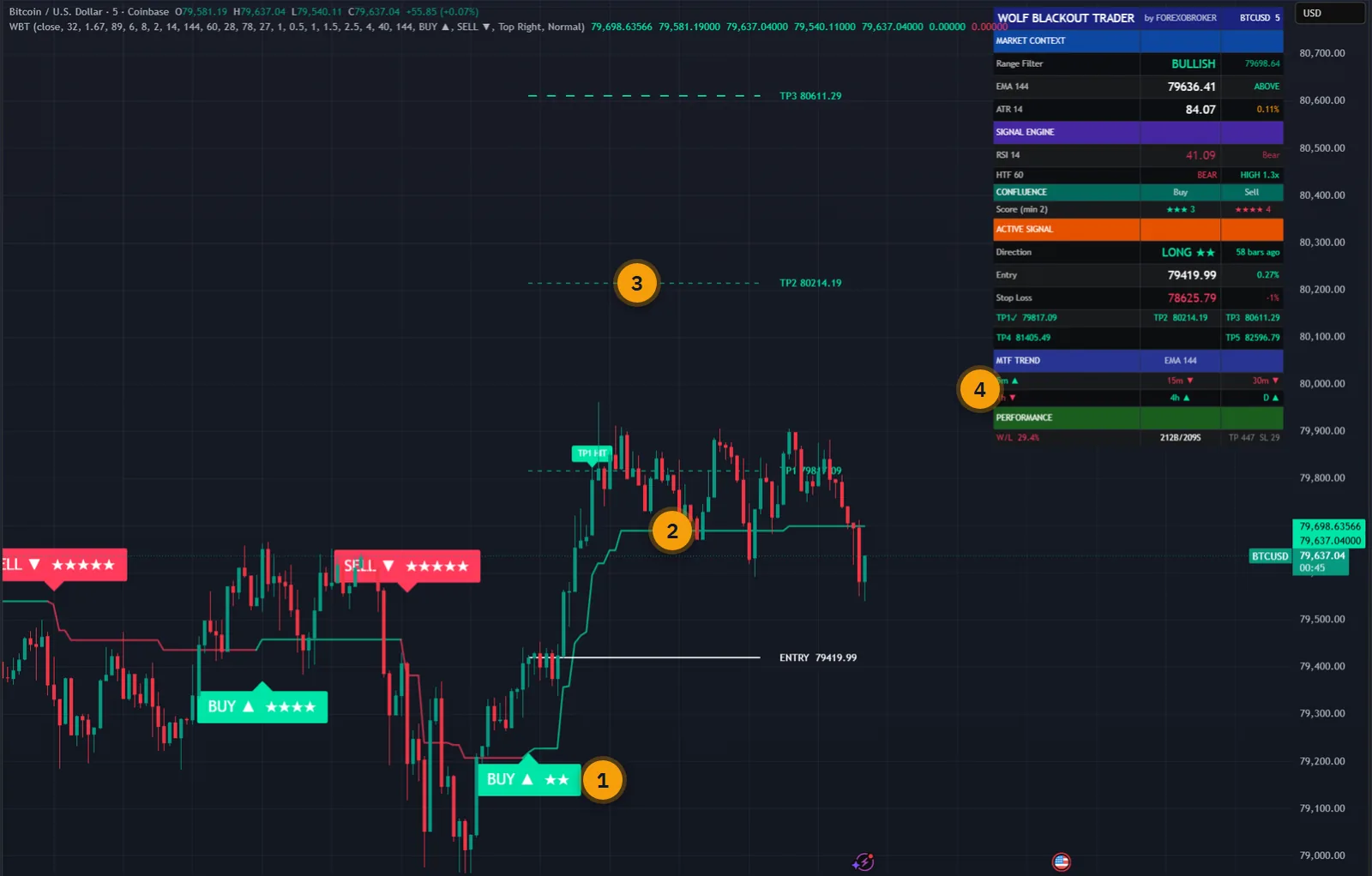
The published walkthrough: the indicator on real charts, what its inputs do, and which signals to take and which to skip.
Most trend indicators give you an entry and, at best, a single target. Price gets most of the way there, turns, and a good trade becomes a scratch because there was nowhere sensible to take anything off.
The other half of the problem is the trigger. A single moving filter either reacts quickly and whipsaws, or waits for confirmation and enters late.
Wolf Blackout Trader runs two range filters at once, so the fast one can trigger while the slow one decides whether the trend allows it. Then it lays out five targets, close to far, and remembers which ones price has touched.
The script page on TradingView is public. Read the full description there before you pay.
A trend engine, a reversal detector and a trade tracker, each with its own switches.
A fast filter, length 32, reacts within a few bars. A slow one, length 89, trails the structural trend. Each draws its own band above and below.
Price above both filters with the fast one rising is a bullish regime, and the reverse is bearish. Candles are tinted so the regime is visible at any zoom.
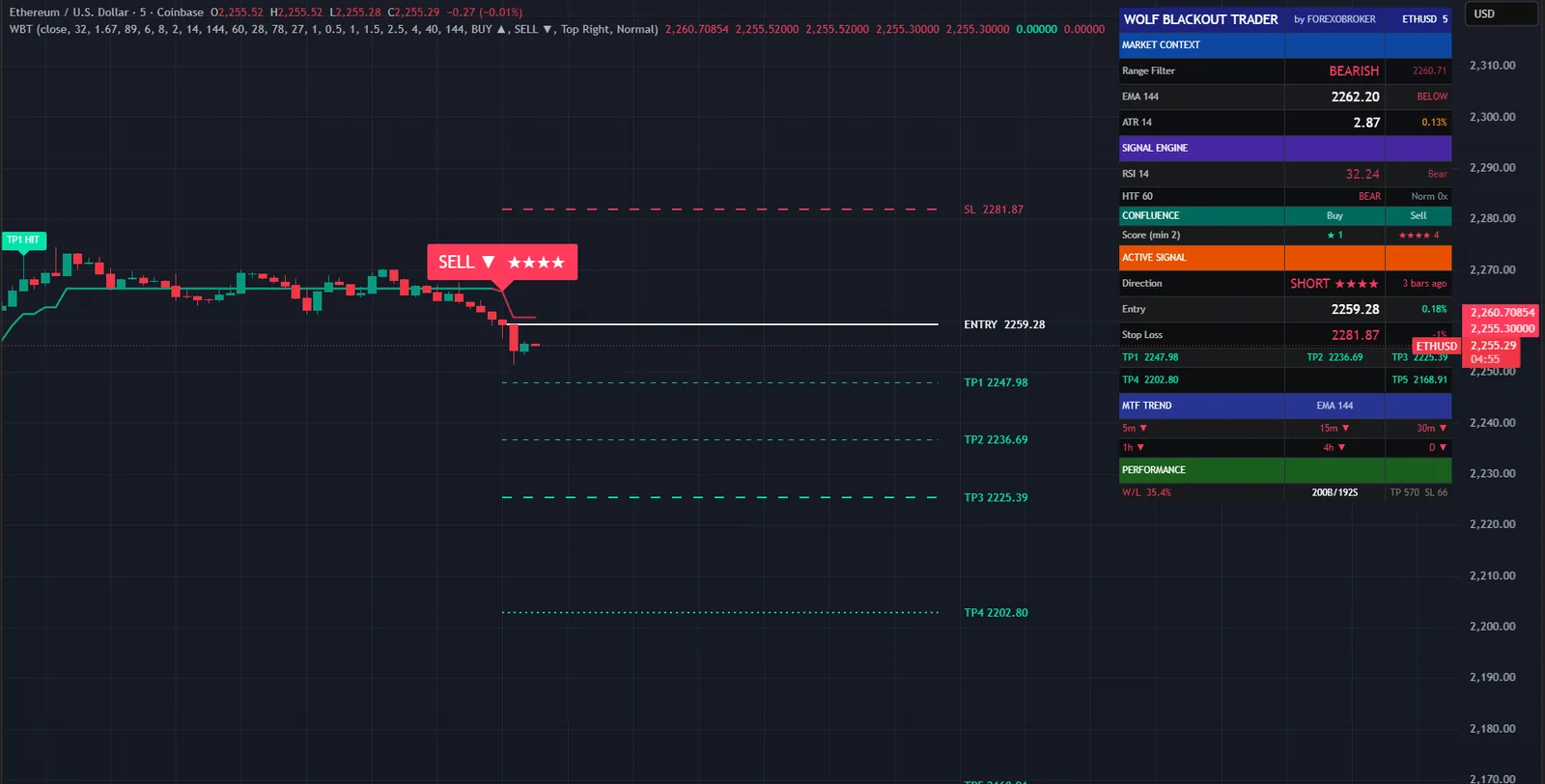
Range trend, RSI side of 50, the trend EMA, a higher-timeframe EMA and a volume burst. One star each, default minimum three.
A 28-period RSI flags exhausted moves above 78 and below 27, and marks the cross back out with a diamond. It has its own alerts and ignores the trend cooldown.
A stop at 1 percent of the entry by default. Like every level here it is a percentage, so it fits any price scale.
Targets at 0.5, 1, 1.5, 2.5 and 4 percent. A rung that has been reached stays ticked even if price pulls back. TP5 or the stop closes the trade.
Regime, price against both filters, six timeframes of trend, live buy and sell scores, the open trade with all five targets, and running counters.
Buy, sell, any, strong buy and strong sell, both reversals, all five targets and the stop. All on the bar close.
Signals are gated by bar confirmation, and the filter advances only from the previous bar's value and the current close, both fixed once the bar is closed.
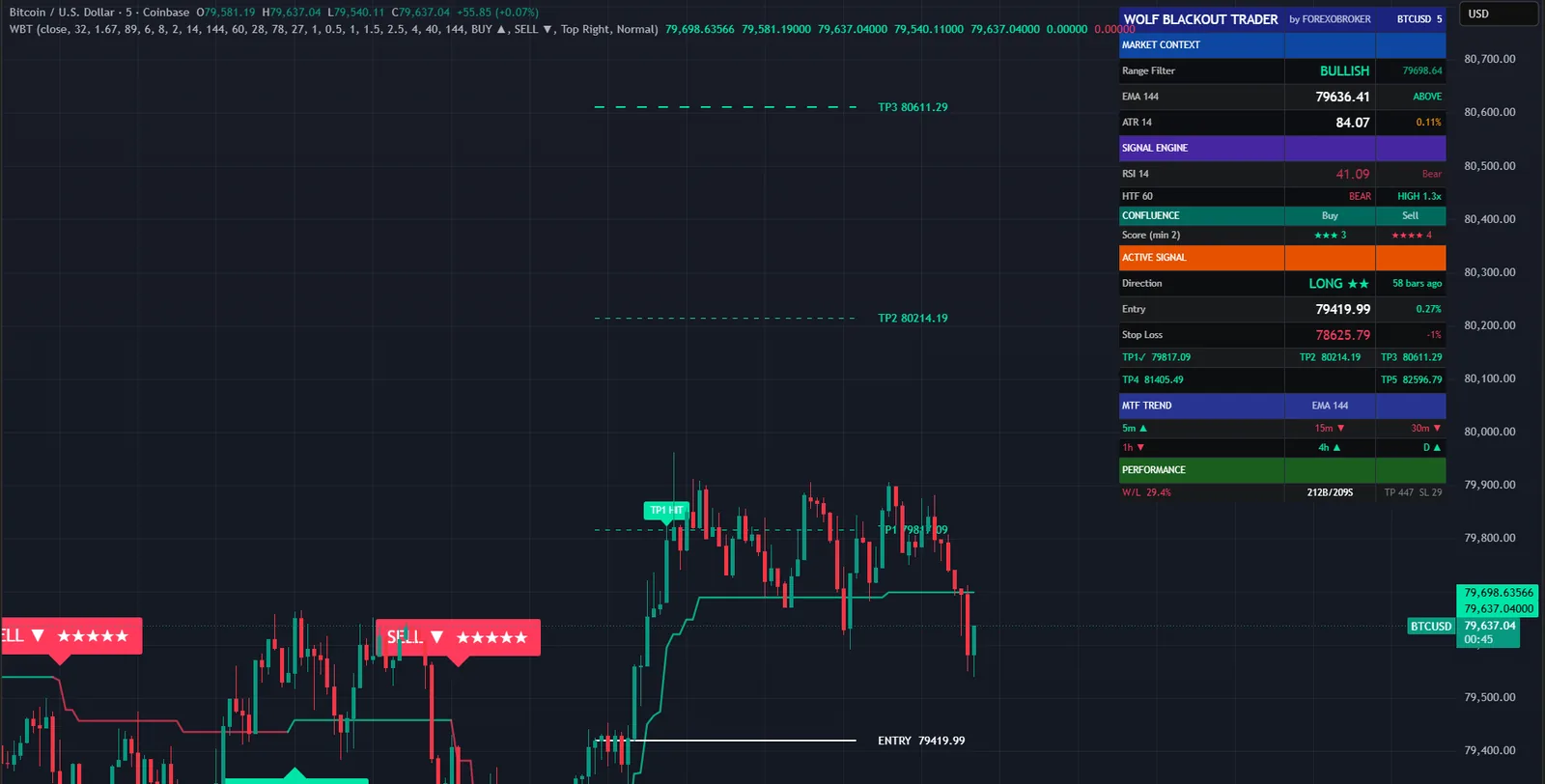
Every picture below is a TradingView capture with numbered notes added. Nothing on the charts is drawn by hand. Click any image to enlarge it.

The default ladder is weighted toward the front: half a percent, one, one and a half, then two and a half and four. The first rungs lock something in quickly and the last ones leave room for the move that keeps going.
Hits are remembered. A trade that reaches the third rung and then retraces still shows the first three as reached, on the chart and on the dashboard, so you always know what the trade has already given you.
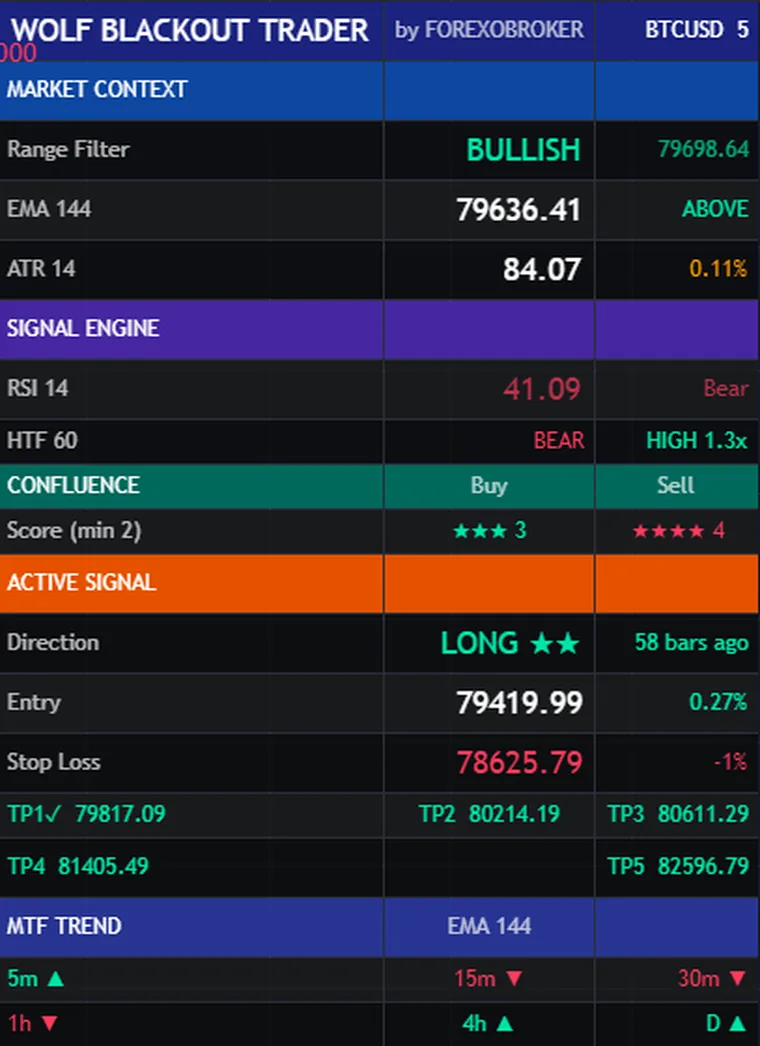
The confluence rows show the buy score and the sell score side by side, updating as the bar forms, against the minimum you set. You can see a setup building before it prints.
Underneath are the open trade with its five targets, and a trend table for 5 minutes, 15, 30, one hour, four hours and daily. A last block keeps running counts of signals, targets and stops on the chart you are looking at.
One and four hours suit swing entries and the daily chart gives the slowest, highest-conviction setups. It also works on 5 and 15 minutes for active trading, where a tighter ladder makes sense.
Stops and targets are percentages of price, so nothing needs retuning between instruments. The volume layer needs real volume.


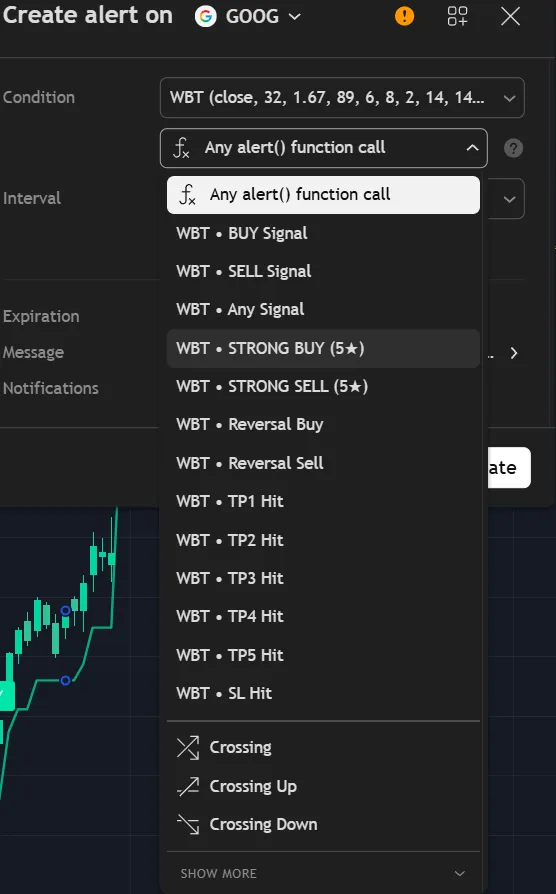
Thirteen conditions, all on the bar close. If you only want the best setups, alert on Strong BUY and Strong SELL, which need four or five stars.
Reversal alerts are separate from the trend signals and do not wait for the eight-bar cooldown. Nothing fires for old history when you first add the indicator.
Any layer can be switched off. A switched-off layer gives a free point, so the score is never pushed down by a check you chose not to use.
The fast range filter must slope in the trade direction, and RSI must be above 50 for a buy or below it for a sell.
Price above the trend EMA for a buy, below it for a sell.
The same test against a higher-timeframe trend EMA, so the entry is not fighting the larger move.
The bar's volume must meet or exceed its 20-bar average, so somebody is behind the move.
| Single trend filter | Wolf Blackout Trader | |
|---|---|---|
| Trigger and trend | One filter does both jobs | Fast filter triggers, slow filter gates |
| Signal quality | Every cross looks the same | One to five stars, minimum set by you |
| Targets | One, or none | Five rungs, reached ones remembered |
| Reversals | Not covered | A separate RSI reversal detector |
| Higher timeframes | Open more charts | Six timeframes in the dashboard |
| Alerts | Direction change | 13 conditions |
No subscription and no renewal. Pay once and the indicator stays on your TradingView account, updates included.
Wolf Blackout TraderTradingView indicator
$47one payment, lifetime access
Access is granted by hand from my TradingView account, normally within a few hours and always within 24 hours of your form arriving.
Because access to an invite-only script cannot be handed back, a sale is final once access has been granted. The script page on TradingView is public, so you can read the full description and see it on charts before you pay.
The full terms of sale and the privacy notice for buyers are one page each, in plain language.
Trading carries risk of loss. This is an analysis tool, not financial advice, and no indicator can promise a profit.
No. Every signal type is evaluated only on closed bars, and the range filter itself advances from the previous bar's value and the current close, both of which are fixed once the bar has closed. A strict Non-Repaint Mode evaluates triggers on the close of the prior bar, which is the safest setting for automation.
So that a trade which goes most of the way still pays something. The defaults are 0.5, 1, 1.5, 2.5 and 4 percent of the entry price. Hits are remembered, so you can see which rungs a trade reached even after it has pulled back. All five are inputs.
Any symbol and any timeframe. One and four hours suit swing and intraday position trading, daily gives higher-conviction setups, and 5 and 15 minutes work for active trading with a tighter ladder.
No. Invite-only indicators work on the free plan. The free plan limits how many indicators you can have on one chart and how many alerts you can run, so a paid plan helps if you use many, but it is not required for this one.
I grant access by hand from my TradingView account. It is normally done within a few hours and always within 24 hours of your form arriving, including weekends.
No. It is one payment of 47 USD for lifetime access on one TradingView username, with future updates included.
Once access has been granted the sale is final, because access to an invite-only script cannot be returned. That is why the script page on TradingView is public: read it and look at the charts first. If you paid and access has not been granted yet, email me and I will refund you in full.
Yes. Email me from the address you bought with and I will move the access to your new username.
Yes. A MetaTrader 4 and 5 edition is on the MQL5 Market. It is a separate product sold by that store; this page is the TradingView edition.
No indicator can promise that, and this one does not. It gives you a clear, rule-based reading of the chart and a plan to work from. What you do with that, and how you size positions, decides the outcome.
Each one is invite-only, 47 USD once, and has its own page with charts and a full description.
A non-repainting reversal and continuation indicator built around the problem a bare RSI leaves unsolved.
$47 one payment, lifetime access
A non-repainting adaptive Ichimoku trading system.
$47 one payment, lifetime access
A non-repainting momentum confluence indicator that scores every closed bar against three independent tests.
$47 one payment, lifetime access
47 USD once. Lifetime access on your TradingView username, updates included, and access granted within 24 hours.


