Close-against-open cross
One average of the close, one of the open. When they cross, intent has changed. It reacts faster than two close averages of different lengths, with less lag.
 Invite-only TradingView indicator
Most signal indicators print an arrow and leave you alone with the trade. Flintridge Trader Pro prints the entry, draws the stop and three targets in percent of price, maps the supply and demand zones around it, and then follows the trade: first target, second, third or the stop, each one marked as it happens.
$47one payment, lifetime access
Get lifetime access
The published walkthrough: the indicator on real charts, what its inputs do, and which signals to take and which to skip.
Finding an entry is not what most traders struggle with. It is everything after it: where the stop goes, where to take profit, whether the first target was already reached while you were away, and whether the level price is heading into is one that matters.
A plain signal indicator answers none of that. It marks a bar and moves on.
Flintridge Trader Pro treats a signal as the start of a trade, not the end of its job. The plan is drawn with the entry, the zones show where price is likely to react, and a state machine records how far the trade has got.
The script page on TradingView is public. Read the full description there before you pay.
A signal engine, a structure map and a trade tracker, working from the same closed bars.
One average of the close, one of the open. When they cross, intent has changed. It reacts faster than two close averages of different lengths, with less lag.
Three low-lag average types to choose from, ALMA by default, plus an optional Heikin Ashi source for noisy symbols and fast charts.
The cross is read from a bar that has already closed. Those values can never change, so neither can the signal.
Optional. The same cross is checked on a timeframe eight times higher, and an entry is accepted only if the two agree.
Seeded from confirmed swing highs and lows, sized by volatility, each with a Point Of Interest line through its middle.
When price closes decisively through a zone, the zone is converted to a break-of-structure marker: the level that held and then broke.
Stop at 0.5 percent, targets at 1, 1.5 and 2 percent of entry. Because it is percent, the same settings work on a coin and on a currency pair.
Flat, entry, TP1, TP2, TP3 or stop, strictly in order. The dashboard and the chart read the same state, so they never disagree.
Every entry, every target and every stop, long and short, plus catch-all entry and exit channels, with a webhook message for each.
Every picture below is a TradingView capture with numbered notes added. Nothing on the charts is drawn by hand. Click any image to enlarge it.
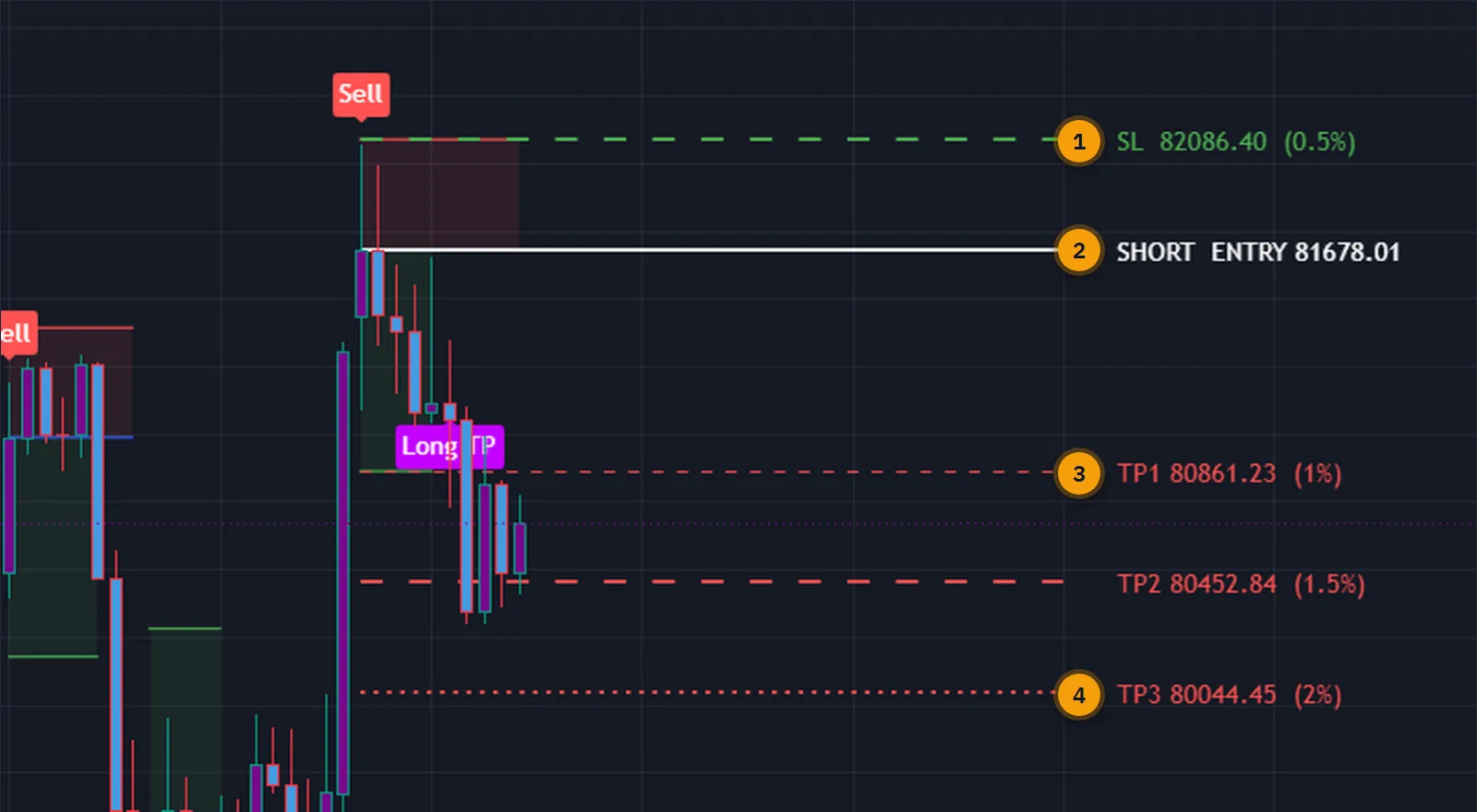
When a signal fires, five lines appear with their prices and percentages: the entry, the stop and three targets. The plan stays projected forty bars forward, so it does not slide off the left of the screen while the trade is open.
From then on the indicator checks every closed bar. Reaching a target marks it. Reaching the third target or the stop closes the trade, retires the lines and frees the engine for the next setup.
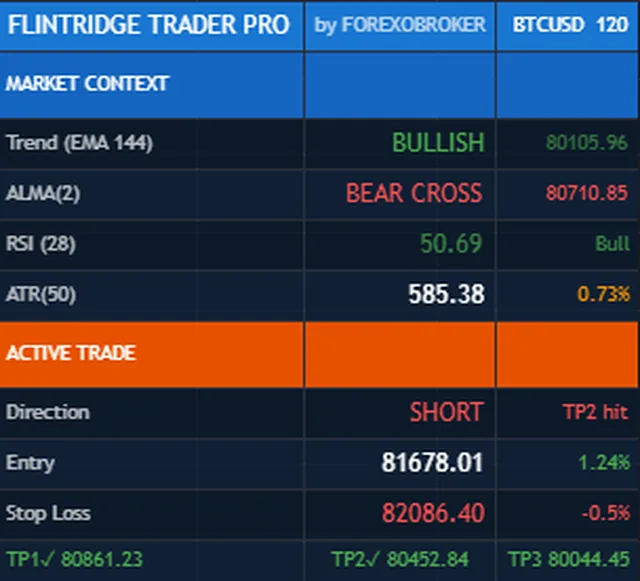
The top block is context: the long-term trend against the 144 EMA, the current state of the cross, a slow RSI and a 50-period ATR for the volatility regime.
The bottom block is the open trade: direction, entry, live profit or loss in percent, the stop, and the three targets with a mark on each one reached. It reads the same state machine as the lines on the chart.
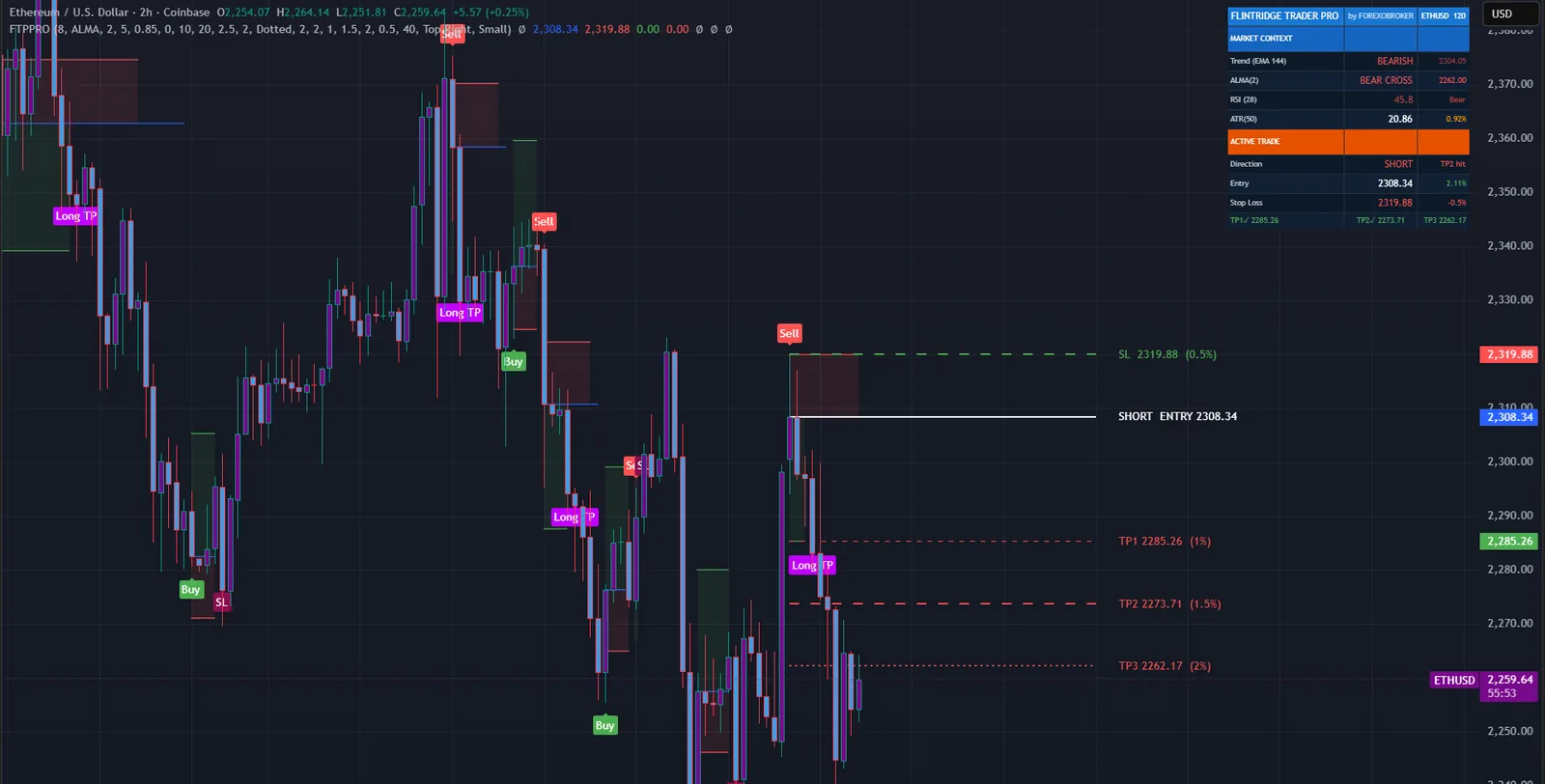
Because the stop and targets are percentages of the entry price, nothing has to be retuned between Bitcoin at eighty thousand and a currency pair at one point one.
Zones are sized by the volatility around the swing, so they stay in proportion on every symbol and timeframe.


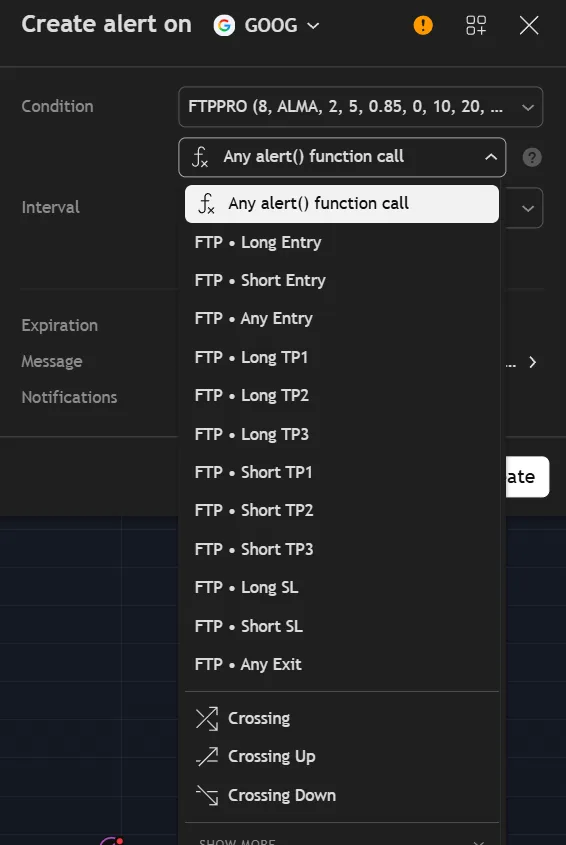
Thirteen alert events cover the whole life of a trade, each on the closed bar: the entry, each of the three targets and the stop, separately for longs and shorts.
Two catch-all channels, any entry and any exit, keep it to two alerts if that is all you want, and each event comes with a structured webhook message for automation.
Non-repainting is a mechanism here, not a label. This is the mechanism.
One of the bar closes, one of the bar opens, with the same short period. Their relationship shows whether bars are closing above or below where they opened, on balance.
The cross is evaluated using values from a bar that has already closed. Once a bar is closed its values are fixed for good.
Because the inputs cannot change, the decision for the current bar cannot change as new ticks arrive. The arrow you see is the arrow that stays.
With higher-timeframe confirmation on, the same cross on a timeframe eight times higher must agree, also from confirmed data.
| Plain signal indicator | Flintridge Trader Pro | |
|---|---|---|
| Repainting | Often, on the forming bar | No: read from a settled bar |
| Stop and targets | You work them out | Drawn with the entry, in percent |
| After the entry | Nothing | Tracked to TP1, TP2, TP3 or the stop |
| Structure | None | Supply and demand zones, break of structure |
| Trend filter | None | Optional higher-timeframe agreement |
| Alerts | Entry only | 13 events across the whole trade |
No subscription and no renewal. Pay once and the indicator stays on your TradingView account, updates included.
Flintridge Trader ProTradingView indicator
$47one payment, lifetime access
Access is granted by hand from my TradingView account, normally within a few hours and always within 24 hours of your form arriving.
Because access to an invite-only script cannot be handed back, a sale is final once access has been granted. The script page on TradingView is public, so you can read the full description and see it on charts before you pay.
The full terms of sale and the privacy notice for buyers are one page each, in plain language.
Trading carries risk of loss. This is an analysis tool, not financial advice, and no indicator can promise a profit.
No. The crossover is read from a bar that has already closed, whose values can no longer change, so the decision for the current bar is fixed. Zones and their Point Of Interest lines are evaluated on confirmed bars too, so a zone never appears, moves or changes type on the live bar.
A percentage of the entry price means the same configuration fits every instrument and price scale without retuning. The defaults are a 0.5 percent stop against targets of 1, 1.5 and 2 percent. All of them are inputs, so you can widen them for a volatile symbol.
Any symbol and any timeframe TradingView offers. On noisy symbols or very low timeframes the Heikin Ashi source mode smooths the crossover and reduces the number of small crosses.
No. Invite-only indicators work on the free plan. The free plan limits how many indicators you can have on one chart and how many alerts you can run, so a paid plan helps if you use many, but it is not required for this one.
I grant access by hand from my TradingView account. It is normally done within a few hours and always within 24 hours of your form arriving, including weekends.
No. It is one payment of 47 USD for lifetime access on one TradingView username, with future updates included.
Once access has been granted the sale is final, because access to an invite-only script cannot be returned. That is why the script page on TradingView is public: read it and look at the charts first. If you paid and access has not been granted yet, email me and I will refund you in full.
Yes. Email me from the address you bought with and I will move the access to your new username.
Yes. The same indicator is on the MQL5 Market for MetaTrader 4 and 5 and on the cTrader Store. Those are separate products sold by those stores; this page is the TradingView edition.
No indicator can promise that, and this one does not. It gives you a clear, rule-based reading of the chart and a plan to work from. What you do with that, and how you size positions, decides the outcome.
Each one is invite-only, 47 USD once, and has its own page with charts and a full description.
A non-repainting EMA crossover indicator that filters the false crosses a bare crossover leaves behind.
$47 one payment, lifetime access
A non-repainting regime indicator built on one rule: signal only while the market is in the regime it was designed for.
$47 one payment, lifetime access
A non-repainting trend and momentum indicator built on a dual Range Filter engine with partial-hit handling.
$47 one payment, lifetime access
47 USD once. Lifetime access on your TradingView username, updates included, and access granted within 24 hours.


