Fibonacci gate signals
The indicator scans a configurable analysis window for its Fibonacci retracement levels. A close beyond the upper or lower threshold fires the signal.
 Invite-only TradingView indicator
Flux Gate Precision measures the Fibonacci retracement levels of a moving analysis window and treats the outer two as a gate. A close above the upper threshold is a BUY, a close below the lower one is a SELL. Each signal arrives with a stop and up to four targets scaled by ATR, and a dashboard that tracks the trade to its outcome.
$47one payment, lifetime access
Get lifetime access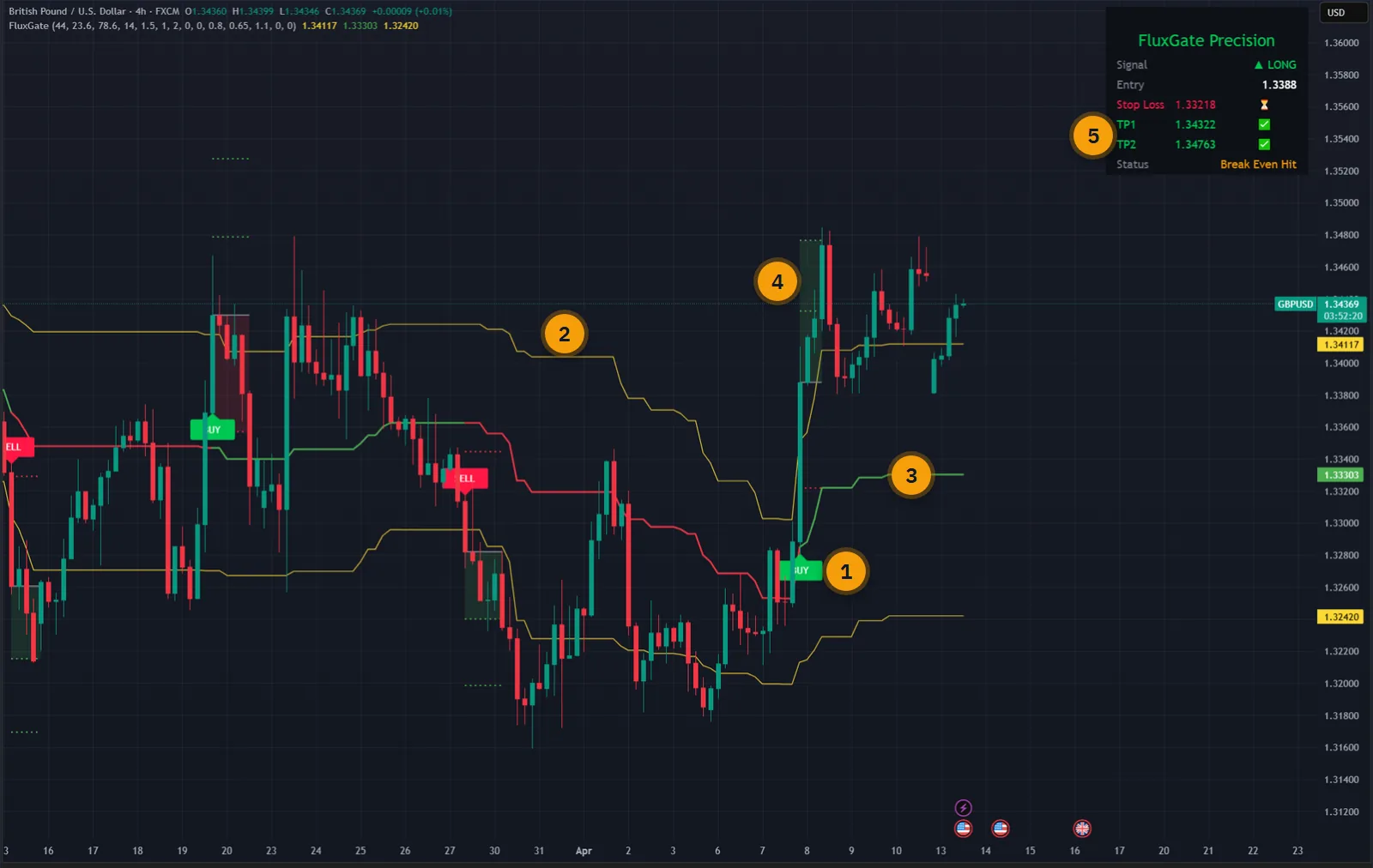
The published walkthrough: the indicator on real charts, what its inputs do, and which signals to take and which to skip.
Plenty of indicators will tell you that price has broken out. Very few tell you where the trade is wrong, where to take profit, and what to do with the stop once the first target is in.
Working that out by hand means a different calculation on every market and every timeframe, because a sensible stop on a one-minute chart is nothing like one on a daily chart.
Flux Gate Precision sets every level in ATR, so the plan scales by itself, and it keeps the record on screen: which targets were reached, whether break-even was triggered, and how the trade ended.
The script page on TradingView is public. Read the full description there before you pay.
A few inputs, no clutter, and a complete plan for every signal.
The indicator scans a configurable analysis window for its Fibonacci retracement levels. A close beyond the upper or lower threshold fires the signal.
All decisions are made on confirmed, closed bars. What you see on a historical chart is what appeared in real time.
The stop and the targets scale with current volatility. Change from one minute to monthly and the levels adjust in proportion, with no retuning.
Set one to four take-profit levels, each with its own ATR multiplier. A multiplier of zero switches that level off.
When TP1 is reached the stop moves to entry, when TP2 is reached it moves to TP1, and so on up the ladder.
Prefer fixed distances? Switch ATR mode off and set the stop and targets as percentages of price instead.
Signal direction, entry, stop, every target with a reached or waiting mark, and the status of the trade.
Level lines, signal labels and the dashboard can each be hidden, so the chart shows as much or as little as you want.
BUY, SELL, TP1, TP2, TP3, TP4, stop loss and break-even triggered. Use them as notifications or send them on to an execution platform.
Every picture below is a TradingView capture with numbered notes added. Nothing on the charts is drawn by hand. Click any image to enlarge it.
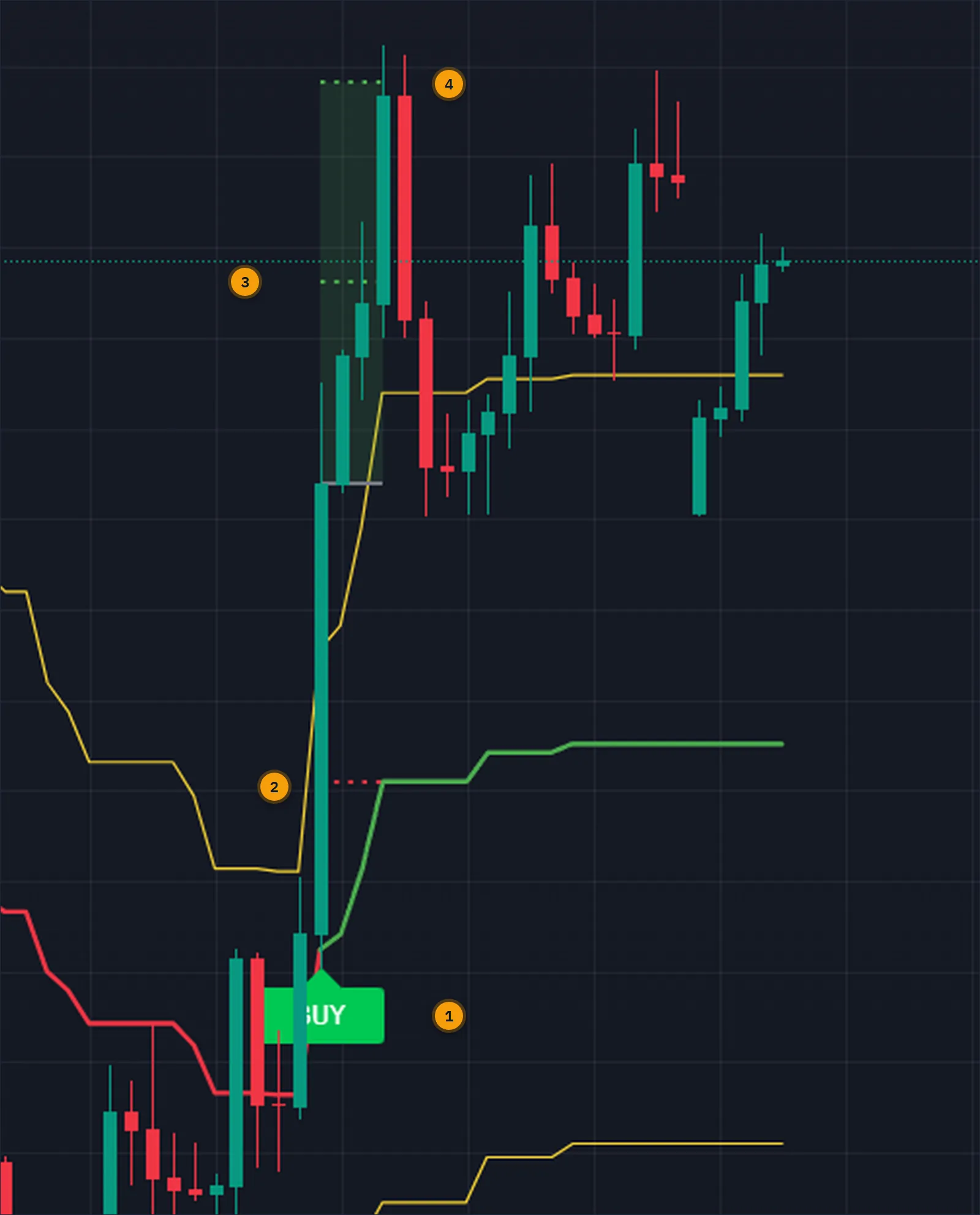
When the BUY prints, the entry is the close of that bar. The stop sits 1.5 ATR away by default, TP1 at one ATR and TP2 at two. The zone between entry and the last target is shaded so you can see at a glance how far the trade has travelled.
With break-even on, reaching TP1 moves the stop to entry. From that point the planned risk on the trade is zero, and each further target moves the stop up one more step.
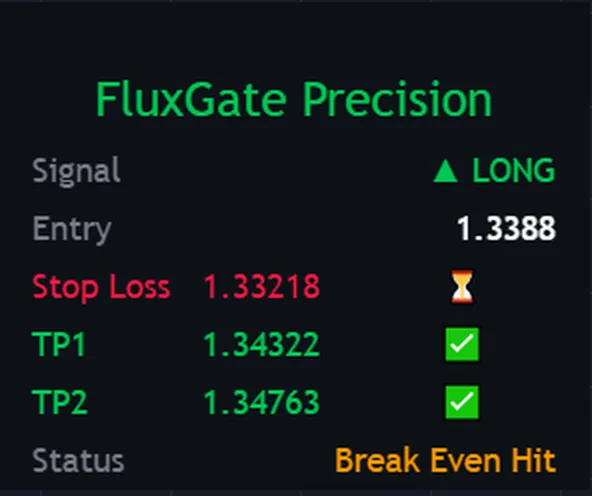
The panel is deliberately short. It shows the direction of the current signal, the entry price, the stop, and each active target with a mark that changes from waiting to reached.
The status line gives the outcome so far, for example that break-even has been triggered. You do not have to scroll back through the chart to know where a trade stands.
Forex, crypto, stocks, indices and commodities. Because the levels are measured in ATR, they are visually and mathematically proportionate whatever the instrument or the chart resolution.
The signal has three inputs, the analysis window and the two Fibonacci sensitivities, so there is very little to tune.


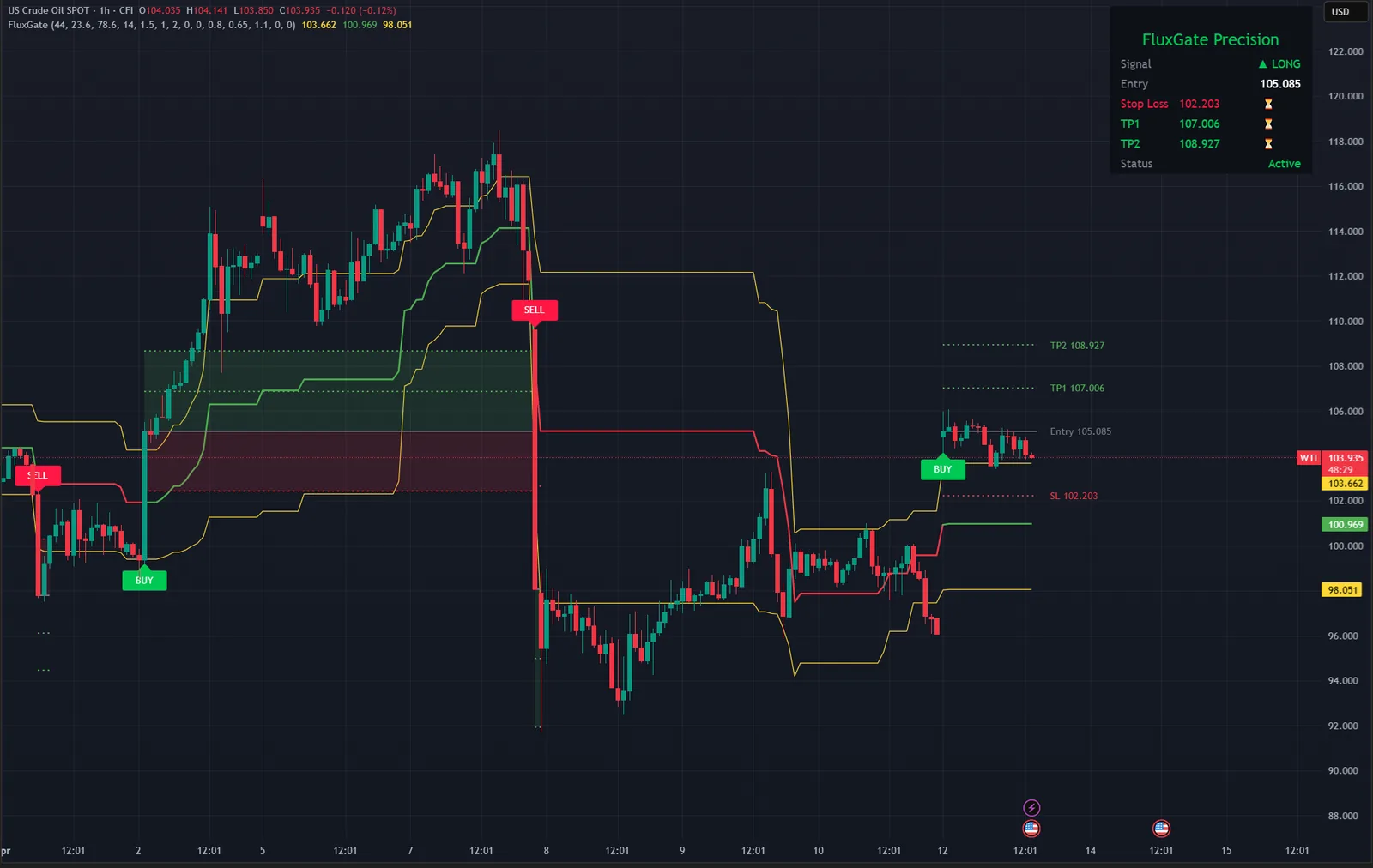
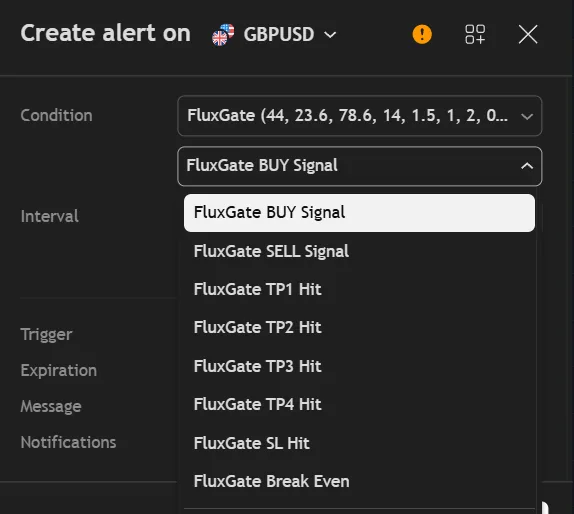
An alert for each signal direction, one for each of the four targets, one for the stop and one for break-even being triggered. Together they tell the full story of a trade without you watching the chart.
They are ordinary TradingView alerts, so they can go to your phone, your email or a webhook.
Four steps, decided on closed bars only.
Take the high and low of the analysis window and compute the Fibonacci retracement levels between them.
The upper and lower sensitivity levels form the gate. While price stays between them, nothing fires.
A bar that closes above the upper threshold is a BUY. A bar that closes below the lower one is a SELL.
Stop and targets are placed from ATR, each level is marked when reached, and break-even steps the stop forward.
| Drawing Fibonacci by hand | Flux Gate Precision | |
|---|---|---|
| Levels | Redrawn as the range moves | Recalculated on every bar |
| Signal | Your judgement | A confirmed close through the gate |
| Stop and targets | Worked out per chart | ATR-scaled, one to four targets |
| Break-even | Remember to do it | Steps forward with each target |
| Trade record | In your head | Dashboard with a mark per level |
| Alerts | Price alerts, set by hand | 8 conditions |
No subscription and no renewal. Pay once and the indicator stays on your TradingView account, updates included.
Flux Gate PrecisionTradingView indicator
$47one payment, lifetime access
Access is granted by hand from my TradingView account, normally within a few hours and always within 24 hours of your form arriving.
Because access to an invite-only script cannot be handed back, a sale is final once access has been granted. The script page on TradingView is public, so you can read the full description and see it on charts before you pay.
The full terms of sale and the privacy notice for buyers are one page each, in plain language.
Trading carries risk of loss. This is an analysis tool, not financial advice, and no indicator can promise a profit.
No. Every decision is made on a confirmed, closed bar, and a signal that has printed does not disappear. What you see on historical bars is what was shown in real time.
When it is enabled, reaching TP1 moves the stop to the entry price. Reaching TP2 moves it to TP1, and so on for as many targets as you have set. An alert fires when break-even is triggered.
Any market and any timeframe from one minute to monthly. The stop and targets are measured in ATR, so they stay proportionate to the instrument and the chart resolution without manual tuning.
No. Invite-only indicators work on the free plan. The free plan limits how many indicators you can have on one chart and how many alerts you can run, so a paid plan helps if you use many, but it is not required for this one.
I grant access by hand from my TradingView account. It is normally done within a few hours and always within 24 hours of your form arriving, including weekends.
No. It is one payment of 47 USD for lifetime access on one TradingView username, with future updates included.
Once access has been granted the sale is final, because access to an invite-only script cannot be returned. That is why the script page on TradingView is public: read it and look at the charts first. If you paid and access has not been granted yet, email me and I will refund you in full.
Yes. Email me from the address you bought with and I will move the access to your new username.
Yes. A MetaTrader 4 and 5 edition is on the MQL5 Market and a cTrader edition is in the cTrader Store. They are separate products sold by those stores; this page is the TradingView edition.
No indicator can promise that, and this one does not. It gives you a clear, rule-based reading of the chart and a plan to work from. What you do with that, and how you size positions, decides the outcome.
Each one is invite-only, 47 USD once, and has its own page with charts and a full description.
A self-adaptive Supertrend whose band width is modulated on every bar by a continuous Trend Quality Index.
$47 one payment, lifetime access
A non-repainting adaptive trend-following indicator, with every trend flip graded and the stop and targets fixed at the signal.
$47 one payment, lifetime access
Order blocks, fair value gaps, market structure shifts, equal highs and lows and liquidity sweeps, scored into buy and sell signals.
$47 one payment, lifetime access
47 USD once. Lifetime access on your TradingView username, updates included, and access granted within 24 hours.


