Five-factor score
MACD momentum, the EMA 150 and 250 cloud, ADX above 20, volume above its 20-bar average and the slope of a 55-period Hull average. One star for each that agrees.
 Invite-only TradingView indicator
Every SuperTrend flip looks the same on the chart, and most of them are not worth a trade. Hyper Trend PRO checks each one against five independent conditions, prints the score as stars on the label, and draws the stop and three targets on the bar where the signal closed.
$47one payment, lifetime access
Get lifetime access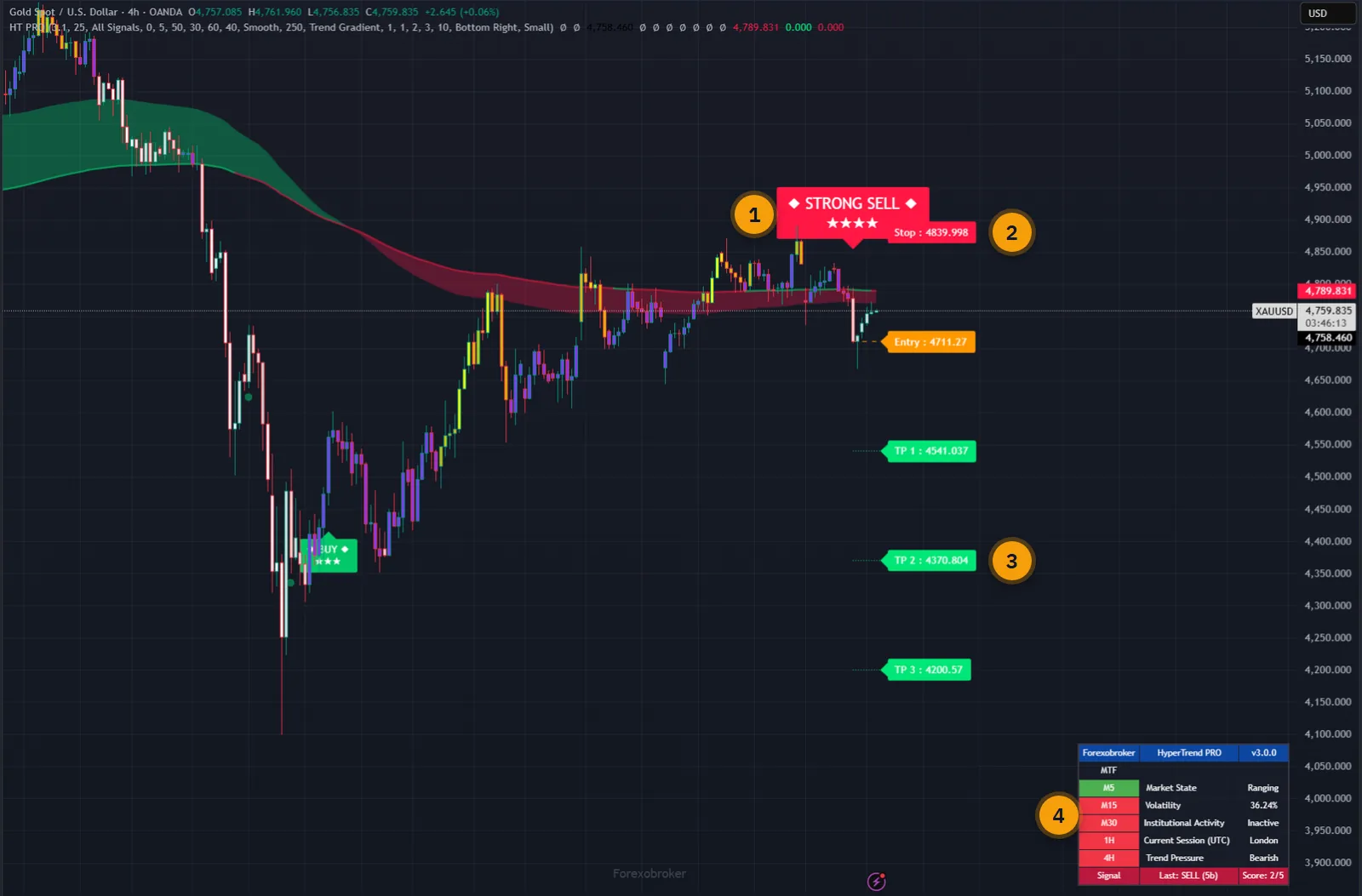
The published walkthrough: the indicator on real charts, what its inputs do, and which signals to take and which to skip.
SuperTrend does one thing: it tells you when price has closed on the other side of an ATR band. It says nothing about whether momentum is behind the move, whether the market is trending at all, or whether anybody is trading it.
So you get the same arrow in a clean breakout and in the fourth fake-out of a dead afternoon, and you are left to tell them apart by eye, after the fact.
Hyper Trend PRO puts that judgement on the chart before you act. Five separate checks run on every flip, the result is printed on the label, and you set the minimum score you are willing to look at.
The script page on TradingView is public. Read the full description there before you pay.
All of it switchable, so you can run it as a full system or as a clean signal line.
MACD momentum, the EMA 150 and 250 cloud, ADX above 20, volume above its 20-bar average and the slope of a 55-period Hull average. One star for each that agrees.
All Signals shows every flip with its score. Quality+ needs three stars, Strong+ needs four. Trend Scalper swaps to a Heikin-Ashi EMA ribbon for fast charts.
Stop at 2.2 times ATR or a percentage you set, targets at 1R, 2R and 3R, all editable, all drawn with their prices from the signal bar forward.
Optional. It ratchets in the direction of the trade using the same ATR multiple and never moves against you.
Smooth for swing charts, Scalping and Scalping+ for fast ones, Swing for position trading. Green when the trend is up, red when it is down.
Trend gradient from MACD, signal based, or an RSI gradient that warms and cools with consecutive closes. Low-momentum bars can be greyed out.
WaveTrend pullbacks inside a trend, and a smoothed-RSI contrarian engine for turns. Both are separate from the main signals and both wait for the bar to close.
M5, M15, M30, 1H and 4H trend against the 200 EMA, market state, volatility, the active session and the last signal with its score.
Signals are evaluated only on a confirmed bar. Once a label is printed it stays on that bar, and higher-timeframe data uses confirmed values only.
Every picture below is a TradingView capture with numbered notes added. Nothing on the charts is drawn by hand. Click any image to enlarge it.
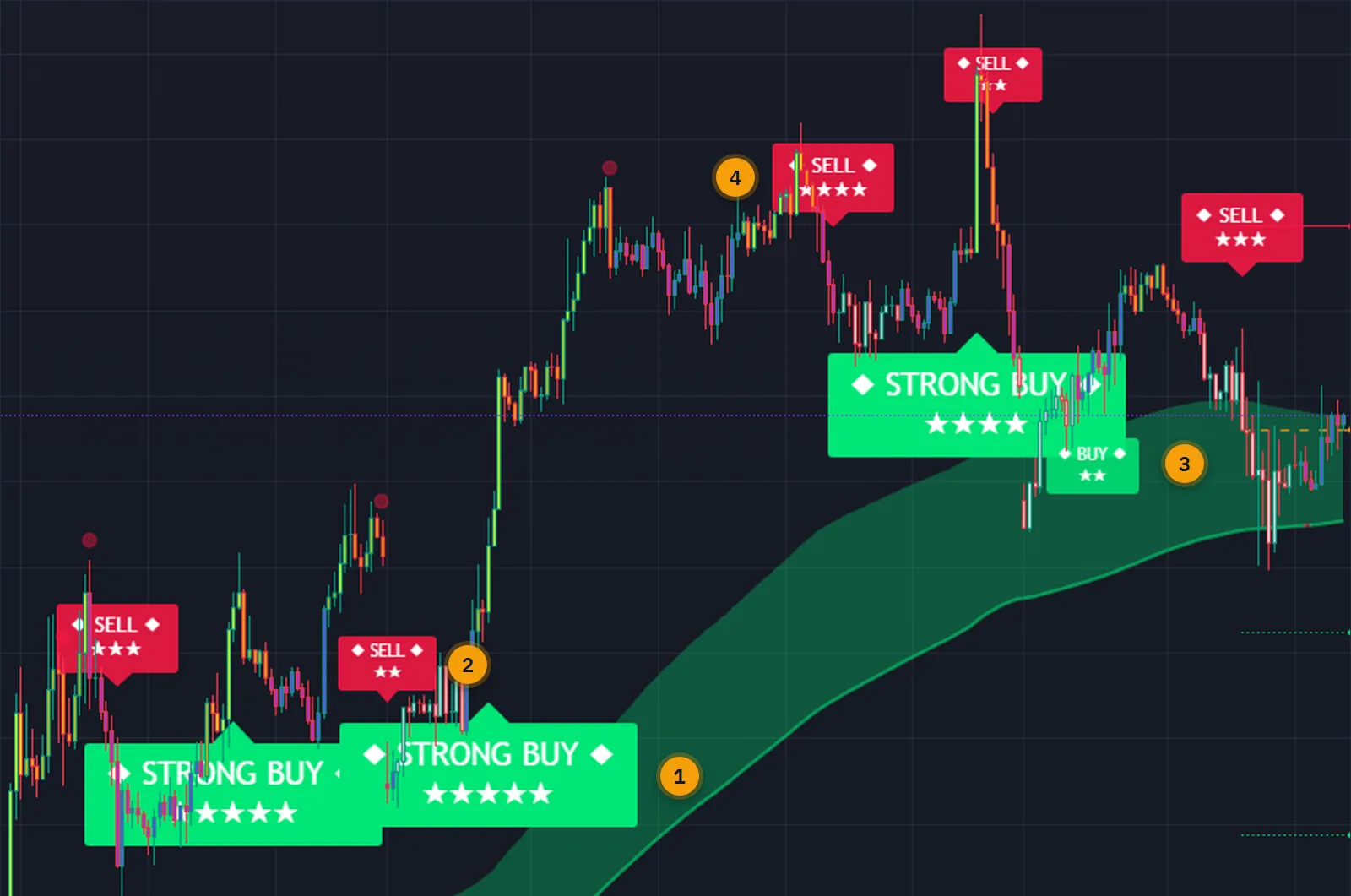
On this EURUSD chart the same engine printed a five-star STRONG BUY, a four-star one, and several two and three-star signals in between. You can see the difference without reading anything: strong signals are large, weak ones are small.
A score of four or more with price beyond the 200 EMA is labelled STRONG. The score counts how many of the five checks agreed. It is not a probability of profit, and a five-star signal can still lose.

When a signal closes, the entry, the stop and three targets are drawn with their prices. You can size the position from the stop distance straight away.
The indicator then tracks the trade: when the stop or any target is reached, the matching alert fires. Switch the trailing stop on and the fixed stop line is replaced by one that follows the trade.
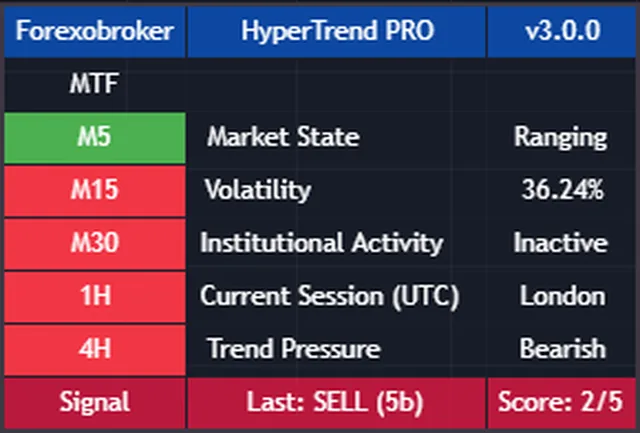
One small table answers the questions you would otherwise flip timeframes for: which way the higher timeframes lean, whether the market is trending or ranging, how volatile it is, and which session is open.
The bottom row shows the last signal, how many bars ago it printed and its score.
Forex, gold, crypto, indices, stocks and oil, on any timeframe. Two inputs, Sensitivity and the Signal Tuner, set how tightly the bands follow price, so the same tool works on a one-minute chart and on a daily one.
The volume check needs real volume, so on symbols without it that one star simply does not score. The other four still do.


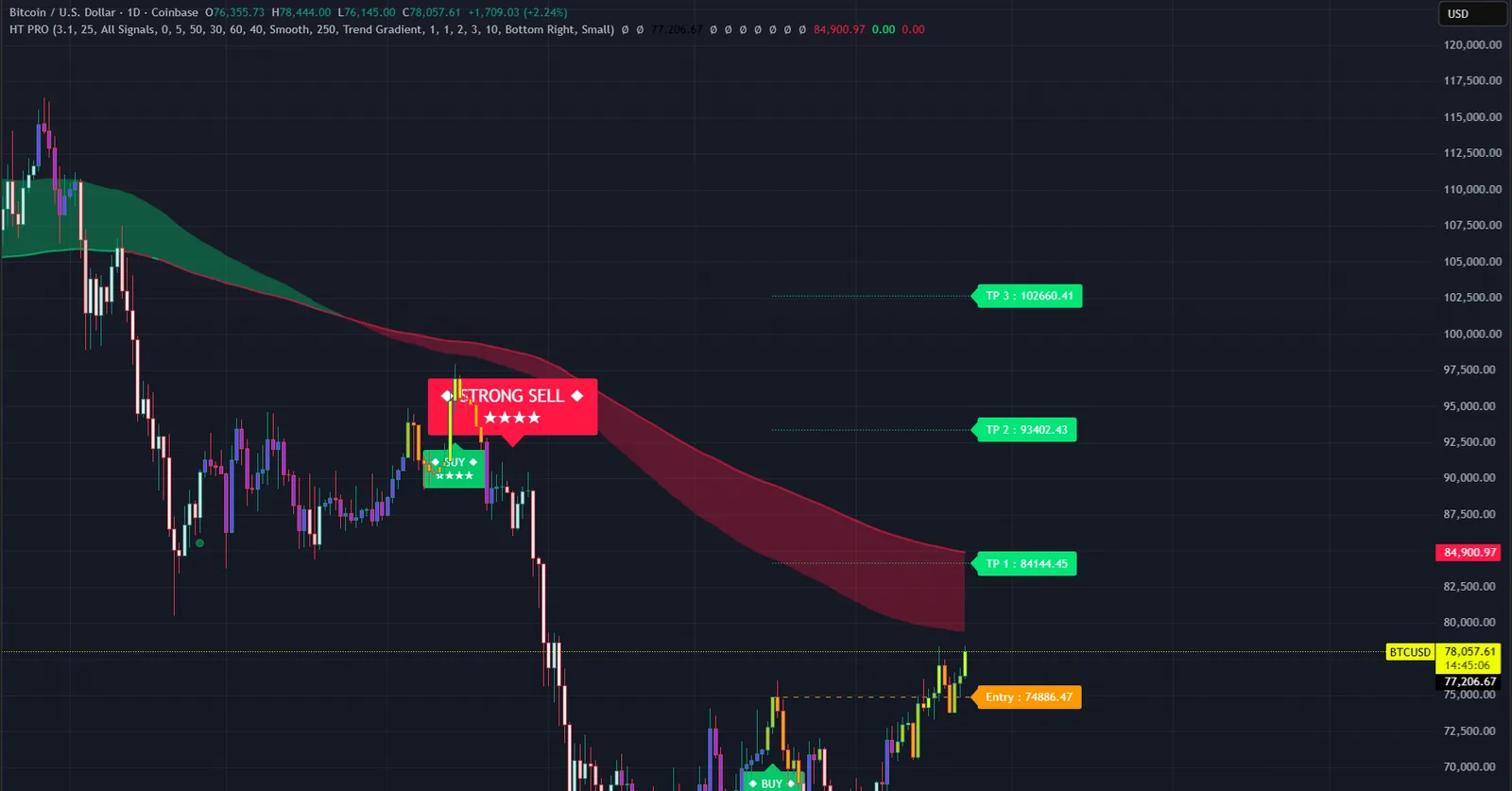
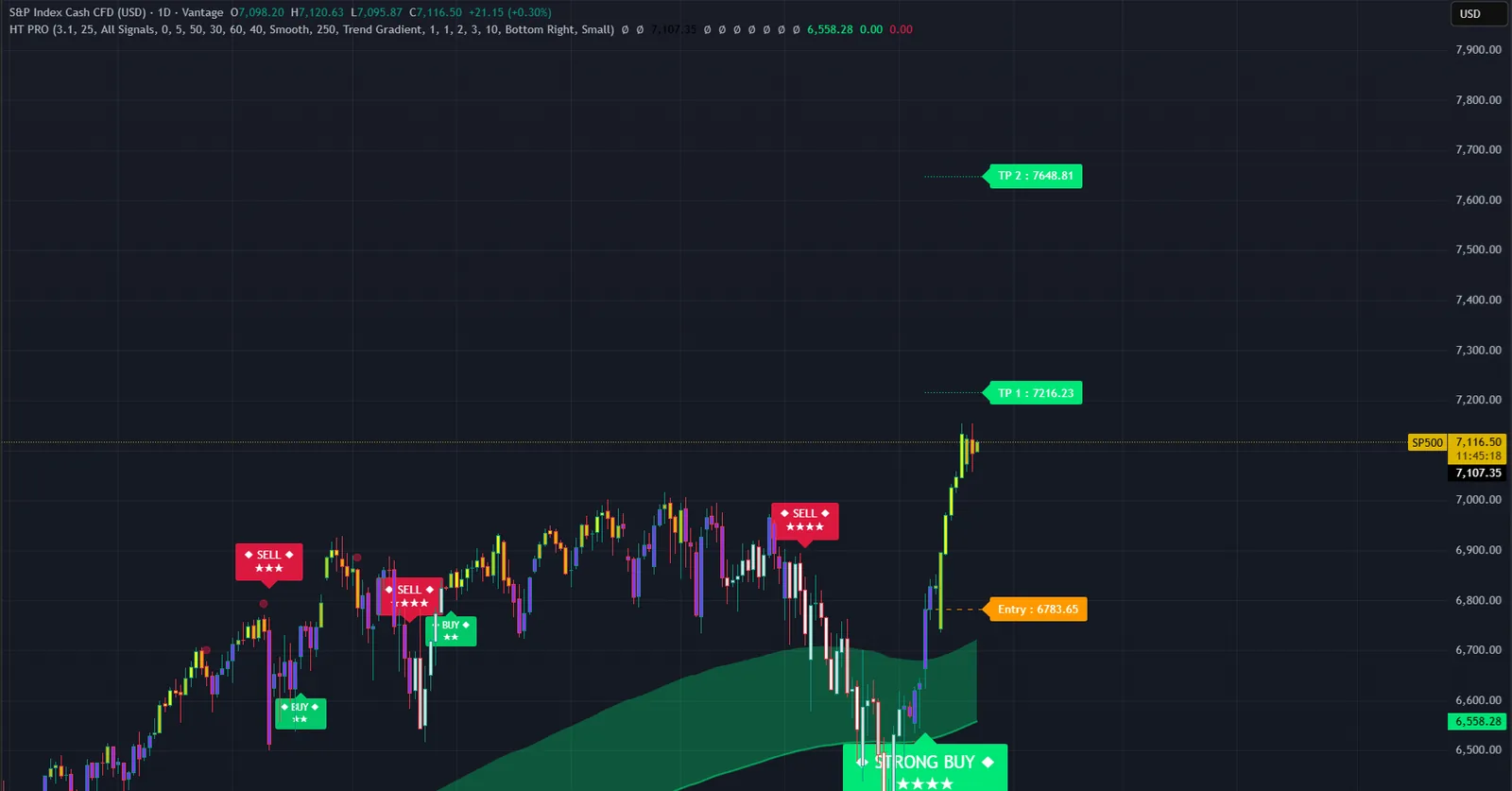


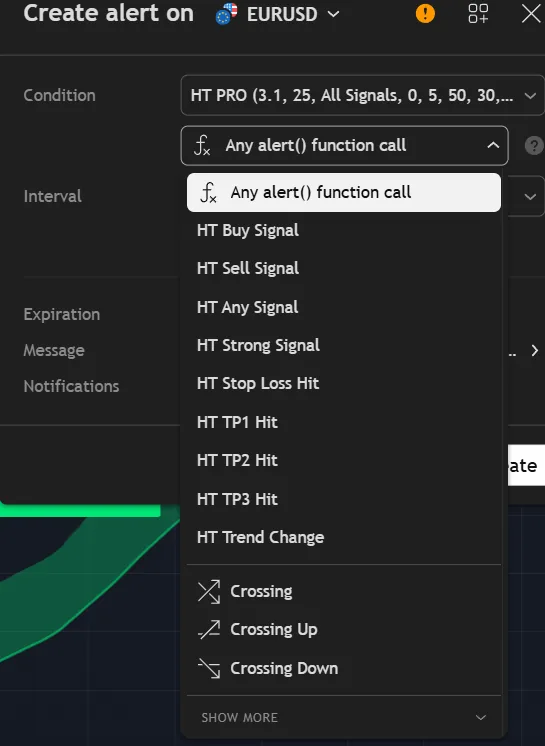
Set an alert once and TradingView tells you when something happens, by pop-up, app push, email or webhook. Every condition fires once per bar, at the close.
Switch on the webhook format and buy and sell alerts send structured JSON with the action, ticker, timeframe, price, stop, three targets and the score, which is what a bot needs.
Each one is a plain, well-known measurement. The value is in requiring them to agree before you look.
For a buy, the histogram must be positive and rising. For a sell, negative and falling. Short-term momentum has to point the same way as the signal.
EMA 150 above EMA 250 for a buy, below for a sell. The medium-term structure has to support the trade.
ADX above 20 says the market is trending rather than drifting. Volume above its 20-bar average says somebody is actually trading the move.
A 55-period Hull moving average must be rising for a buy and falling for a sell. It turns faster than a plain average without the noise.
| Plain SuperTrend | Hyper Trend PRO | |
|---|---|---|
| Signal quality | Every flip looks the same | Graded 1 to 5 stars, sized by strength |
| Filtering | None | Presets plus five extra filters |
| Stop and targets | You work them out | Drawn with the signal, in R |
| Trailing stop | No | Optional, ATR or percentage |
| Trend context | One line | Four cloud styles and three candle colourings |
| Higher timeframes | Open another chart | Five timeframes in the dashboard |
| Alerts | Direction change | Nine conditions, with webhook JSON |
No subscription and no renewal. Pay once and the indicator stays on your TradingView account, updates included.
Hyper Trend PROTradingView indicator
$47one payment, lifetime access
Access is granted by hand from my TradingView account, normally within a few hours and always within 24 hours of your form arriving.
Because access to an invite-only script cannot be handed back, a sale is final once access has been granted. The script page on TradingView is public, so you can read the full description and see it on charts before you pay.
The full terms of sale and the privacy notice for buyers are one page each, in plain language.
Trading carries risk of loss. This is an analysis tool, not financial advice, and no indicator can promise a profit.
No. Signals are evaluated only once a bar is confirmed, so nothing is printed on a bar that is still forming. Once a label is on the chart it stays on that bar. The higher-timeframe readings in the dashboard use confirmed values only.
One star for each of five checks that agreed with the signal: MACD momentum, the EMA cloud, ADX above 20, volume above its average and the slope of a Hull moving average. It is a count of agreement, not a probability of profit.
Any symbol TradingView offers and any timeframe. On symbols with no real volume the volume check cannot score, so the maximum there is four stars.
No. Invite-only indicators work on the free plan. The free plan limits how many indicators you can have on one chart and how many alerts you can run, so a paid plan helps if you use many, but it is not required for this one.
I grant access by hand from my TradingView account. It is normally done within a few hours and always within 24 hours of your form arriving, including weekends.
No. It is one payment of 47 USD for lifetime access on one TradingView username, with future updates included.
Once access has been granted the sale is final, because access to an invite-only script cannot be returned. That is why the script page on TradingView is public: read it and look at the charts first. If you paid and access has not been granted yet, email me and I will refund you in full.
Yes. Email me from the address you bought with and I will move the access to your new username.
Yes. The same indicator is on the MQL5 Market for MetaTrader 4 and 5 and on the cTrader Store. Those are separate products sold by those stores; this page is the TradingView edition.
No indicator can promise that, and this one does not. It gives you a clear, rule-based reading of the chart and a plan to work from. What you do with that, and how you size positions, decides the outcome.
Each one is invite-only, 47 USD once, and has its own page with charts and a full description.
Order blocks, fair value gaps, market structure shifts, equal highs and lows and liquidity sweeps, scored into buy and sell signals.
$47 one payment, lifetime access
Pivot highs and lows joined by sloped trendlines, with buy and sell signals on a confirmed break at bar close.
$47 one payment, lifetime access
A non-repainting signal and trade-management indicator: supply and demand zones with break of structure, a higher-timeframe cross, a stop and three targets.
$47 one payment, lifetime access
47 USD once. Lifetime access on your TradingView username, updates included, and access granted within 24 hours.


