Range filter core
An adaptive ATR-scaled filter tracks trend direction. A break of the filter band is the raw trend-change signal that everything else then examines.
 Invite-only TradingView indicator
A trend-change signal on its own tells you very little. FXB Confluence Engine takes a range filter signal and checks it against up to ten independent layers: EMA alignment, five timeframes, four other sensitivities, the higher-timeframe bias, RSI, volume, VWAP, the candle itself and three anti-chop gates. The result is one score, and a dashboard that shows where every point came from.
$47one payment, lifetime access
Get lifetime access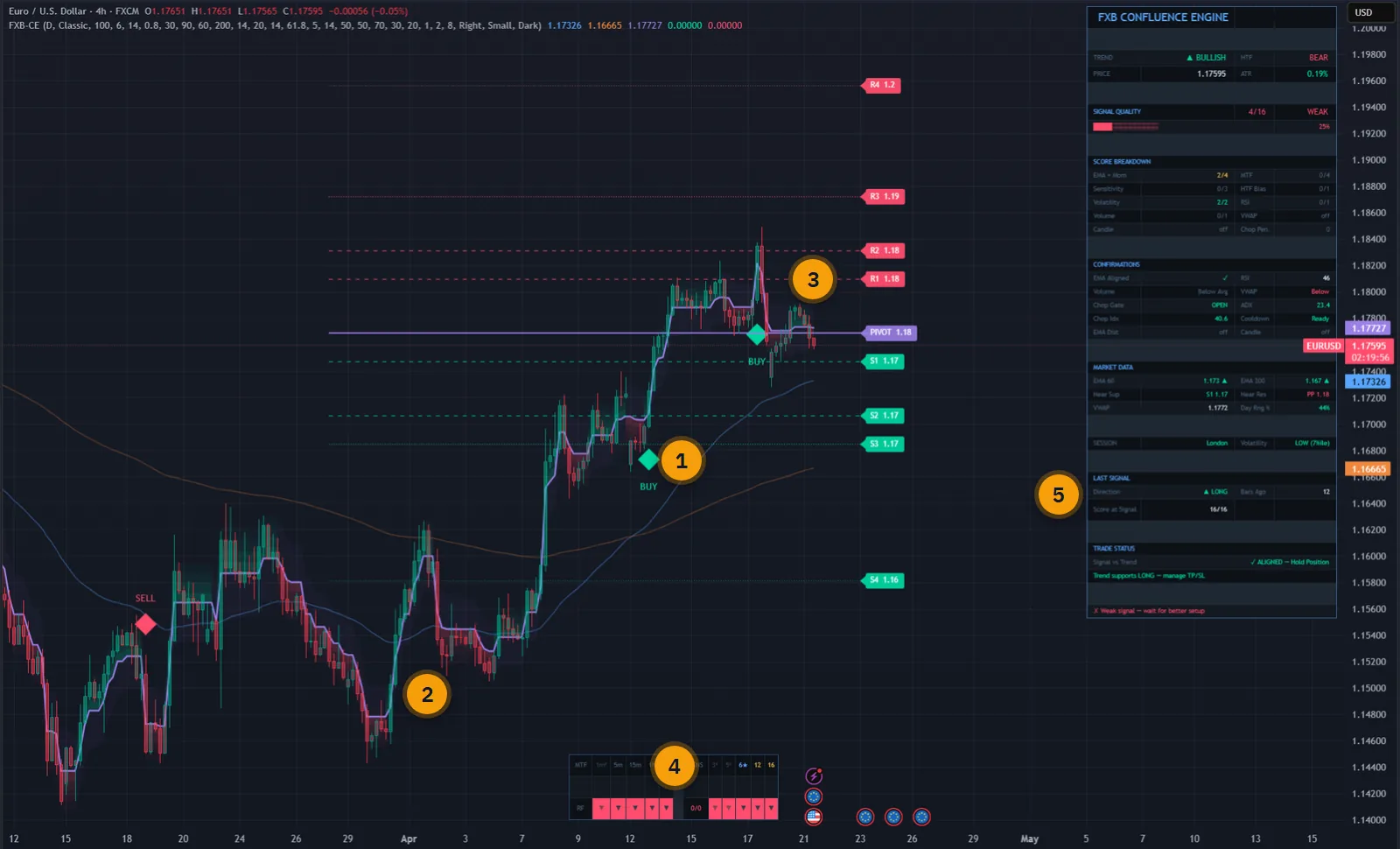
The published walkthrough: the indicator on real charts, what its inputs do, and which signals to take and which to skip.
Most signal indicators fire on a single condition and leave the rest to you: is the higher timeframe with it, is there volume, is the market even trending, would the signal still exist at a slightly different setting?
Checking all of that by hand on every signal is slow, and under pressure it gets skipped. FXB Confluence Engine does it on every closed bar and writes the answer down as a score out of the points available.
Signals below your minimum strength are held back and marked on the chart as filtered, so you can always see what the engine refused and why.
The script page on TradingView is public. Read the full description there before you pay.
Core layers are always counted. Optional ones add a point each when you switch them on.
An adaptive ATR-scaled filter tracks trend direction. A break of the filter band is the raw trend-change signal that everything else then examines.
Fast and slow EMA, 60 and 200 by default. Cross direction, price against the fast EMA and the EMA slope must all line up when the gate is on.
The same range filter runs on 1 minute, 5 minutes, 15 minutes, 1 hour and 4 hours. Each timeframe that agrees adds to the score.
The signal is tested at four other sensitivities, so a trend change that exists at only one parameter setting scores lower.
ADX above 20, a Choppiness Index below 61.8 and a five-bar cooldown between signals. Each can be switched off or retuned.
RSI above 50 for longs and below for shorts, and volume above its 20-period average. VWAP, candle pattern and EMA distance are optional extras.
HIGH at 80 percent and above, MED from 57 to 79, LOW from 43 to 56, WEAK below that. A minimum strength setting hides the rest.
Classic, Fibonacci or Camarilla pivots with S1 to S4 and R1 to R4. Resistance turns green when broken and support turns red.
Signals, strong signals, EMA-confirmed signals, trend changes, chop gate, higher-timeframe bias, RSI, volume spike, score thresholds and trade invalidated.
Every picture below is a TradingView capture with numbered notes added. Nothing on the charts is drawn by hand. Click any image to enlarge it.
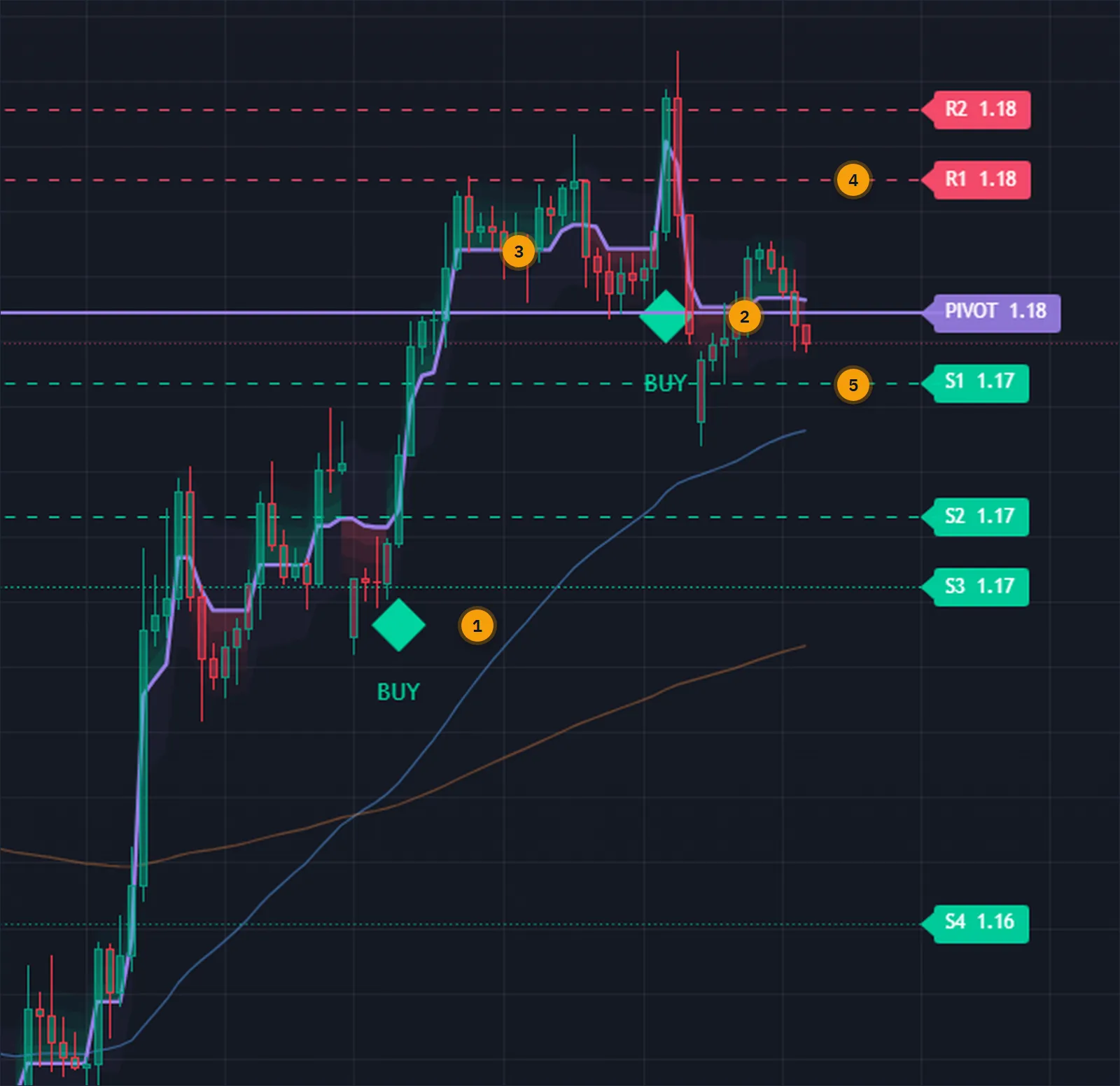
The range filter proposes a trend change. The engine then asks whether the EMAs agree, how many timeframes and sensitivities point the same way, whether the market is trending at all, and whether enough bars have passed since the last signal. Only then is a BUY or SELL printed, on the closed bar.
Pivot levels sit on the same chart, so a signal straight into resistance looks like what it is. A level changes colour when price breaks it.
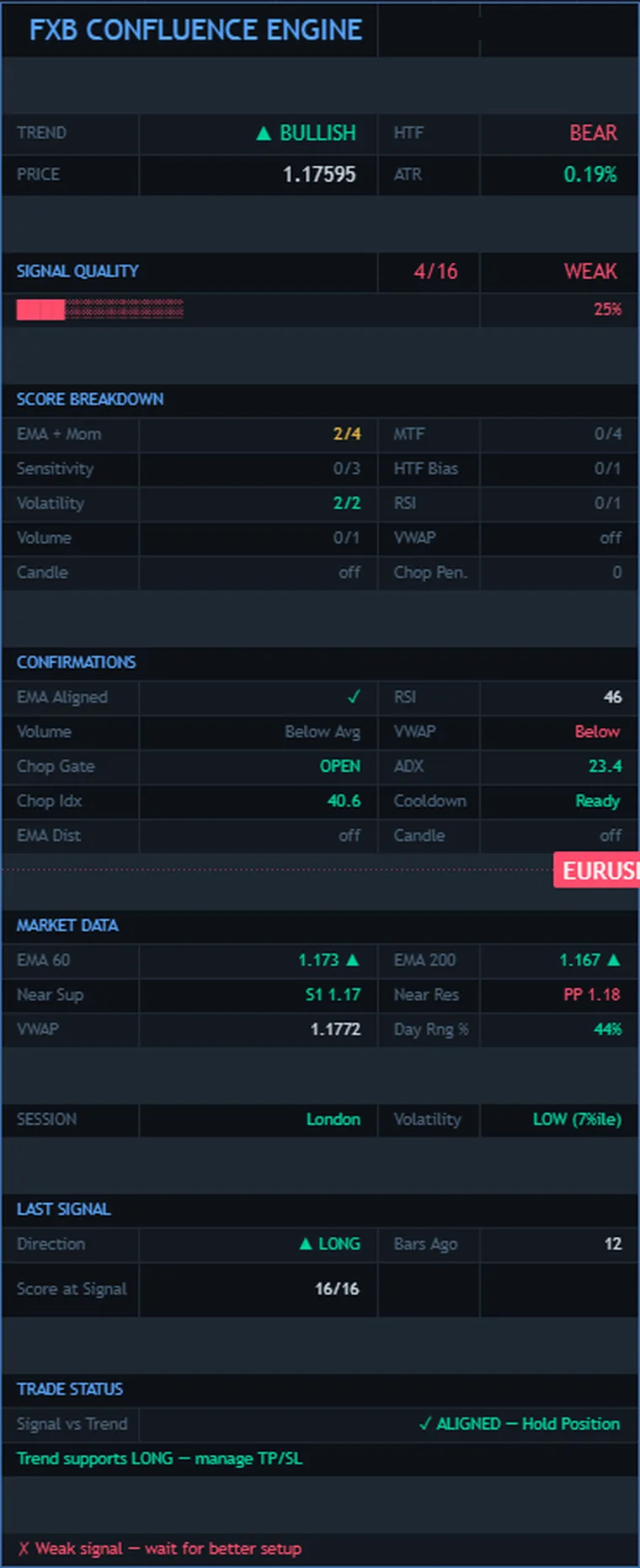
The score breakdown lists each component with its points: EMA and momentum, timeframes, sensitivity, volatility, higher-timeframe bias, RSI, volume, VWAP, candle, and any chop penalty. Under it, the confirmations block shows every gate as passed or failed, with the live ADX, Choppiness Index and RSI values.
The lower half is about the trade you may already be in. Last signal gives the direction, how many bars ago and its score at the time. Trade status compares that signal with the current trend and says plainly whether it is still aligned or has been reversed.
The filter and its thresholds are scaled by ATR, so the engine carries from a currency pair to an index or a coin without being rebuilt.
It has been used from one minute to daily. With the default settings the 5-minute, 15-minute, one-hour and four-hour charts work best. VWAP confirmation applies to intraday charts only.


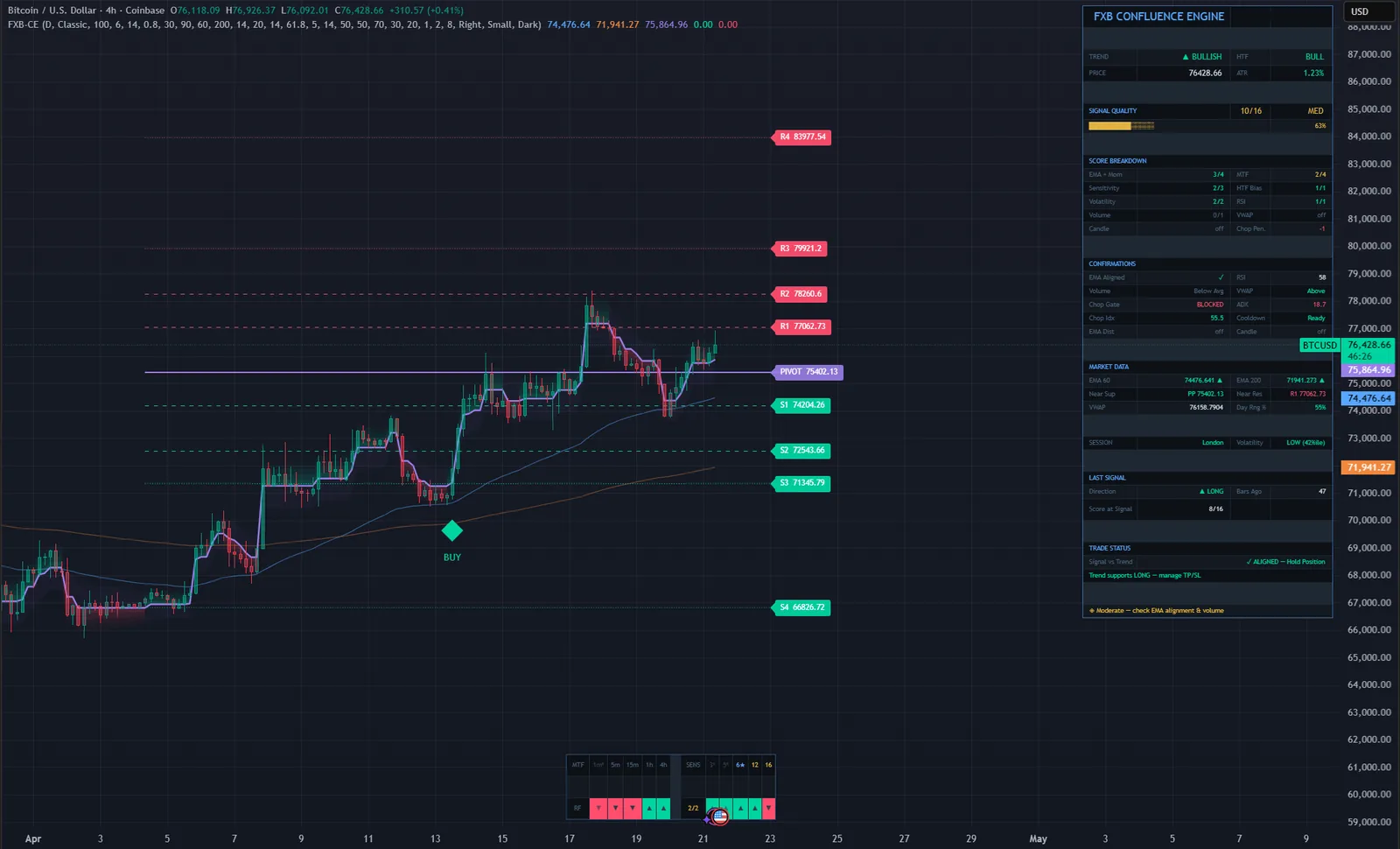
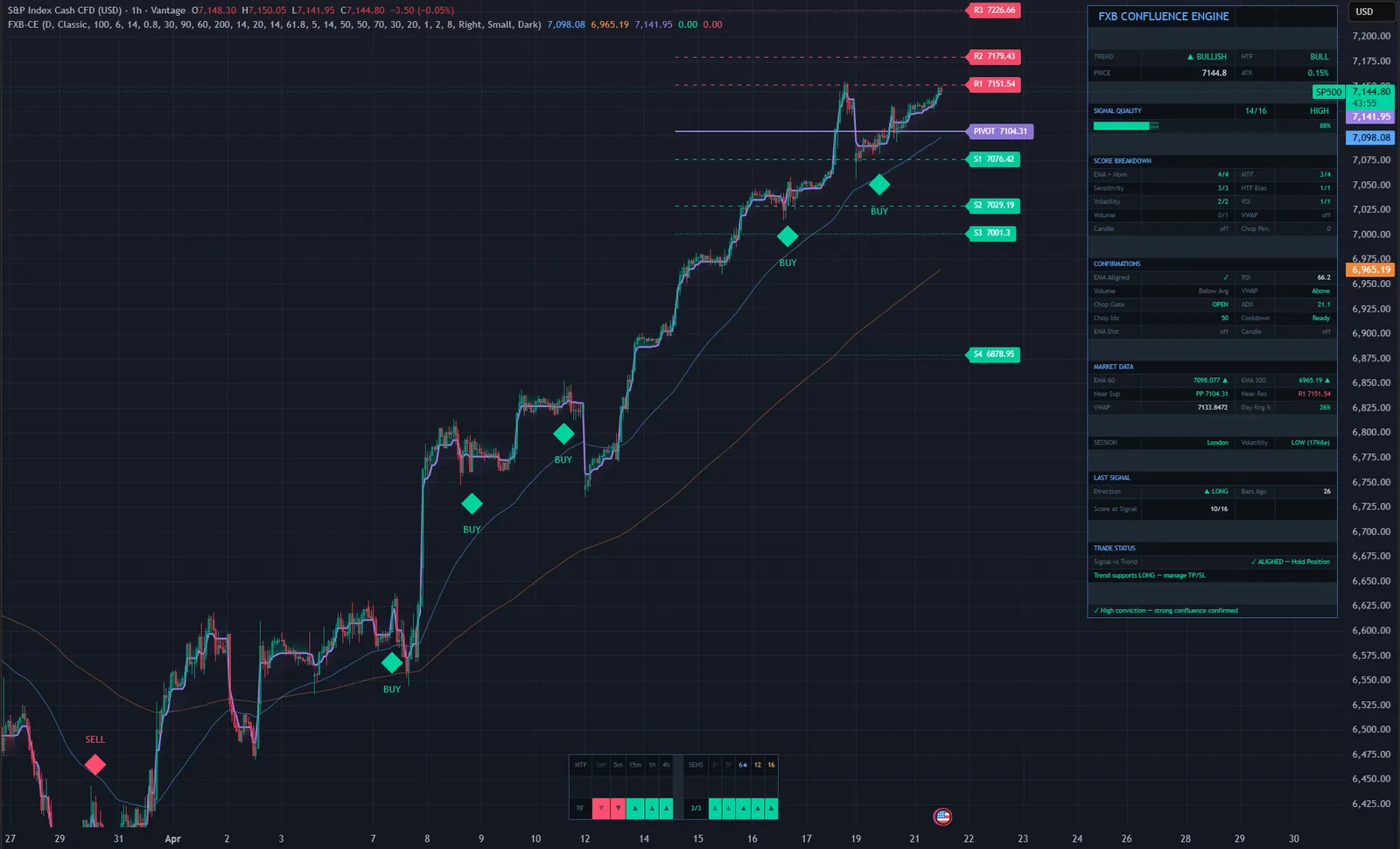
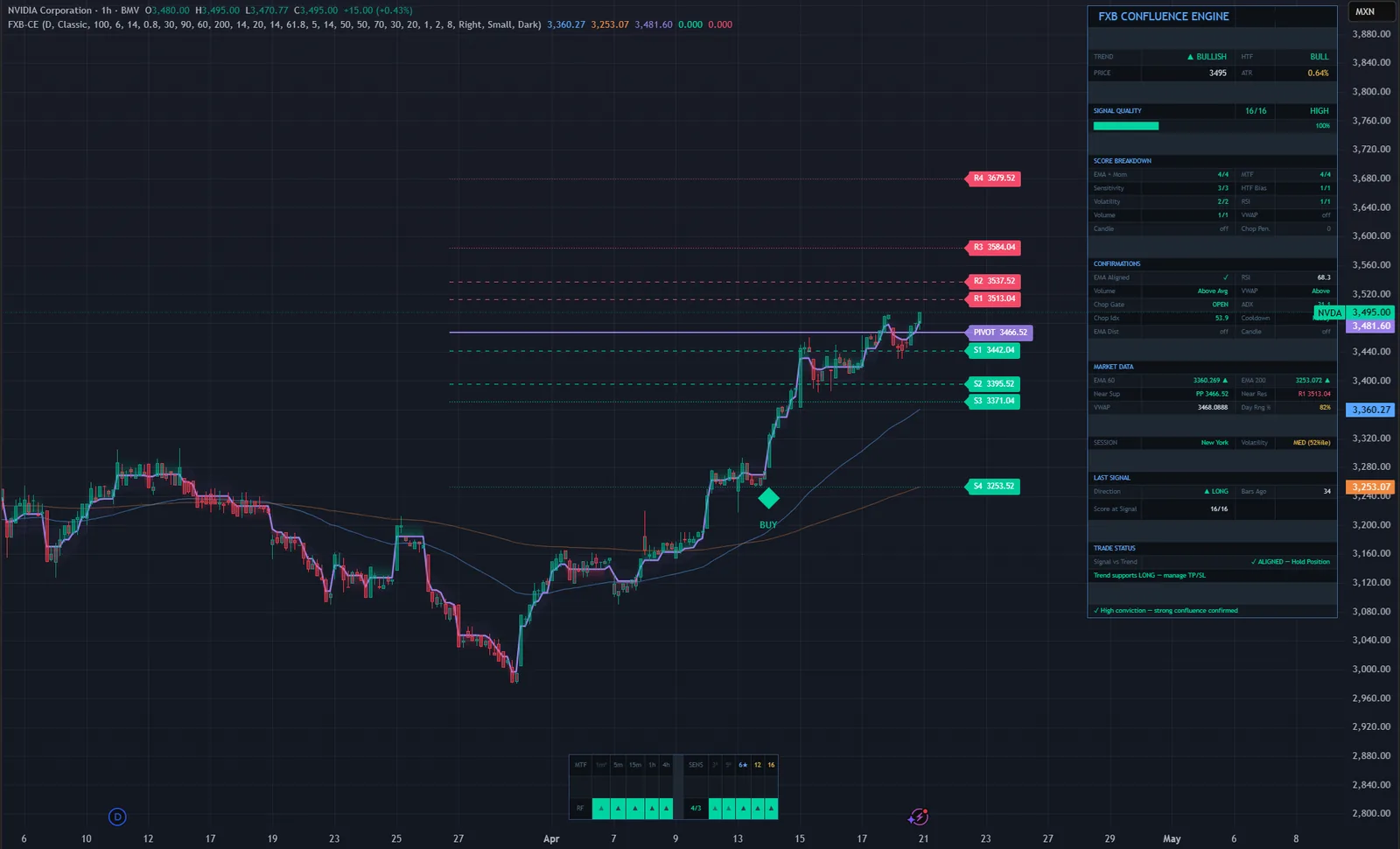
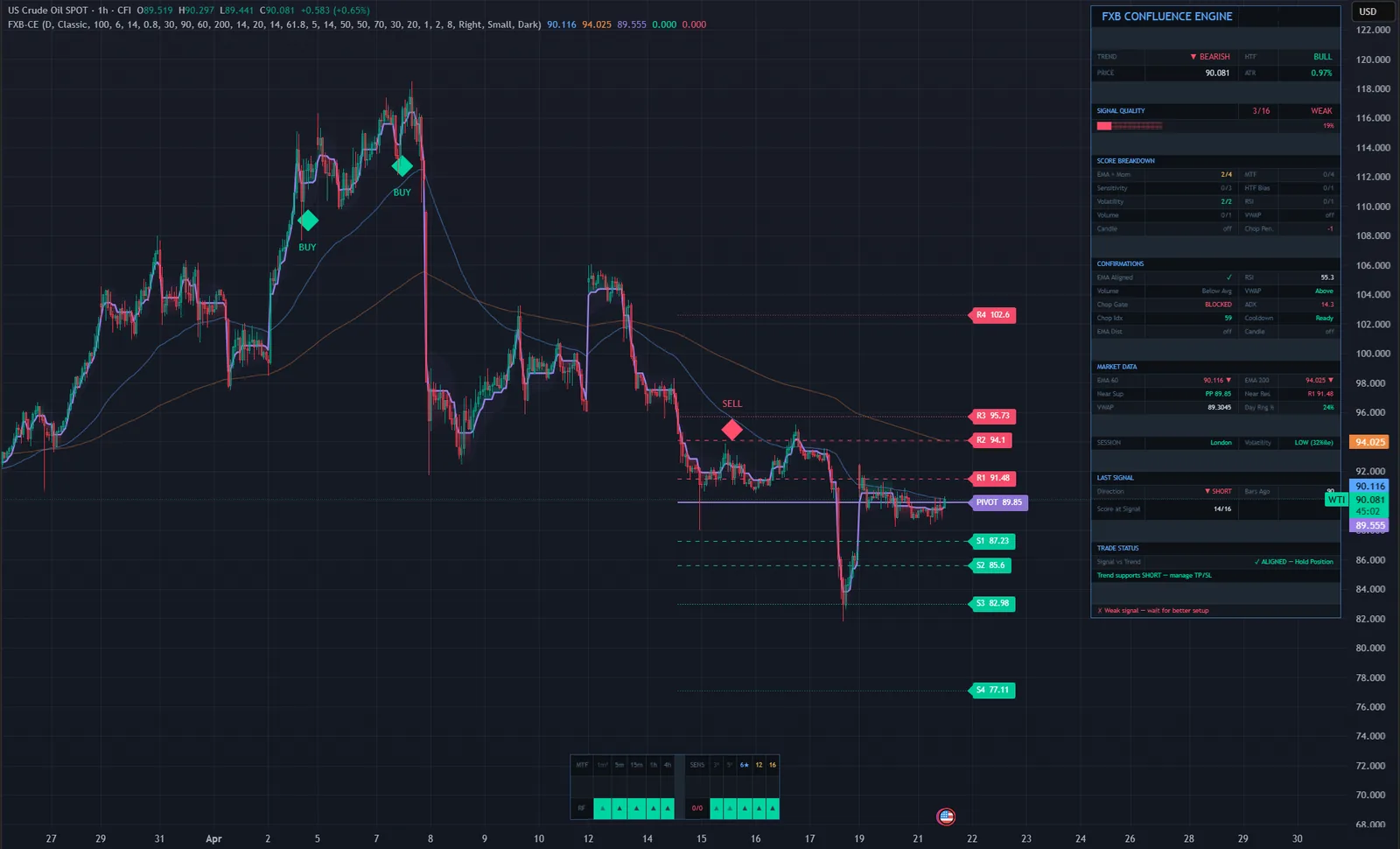
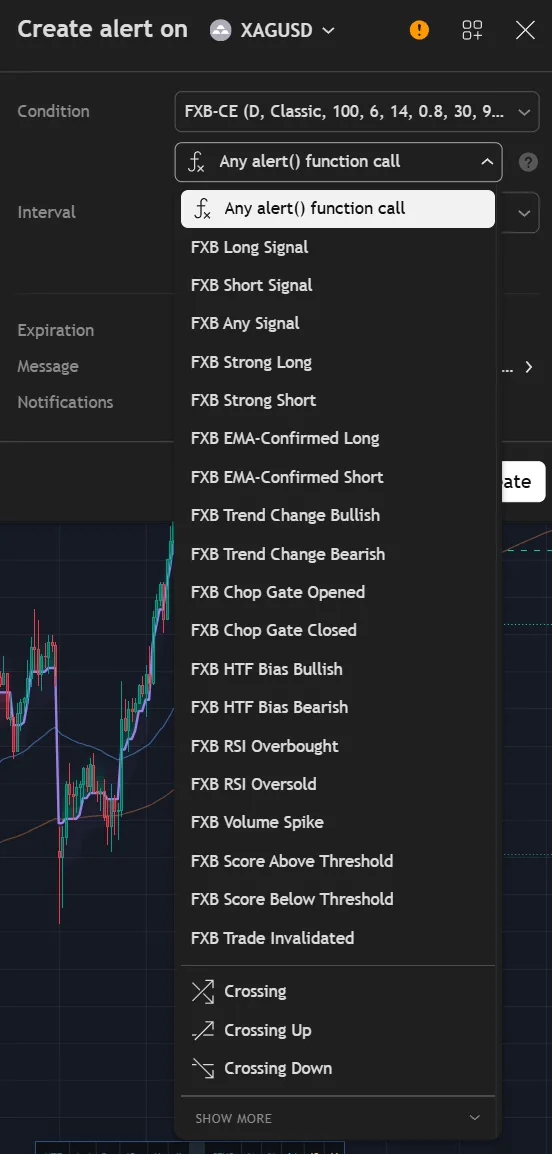
Beyond long and short, you can be alerted only to strong signals at 80 percent and above, only to EMA-confirmed ones, or to changes in market state: the chop gate opening or closing, the higher-timeframe bias turning, RSI extremes and volume spikes.
Trade Invalidated fires when the trend reverses against your last signal. Messages are webhook-ready and carry the symbol, timeframe, price, score, bias, RSI and volume status.
Four steps, on every closed bar.
The ATR range filter marks a trend change when price breaks its band at the sensitivity you chose.
Enabled gates are checked: EMA alignment, ADX, Choppiness Index, cooldown, RSI, volume and the optional ones.
Points are added for EMA and momentum, timeframes, sensitivities, volatility, bias and each optional filter, and removed for chop penalties.
A signal at or above your minimum strength is printed and alerted. One below it is marked as filtered.
| Single-condition signal | FXB Confluence Engine | |
|---|---|---|
| Basis | One trigger | Up to ten layers, one score |
| Ranging markets | Keeps firing | ADX, chop index and cooldown gates |
| Other timeframes | Open more charts | Five timeframes scored for you |
| Parameter luck | Unknown | Cross-checked at four sensitivities |
| After entry | Nothing | Trade status: aligned or reversed |
| Alerts | Buy and sell | 19 conditions, webhook-ready |
No subscription and no renewal. Pay once and the indicator stays on your TradingView account, updates included.
FXB Confluence EngineTradingView indicator
$47one payment, lifetime access
Access is granted by hand from my TradingView account, normally within a few hours and always within 24 hours of your form arriving.
Because access to an invite-only script cannot be handed back, a sale is final once access has been granted. The script page on TradingView is public, so you can read the full description and see it on charts before you pay.
The full terms of sale and the privacy notice for buyers are one page each, in plain language.
Trading carries risk of loss. This is an analysis tool, not financial advice, and no indicator can promise a profit.
No. Signals are generated only on confirmed, closed bars, and once one is printed it does not move or disappear. Higher-timeframe data is requested without lookahead, and pivot levels use the prior period's data, which is the standard non-repainting pattern.
It is how many of the available points agreed with the signal. The core components give up to 14 points and each optional filter you enable adds one, with a point removed for each anti-chop penalty. 80 percent and above is HIGH, 57 to 79 MED, 43 to 56 LOW. It measures agreement between the layers. It is not a probability of profit.
All instruments: forex, gold, indices, crypto and commodities, from one minute to daily. With the defaults, the 5-minute, 15-minute, one-hour and four-hour charts work best.
No. Invite-only indicators work on the free plan. The free plan limits how many indicators you can have on one chart and how many alerts you can run, so a paid plan helps if you use many, but it is not required for this one.
I grant access by hand from my TradingView account. It is normally done within a few hours and always within 24 hours of your form arriving, including weekends.
No. It is one payment of 47 USD for lifetime access on one TradingView username, with future updates included.
Once access has been granted the sale is final, because access to an invite-only script cannot be returned. That is why the script page on TradingView is public: read it and look at the charts first. If you paid and access has not been granted yet, email me and I will refund you in full.
Yes. Email me from the address you bought with and I will move the access to your new username.
Yes. A cTrader edition is in the cTrader Store. It is a separate product sold by that store; this page is the TradingView edition.
No indicator can promise that, and this one does not. It gives you a clear, rule-based reading of the chart and a plan to work from. What you do with that, and how you size positions, decides the outcome.
Each one is invite-only, 47 USD once, and has its own page with charts and a full description.
A non-repainting Fibonacci-based trend detection indicator, with an ATR stop, four targets and a break-even ladder.
$47 one payment, lifetime access
A self-adaptive Supertrend whose band width is modulated on every bar by a continuous Trend Quality Index.
$47 one payment, lifetime access
A non-repainting adaptive trend-following indicator, with every trend flip graded and the stop and targets fixed at the signal.
$47 one payment, lifetime access
47 USD once. Lifetime access on your TradingView username, updates included, and access granted within 24 hours.


